
Magento HTML Sitemaps: Still Worth It in 2026?

A Magento HTML sitemap is still useful when it does a job navigation can't: giving shoppers (and crawlers) a single structured map of your catalogue, and passing internal link equity to deep pages your menus don't reach. It stops being useful the moment it becomes a flat wall of every URL on the site. The value is in the structure, not the completeness. A well-grouped HTML sitemap of your categories and key pages helps; a dump of 40,000 product links helps no one.
What is an HTML sitemap, and how is it different from an XML one?
An HTML sitemap is a normal, human-readable page on your storefront that links to the important parts of your site, usually grouped by category. An XML sitemap is a machine-readable file you submit to Search Console for crawlers (we cover what belongs in a Magento XML sitemap separately). They serve different audiences: the XML file tells Google what to crawl; the HTML page helps a person (or an AI crawler reading the page like a person) understand how the site is organised and find things.
They're not interchangeable. You want the XML sitemap regardless - it's a crawl instruction. The HTML sitemap is optional, and whether it's worth building comes down to your catalogue size and how good your normal navigation already is.
Do HTML sitemaps still help SEO?
Yes, but indirectly, through internal linking rather than as a ranking signal in its own right. Google stopped treating an HTML sitemap as anything special years ago; it's just another page with links on it. The benefit is structural: it creates crawlable paths to pages buried deep in your catalogue, and it distributes internal link equity to categories and products that your header menu and footer don't link to directly.
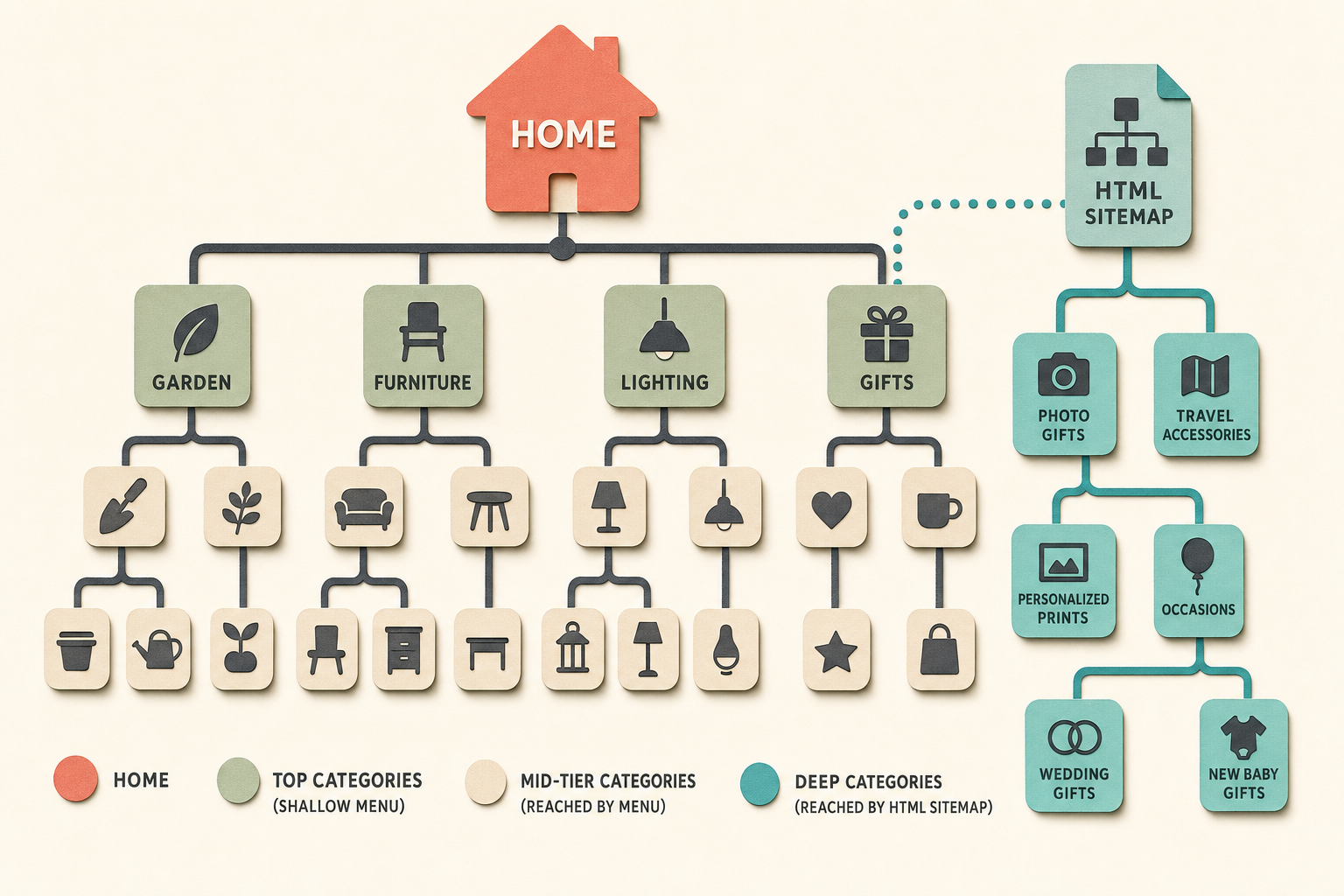
That matters most on large stores. If you sell 200 products across a shallow menu, every page is already two clicks from home and an HTML sitemap adds little. If you sell 20,000 products across a deep taxonomy where some categories are five clicks down, an HTML sitemap that surfaces those category hubs on a single well-linked page genuinely helps discovery and indexing.
What does a good HTML sitemap look like?
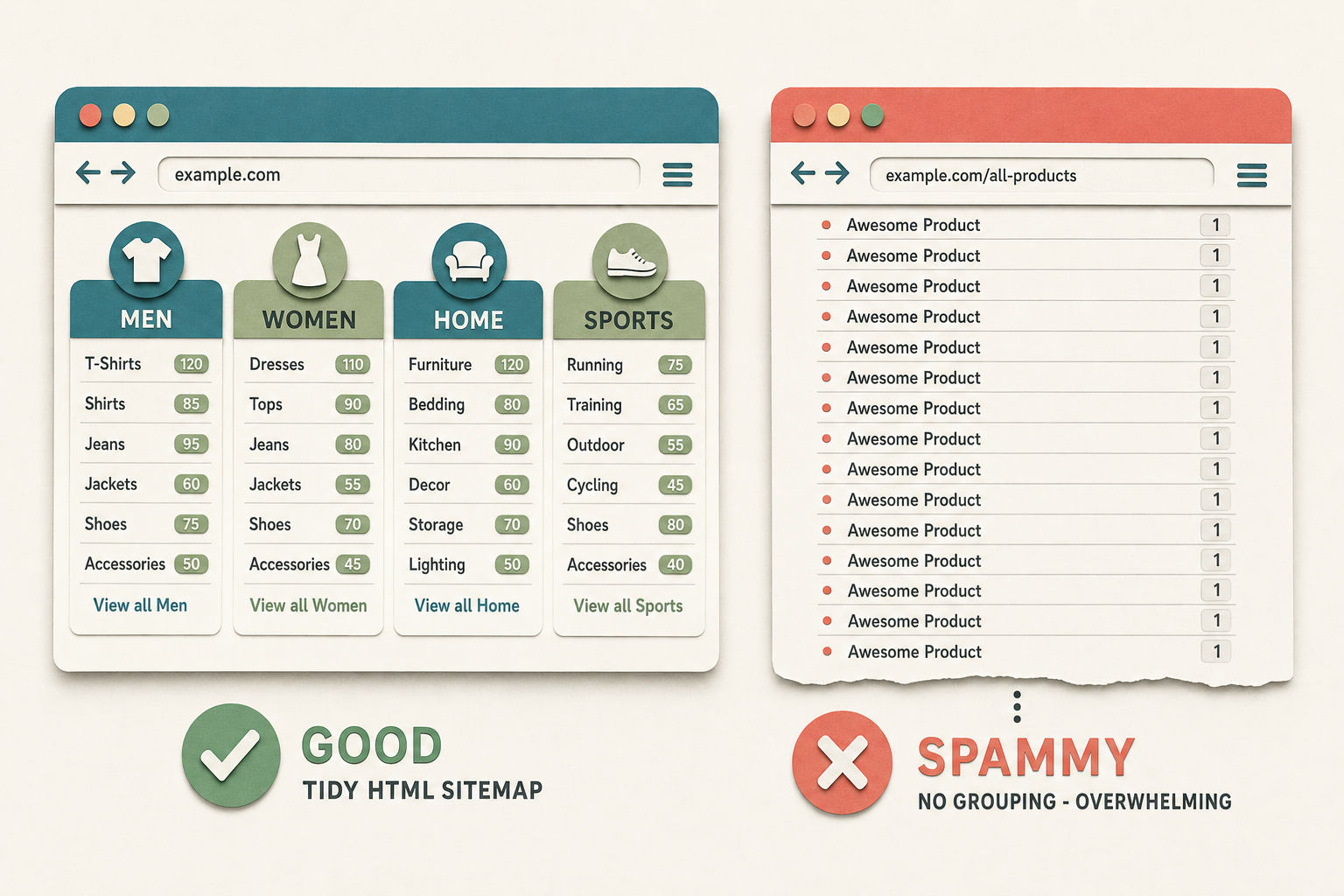
A good one is grouped, scannable, and selective. It reads like a table of contents: top-level categories as headings, subcategories nested under them, key CMS pages in their own section. A shopper can glance at it and understand your whole range in a few seconds. Links are descriptive (the category or page name), not "click here".
A bad one is a flat, undifferentiated list of thousands of links with no hierarchy - the kind of page that exists only to funnel crawlers and reads as spam to both people and search engines. If your HTML sitemap needs its own scrollbar three screens long and lists every SKU, you've built the thing Google's spam guidance warns about, not a useful page.
Are HTML sitemaps useful for AI search?
They can be, for the same reason they help human shoppers: an AI crawler or assistant trying to understand what your store sells benefits from one page that lays out your category structure in plain links. It's a compact map of your entity - "here is everything this store covers, organised" - which is easier to parse than crawling the whole menu system. This is a modest, structural benefit, not a magic bullet, and it only holds if the page is genuinely organised rather than a link dump.
How should you structure one for a large catalogue?
Group by category, cap the depth, and don't list every product. For a large store, the right structure is category-led:
- List categories and subcategories, not individual products. The category pages are the hubs; let them do the job of surfacing products. Listing every SKU is what tips a sitemap from useful into spam.
- Show product counts per category. It helps shoppers gauge the range and signals a real, populated store.
- Hide empty categories. A category with zero in-stock products is a dead link and a poor impression.
- Add a search filter on the page. On a big taxonomy, a client-side filter lets shoppers jump to the section they want without scrolling.
- Keep it one page if you can. Split into lettered or category-grouped sub-pages only if a single page becomes genuinely unwieldy.
How this applies to Magento 2
Magento 2 has no native HTML sitemap. The native sitemap feature (Marketing > SEO & Search > Site Map) generates the XML file only - there's no built-in human-facing sitemap page. So an HTML sitemap on a Magento store is always either a custom CMS/block build or an extension.
The custom route is straightforward for a small catalogue - a CMS page with hand-built category links - but it goes stale the moment you add or remove a category, because nothing keeps it in sync with your live catalogue. For anything beyond a handful of static categories, you want the page generated from the catalogue itself so it updates automatically.
Where Moogento helps
The free Moogento Sitemap module fills exactly this gap: it adds an interactive HTML sitemap page to your storefront, generated from your live catalogue. It shows your category hierarchy with per-category product counts, individual product links within categories where you want them, selectable CMS pages, and custom external links with optional section headings. There's a real-time client-side search filter for large catalogues, an option to hide empty categories, and a toggle to inject a sitemap link into the footer. Because it reads the live catalogue, it stays current without manual editing.
Two things pair naturally with it. CategoryContent makes the category pages your sitemap links to worth arriving at, with real intro and supporting copy rather than a bare product grid. And on the discovery side, SmartCart handles the other half of internal product surfacing - contextual add-on suggestions in the cart - so shoppers find complementary products the sitemap and menus were never going to lead them to.
HTML sitemap audit checklist
- Does the page group links by category, or is it a flat wall? Flat walls read as doorway pages - regroup.
- Is it generated from the live catalogue, or hand-built? Hand-built pages go stale silently - check the last time it matched your real categories.
- Are empty or disabled categories showing as dead links? Hide them.
- Does it list every product? On a large store, drop to category-level links and let category pages surface products.
- Is there a link to it from the footer, so shoppers and crawlers can actually find the page?
- On mobile, is it usable, or an endless scroll? Add a filter or collapse sections.
- Do the linked categories carry real content, or land on a bare grid? Thin category pages waste the internal link you just passed them.
FAQ
Do I need both an HTML and an XML sitemap?
You need the XML sitemap - it's the crawl instruction you submit to Search Console. The HTML sitemap is optional and earns its place mainly on large stores with deep catalogues, where it helps internal linking and human discovery. On a small, shallow store it adds little.
Does an HTML sitemap directly improve rankings?
Not directly. Google treats it as an ordinary page. The SEO benefit is indirect: it creates crawlable internal links to deep pages and distributes link equity to categories your menus don't reach. Treat it as an internal-linking tool, not a ranking lever.
Does Magento 2 have a built-in HTML sitemap?
No. Magento 2's native sitemap feature generates the XML file only. A human-facing HTML sitemap page is always a custom build or an extension. If you build it by hand, remember it won't stay in sync with your catalogue automatically.
How many links should an HTML sitemap have?
Few enough to stay scannable. Link categories and subcategories rather than every product, and if a single page gets unwieldy, split by category group. A page listing tens of thousands of product links reads as spam to search engines and helps no shopper.
If you already have a clean menu and a small catalogue, skip it - your navigation is doing the job. The HTML sitemap earns its keep on the deep, sprawling stores where some pages are simply too far from home for a shopper or a crawler to find any other way.