How to Choose Magento Extensions Without Slowing Your Store

You choose a Magento extension without slowing your store by judging its performance footprint before you buy, not after it's live. The footprint is knowable: how much JavaScript it adds to the front end, whether it writes to the database on every page, what cron jobs and checkout logic it introduces, and how well the vendor maintains it. Score those, ask the vendor the awkward questions, and test on staging under load - and a bad fit shows itself before it reaches production.
Where does an extension actually slow a store down?
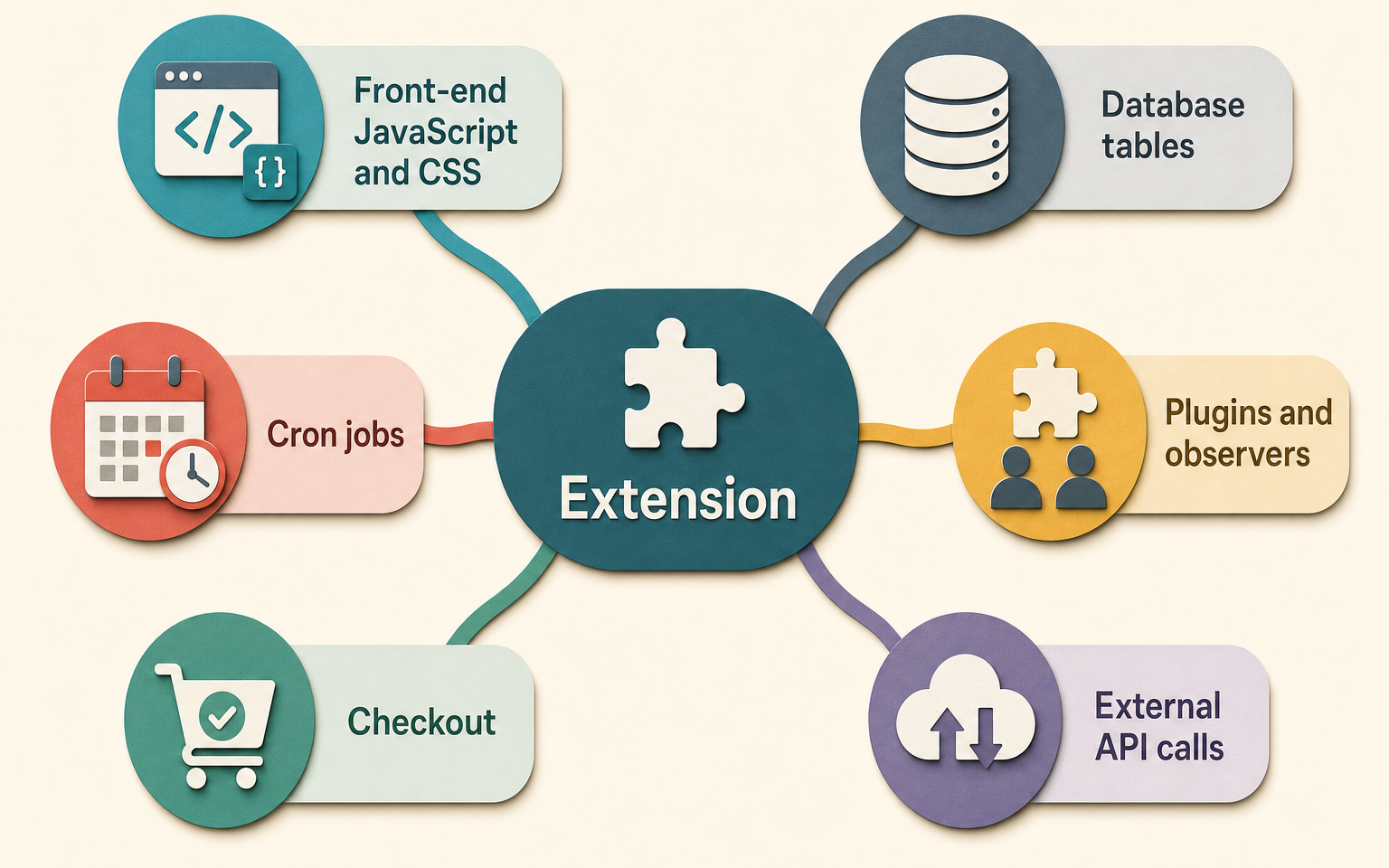
An extension slows a store at specific, predictable places, not everywhere at once. Knowing the places is what lets you evaluate one instead of guessing. There are six that matter, and a good vendor can answer for each:
- Front-end JavaScript and CSS. Anything that renders on the storefront adds assets the browser must load. This is the most visible cost and the one Lighthouse will flag.
- Database work. An extension that runs queries or writes rows on every page view adds load that scales with traffic - fine in testing, painful on a busy day.
- Cron jobs. Background tasks are good until there are too many, or one runs too often, and they crowd out order processing and indexing.
- Plugins and observers. Magento lets extensions hook into core events. A plugin on a hot path (add to cart, checkout, product load) runs on every one of those actions.
- Checkout impact. Checkout is the most performance-sensitive and JavaScript-heavy part of the store. An extension that touches it deserves the most scrutiny.
- External API calls. A call to a third-party service during a page load ties your speed to theirs. If their server is slow, so is your page.
How do you score an extension before buying it?
Rate the extension one to five on each risk surface, where one is low risk and five is high, then read the total as a rough guide rather than a hard rule. This is a framework you apply to any extension, so the judgement stays yours:
| Risk surface | Low risk (1) | High risk (5) |
|---|---|---|
| Front-end assets | Admin-only, no storefront output | Heavy JS/CSS on every page |
| Database | No per-request queries | Writes or complex queries on every view |
| Cron | None, or light and infrequent | Multiple frequent jobs |
| Hot-path plugins | None on cart or checkout | Plugins on add-to-cart or checkout |
| Checkout | Doesn't touch checkout | Rewrites checkout behaviour |
| External calls | None during page load | Synchronous third-party call per load |
| Maintenance | Actively updated, clear version support | Stale, unclear Magento compatibility |
A total in the low teens is a safe, well-scoped tool. A total in the high twenties isn't automatically a no, but it needs to earn its place with a clear, measurable business outcome - and it needs the vendor questions below answered well.
What should you ask the vendor before buying?
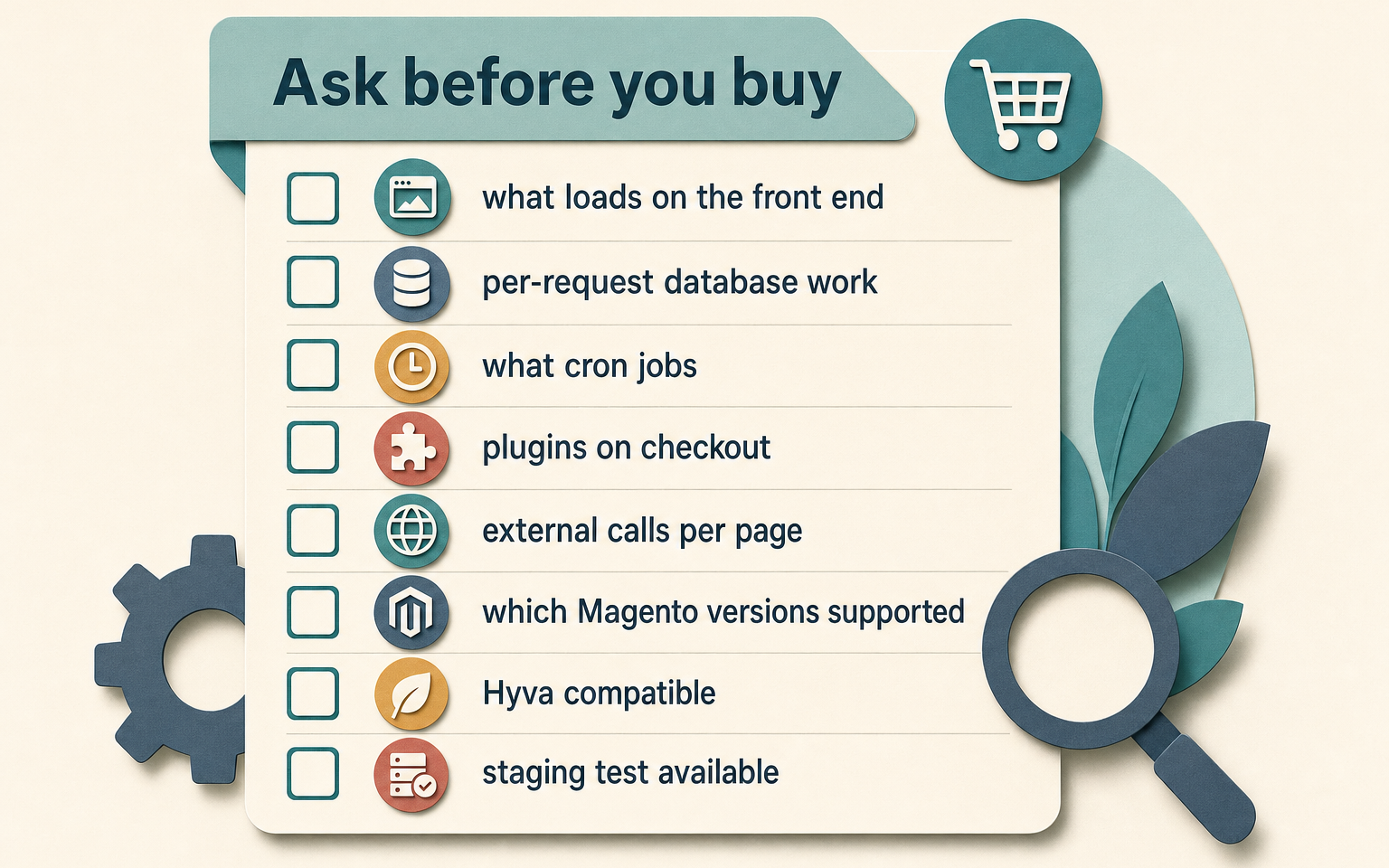
Ask the questions a vendor confident in their code will answer plainly and an evasive one will dodge. The dodge is itself the answer:
- What does this add to the front end, and does any of it load on pages that don't use the feature?
- Does it run queries or write to the database on every page view, or only when the feature is used?
- What cron jobs does it add, and how often do they run?
- Does it place any plugins or observers on cart or checkout?
- Does it call any external service during a customer's page load?
- Which Magento versions is it tested against, and how quickly do you support a new release?
- Is it compatible with my theme, including Hyvä if I'm on it?
- Can I test the full version on staging before committing?
What are the red flags?
Some signals mean walk away regardless of the feature. A vendor who can't or won't say which Magento versions they support is telling you the extension may already be unmaintained. No staging or trial option means you're buying blind. A changelog that stops a year ago suggests the next Magento release will break it and nobody will fix it. Reviews that all mention the same unresolved conflict are a pattern, not bad luck. And a tool that wants deep checkout or payment access for a feature that shouldn't need it is a security question, not just a performance one.
The quieter red flag is buying on features instead of outcomes. An extension with a long feature list and no clear metric it improves is how stores accumulate the twenty installed modules that each add a little weight and collectively drag. Our guide to choosing Magento extensions frames this as picking the fewest tools that move a real number.
How this applies to Magento 2
Magento 2's architecture is exactly why this framework works: the costs are declared in the extension's own files, so a developer can verify a vendor's answers rather than trust them. Plugins and observers are registered in di.xml and events.xml, cron jobs in crontab.xml, and new database tables in db_schema.xml. A five-minute read of those tells you what the extension hooks into and what it stores - as of Magento 2.4.9, that's a reliable, code-level answer to "what will this actually do on every request". You don't need to read them yourself, but knowing they exist lets you ask a developer to confirm before purchase, and to test on staging under realistic load. Adobe's performance best-practices back the same approach: measure impact before it reaches production.
Every category of extension has a well-scoped, lightweight option and a heavy one, and the difference rarely shows in the sales copy. Our documentation index lays out how each Moogento module is built and where it does and doesn't touch the storefront, which is the level of detail worth expecting from any vendor.
Where Moogento helps
The hardest part of extension performance is attribution: after you install something and the store feels different, which change caused it? AuditEasy helps with that specific problem, and it's worth being clear it's a record-keeper, not a profiler. It logs admin-side changes to configuration, catalog and other backend entities with before-and-after values, and records admin logins. So when an extension's setup flips a batch of settings, you have a dated trail of exactly what moved - which turns "something changed after we installed that" into a precise list. It won't measure the extension's page-load cost (that's Lighthouse and staging load-testing), but it answers the config-attribution question that otherwise eats an afternoon of guesswork.
FAQ
Do Magento extensions really slow down a store?
Poorly built or excessive ones do. Each extension adds code that runs on requests, and the cost concentrates in front-end JavaScript, per-request database work, hot-path plugins and checkout logic. A well-scoped, admin-only tool has almost no storefront cost. The problem is usually the total: many overlapping extensions each adding a little, rather than one bad apple.
How many Magento extensions is safe to run?
There's no magic number. The useful test is whether you can name the business outcome each extension delivers. Tools that pass that test and are well built can coexist happily; tools you installed "just in case" are the ones to question. Fewer, well-chosen extensions beat a long list every time.
Should I avoid free Magento extensions?
Not on price alone. A free, actively maintained extension from a reputable source can be a better choice than a paid one that's abandoned. Judge on maintenance, code quality, performance footprint and version support rather than cost. A free tool with a clear changelog and version compatibility is often safer than a paid tool without them.
How do I test an extension's performance before buying?
Ask the vendor for a staging install or trial, then load two comparable pages with and without the extension using Lighthouse, and watch server response time under simulated traffic if you can. Have a developer check what it registers in the extension's own configuration files. If a vendor won't allow a staging test, treat that as a red flag in itself.
Score the next extension before you buy it, ask the vendor the eight questions, and test on staging. The extensions that survive that filter are the ones that earn their place without costing you speed.