SmartCart - AI-powered recommended products for increased AOV

Made for Magento® 2

smartcategories

Intelligent Magento product recommendations that multiply shopping carts into a bigger orders

Most Magento 2 stores rely on static “you may also like” blocks or basic related products widgets that show the same picks to every customer. SmartCart is a Magento extension that replaces those generic blocks with context-aware product recommendations powered by your own sales data and a deterministic rule engine. Whether you run a single storefront or a multi-store ecommerce platform, SmartCart helps you increase average order value by showing relevant upsells and complementary offers at the right moment in the shopping experience.

• Suggest the right complementary product at the exact moment customers are ready to buy

• Mine real order data to discover which products sell together – no guesswork

• Track every offer from impression to purchase with full earnings attribution

Stop leaving money on the table

Context-aware product suggestions for the basket, mini-cart, and checkout

Intelligent product guardrails

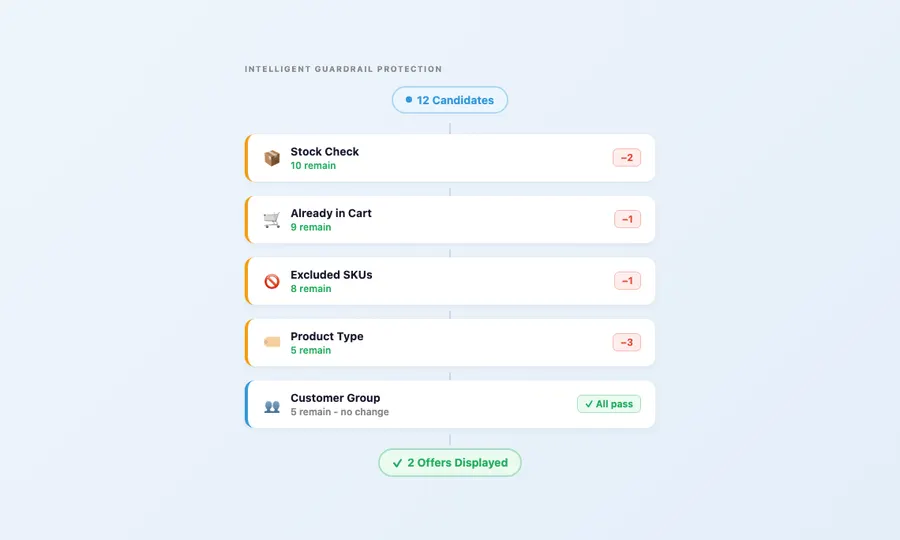
  • Out-of-stock products are never recommended
  • Products already in the cart are filtered out by default so customers only see fresh options
  • Exclude specific SKUs and categories
  • Only simple and virtual products are suggested – no configurable product confusion
  • Customer group restrictions and minimum cart subtotal thresholds let you personalize who sees what

Purchase history suppression

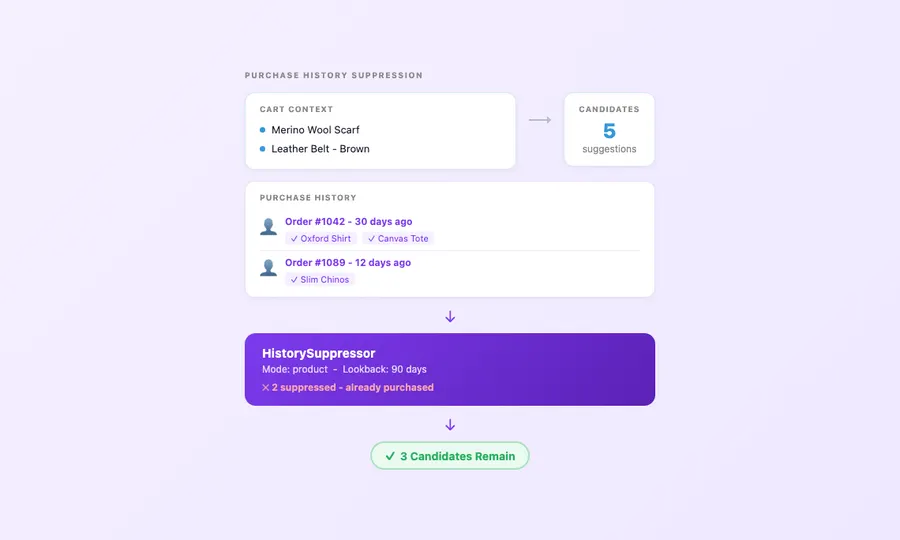
  • Products the shopper already owns are excluded from the results – no one wants to see items they already purchased last week
  • Configurable lookback window – default 90 days, adjustable per rule
  • Four suppression modes: exact product, SKU match, same category, or shared trait
  • Guest order matching by email address (optional, disabled by default)
  • Stored history lookups for zero performance impact

Discover what sells together - seamlessly

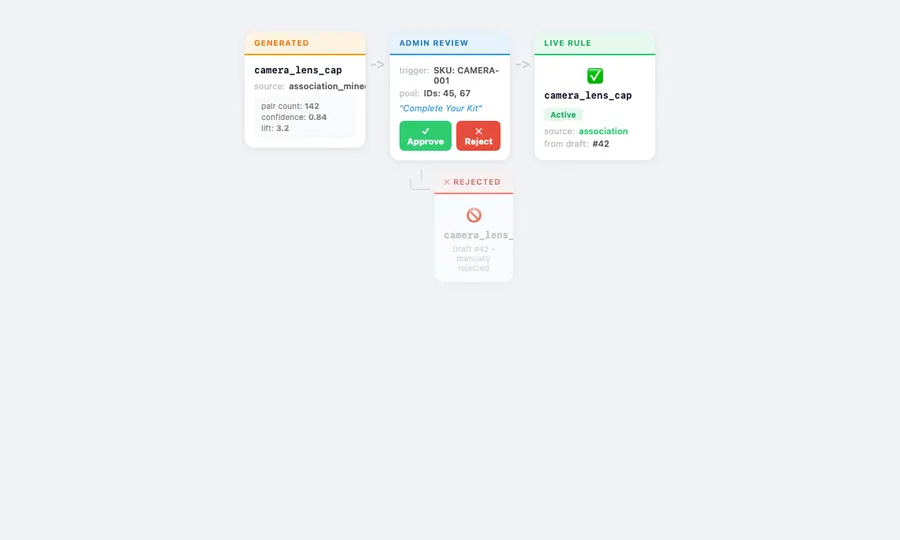
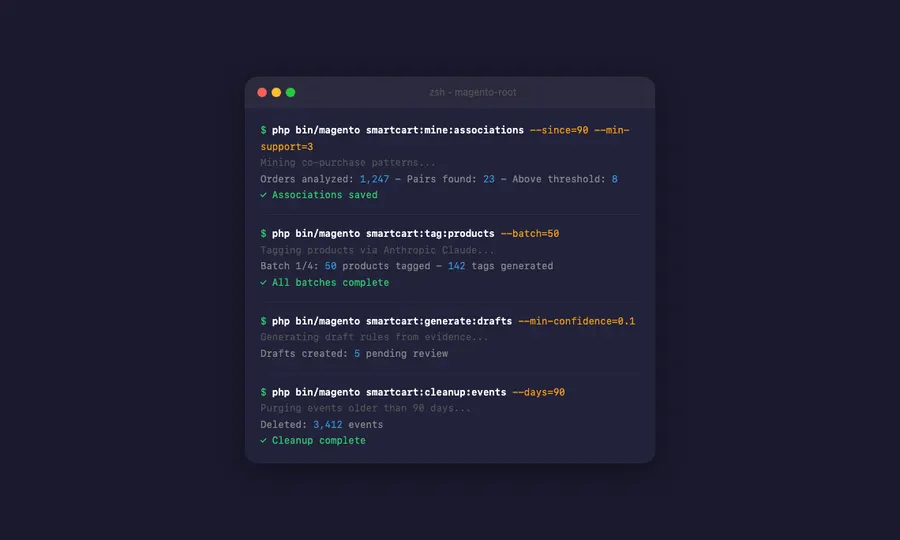
Mine co-purchase patterns from your real order history, enrich them with AI-generated product tags, and generate draft rules that a human approves before they go live. This automation approach turns months of manual merchandising work into a streamlined workflow.

Association mining from order data

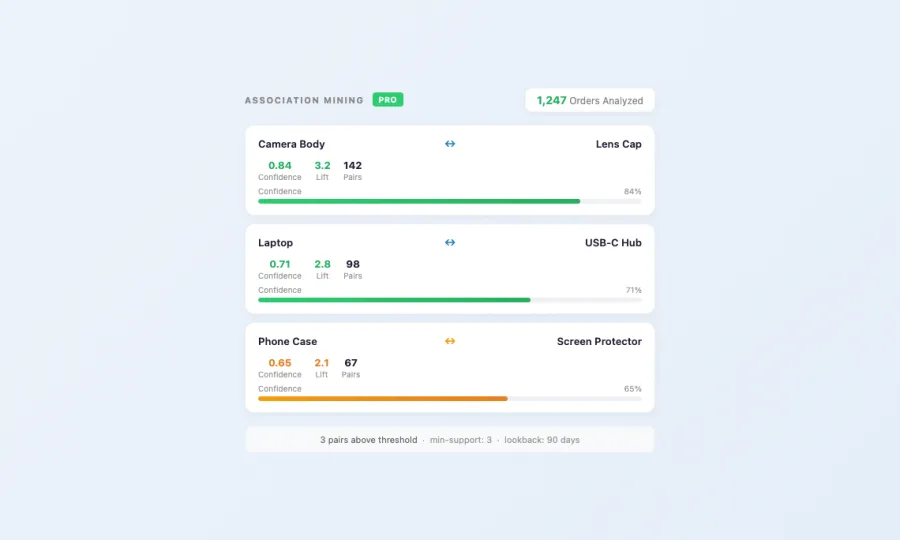
  • Analyzes qualifying orders to find products frequently purchased together based on previous buying behavior
  • Calculates statistical confidence and lift for every product pair discovered
  • Configurable lookback window (default: 90 days) and minimum support threshold
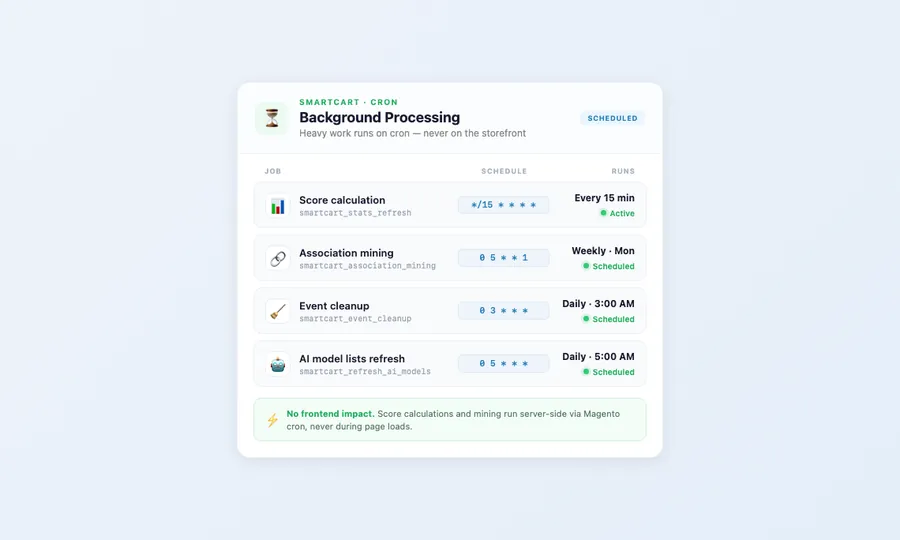
  • Automated weekly mining via cron – fresh insights without manual work
  • Batch processing handles large order volumes efficiently across your entire inventory

AI-powered product tagging

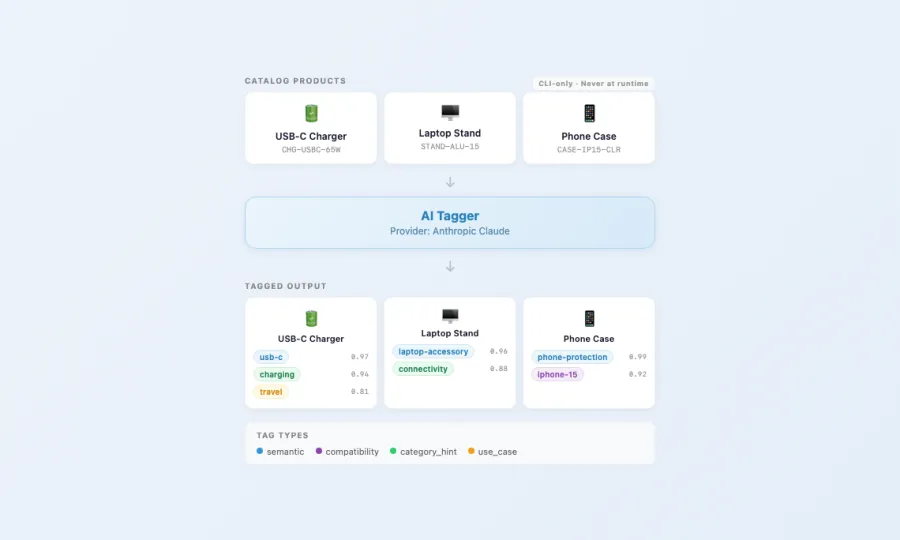
  • Generates semantic tags (use-case, compatibility, category hints) for richer draft quality
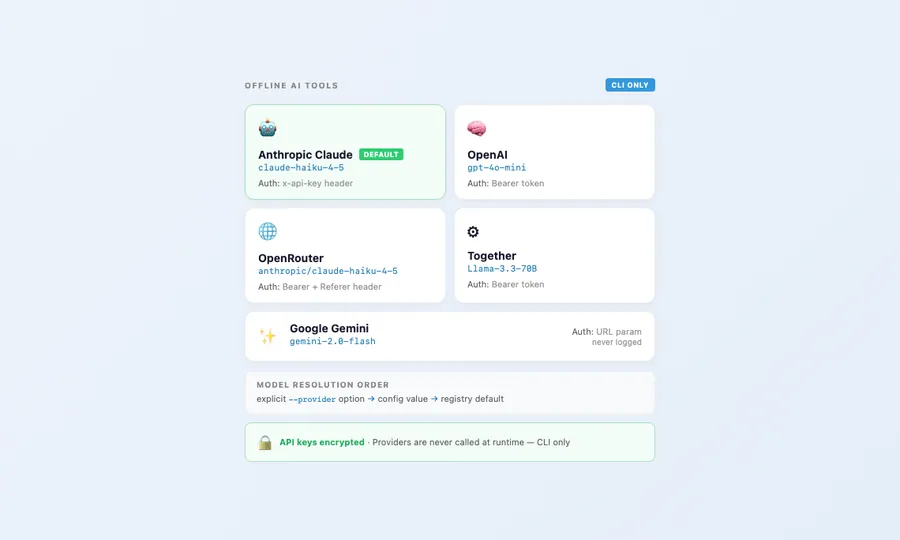
  • Five AI providers supported: Anthropic Claude, OpenAI, OpenRouter, Together, and Google Gemini
  • CLI-only execution – AI is never called during customer-facing page loads, keeping your storefront fast
  • Configurable batch sizes and dry-run mode for safe testing
  • Encrypted API key storage with provider-specific authentication

Draft rules with human approval

  • Mined associations and AI insights generate pending draft rules without manual effort
  • Admin reviews each draft with full evidence: pair count, confidence score, lift metric, shared tags
  • Approve to create a live runtime rule – reject to discard with no side effects
  • Mass approve and reject for efficient batch review
  • Source tracking distinguishes AI-generated from association-mined drafts

Track every product pick's income impact

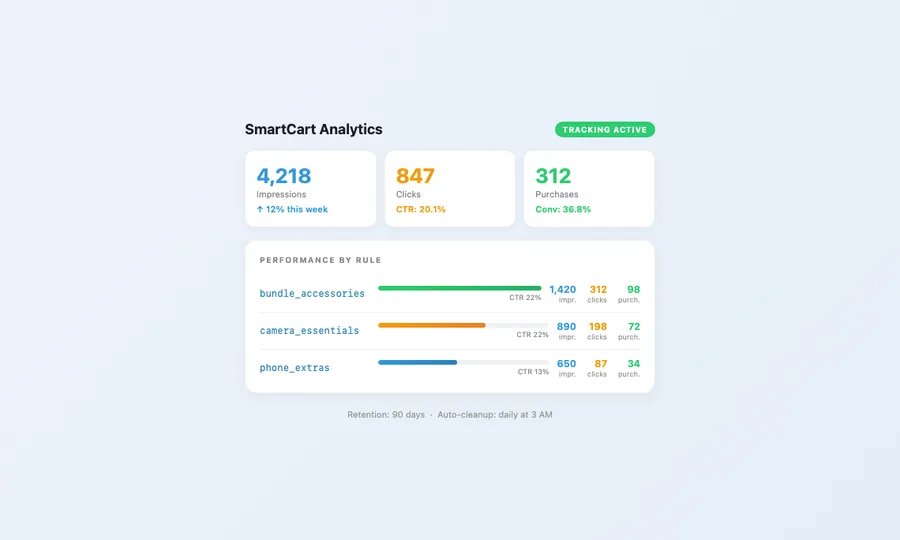
Full-funnel analytics from first impression to completed purchase – know exactly which rules drive income and which need tuning. SmartCart gives you the data to maximize efficiency and continuously optimize your add-on strategy.

Event tracking across the customer funnel

  • Four event types captured: impressions, clicks, dismissals, and purchases
  • Per-rule performance breakdown shows which recommended products actually convert
  • Configurable retention period with automatic GDPR-compliant cleanup
  • Daily cron job purges expired events – no manual database maintenance

Purchase attribution

  • Every product added via SmartCart is tagged with the originating rule code and cart context
  • Attribution persists from quote item through to order item – persists through the purchase
  • Income reporting by rule, time period, and product
  • Click-through rate and conversion rate calculated per rule

Dismissal memory

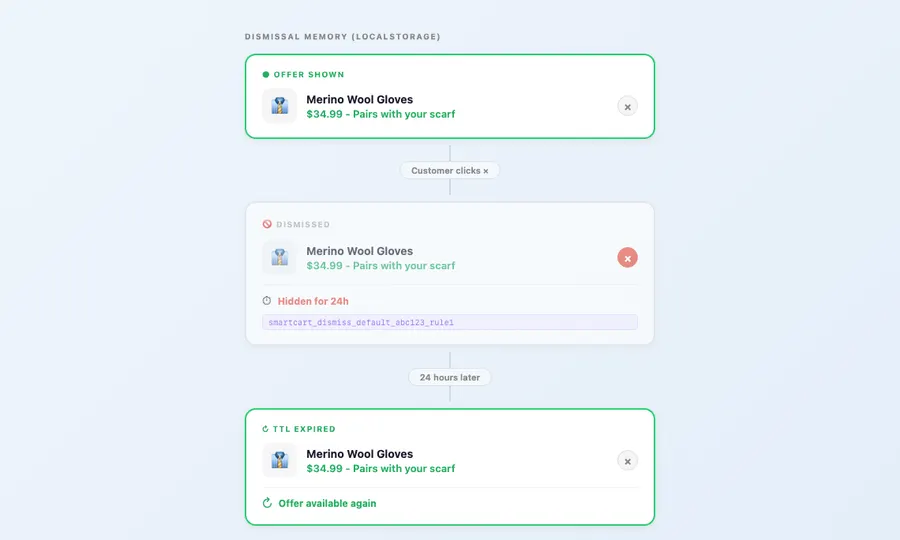
  • Dismissed offers stay hidden for a configurable TTL (default: 24 hours)
  • Per-shopper, per-store, per-context localStorage with automatic expiry
  • Dismissal events feed back into analytics for optimization insights
  • Prevents recommendation fatigue without permanently blocking product offers

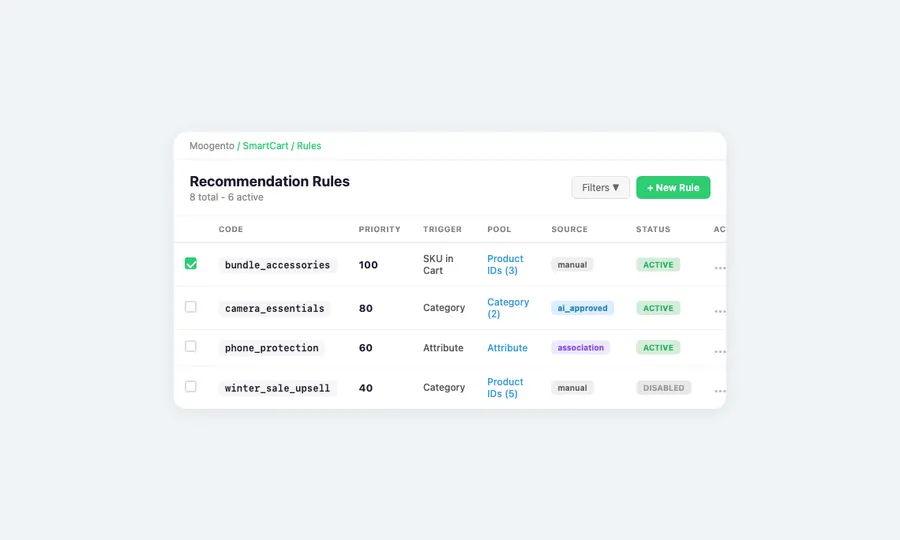
A versatile rule engine built for Magento merchants

Full control over what gets recommended, when, and how it’s presented – without touching code. Edit rules, adjust messaging, and set up triggers all from the Magento backend.

Flexible trigger system

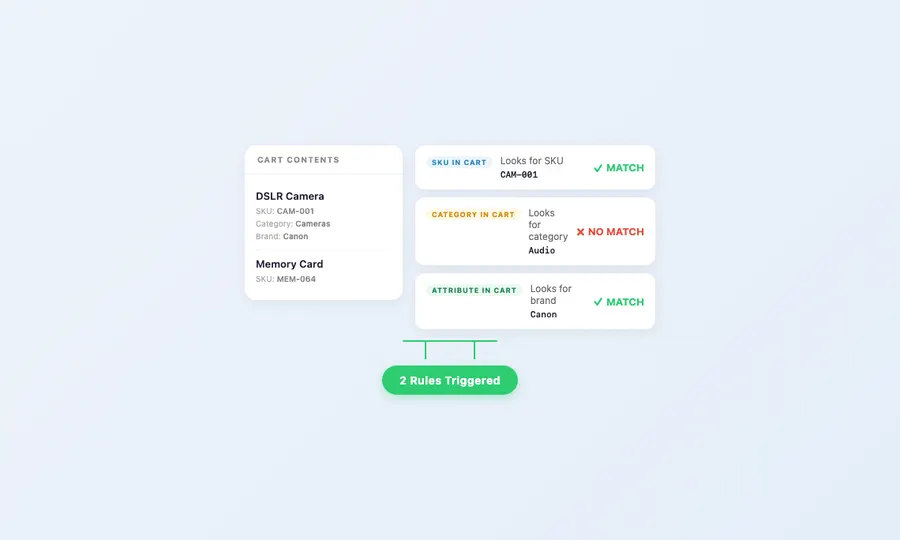
  • SKU in Cart: Trigger when specific product SKUs are present in the cart
  • Category in Cart: Trigger when products from specified categories are in the cart
  • Property in Cart: Trigger when products matching specific property values are present
  • Rules evaluated by configurable priority – highest priority rules win

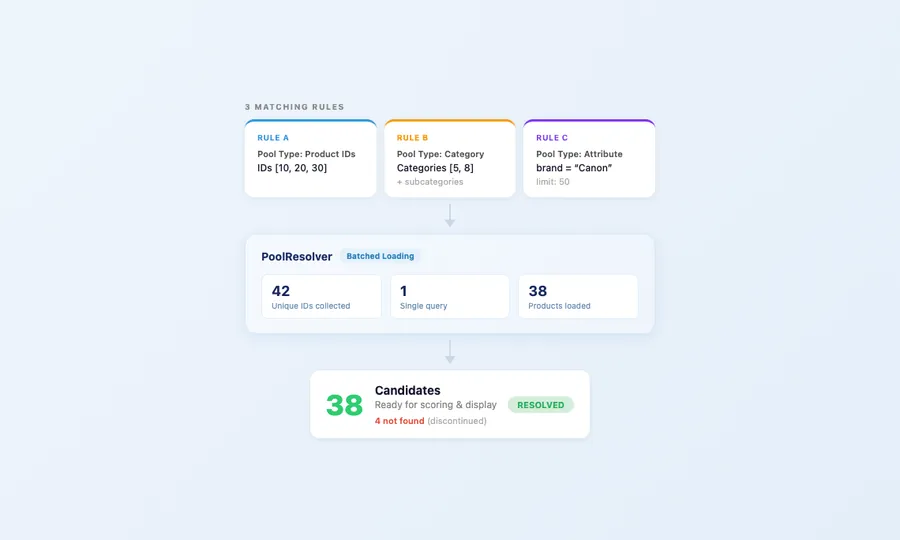
Smart pool resolution for showing related products

  • Product IDs: Recommend specific products in a defined show order
  • Category Pool: Recommend from entire categories, optionally including subcategories
  • Property Pool: Recommend products matching property criteria with configurable limits
  • Batched product loading across all matching rules prevents N+1 database queries

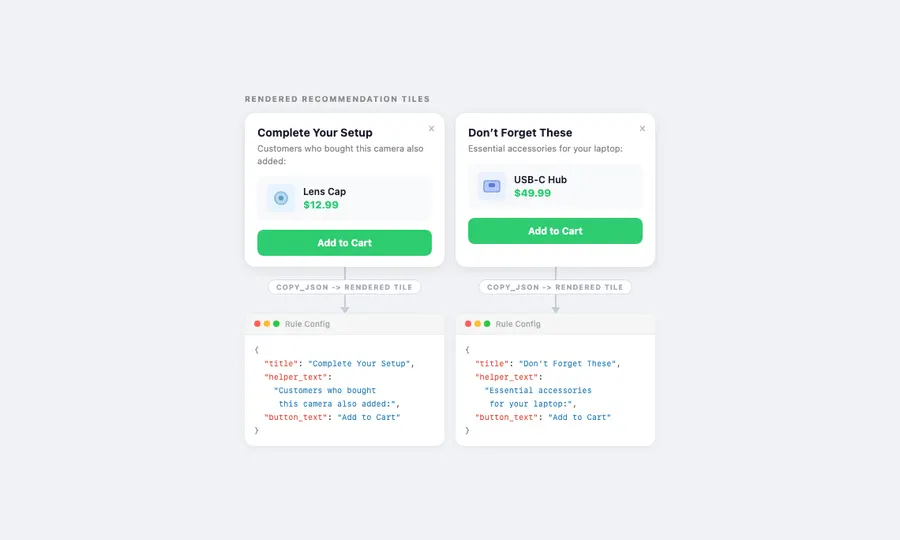
Customize the messaging for every product pick

  • Set a unique title, helper text, and CTA label for every rule
  • Supports store-scoped translations for multi-language shops
  • Admin preview shows exactly how each message will appear
  • Default copy works out of the box – customize only when you want to

Compatibility filtering

  • Optional property-based compatibility checking between cart items and candidates
  • Dynamic row configuration in admin – property code plus match mode per row
  • Three match modes: must_match, must_differ, or any
  • Ensures recommended products are actually compatible with what’s in the customer’s cart

Built for performance and trust on any Magento 2 store

No runtime API calls. No AI in the checkout path. Just fast, deterministic results indexed by cart context. SmartCart is built for commerce at scale – whether your store handles hundreds or thousands of orders per day.

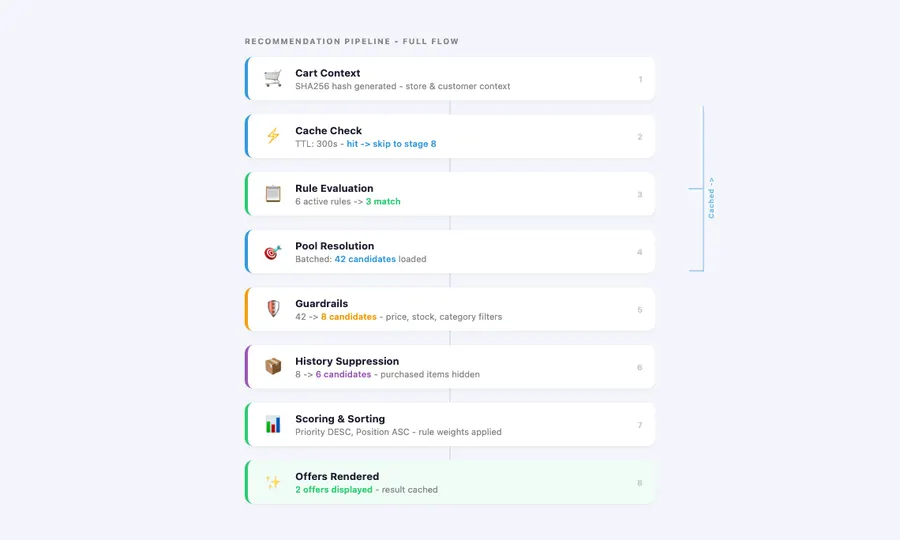
Deterministic runtime pipeline with smart caching

  • Full processing pipeline runs locally – context building, rule evaluation, pool resolution, guardrails, scoring, rendering
  • Context-hash caching with configurable TTL (default: 300 seconds) eliminates redundant computation
  • SHA256 hash incorporates store ID, cart SKUs, quantities, customer group, and coupon status
  • Cache invalidates automatically when cart contents change

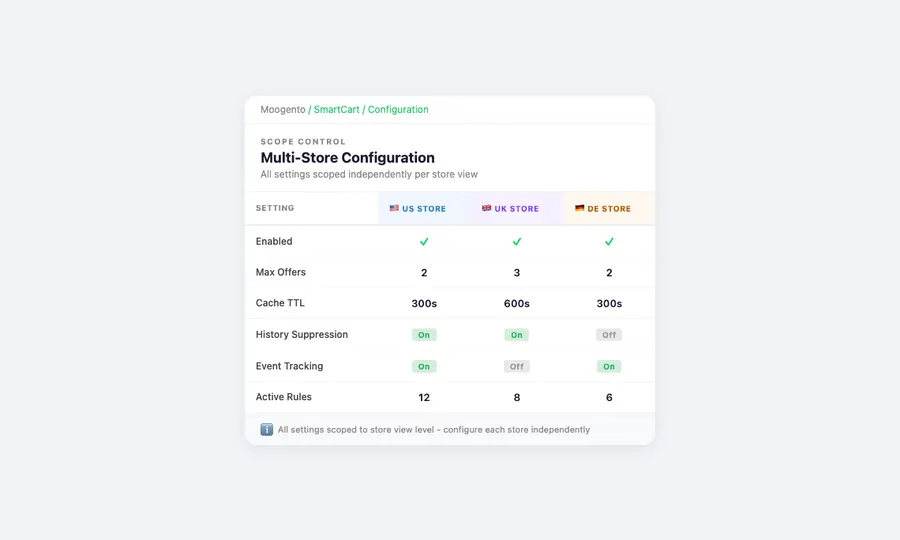
Multi-store ready

  • Store-specific rules, settings, and event tracking
  • All settings scoped to store view level
  • Rules can target specific stores or apply globally (store_id = 0)
  • Per-store analytics and draft management

Secure by design

  • CSRF-validated add-to-cart endpoint via CsrfAwareActionInterface
  • Encrypted AI API key storage using Magento’s Encrypted backend
  • No customer data sent to AI providers – offline CLI-only
  • Input validation on product IDs, rule codes, and context hashes
  • Frontend URLs sanitized to allow only http/https protocols

Pricing: three plans for every stage of growth

Seed

Growth

Pro

Easy setup & Magento integration

Quick installation and upgrade

Works with your existing stack

CLI tools for complete control

Background processing

Professional support & documentation

Complete documentation

  • Step-by-step setup guides
  • Rule creation and management how-tos
  • CLI command reference with full syntax and examples
  • Troubleshooting guide for common setup issues

Responsive technical support

  • Email support with quick response times from our dedicated support team
  • Technical troubleshooting assistance
  • Custom rule setup guidance
  • Regular updates and Magento compatibility releases

30 day Moneyback Guarantee – we want your

We’re confident SmartCart will transform your cart page into a revenue engine – try it with the demo store or get in touch to ask questions.

Ready to boost your cart revenue? 🚀

Annual
Monthly

Pro

$ 83
33
/month
  • Everything from Growth, plus:
  • Sales-Driven Ranking

    ✓ Rank by sales velocity and conversion
    ✓ Let real data pick the winners


    What's included?
    • ProfitEasy integration for performance metrics
    • Weighted scoring using sales velocity and conversion rate
    • Graceful fallback if ProfitEasy is missing or data is stale

    Benefits:
    • Spotlight products that actually convert
    • More revenue from category pages
  • Optimization Modes

    ✓ Choose your ranking strategy
    ✓ Set per category or use a global default


    What's included?
    • Modes: Performance-first, Behavior-first, or Balanced
    • Global default mode plus per-category override
    • Blended scoring across availability, behavior, and performance

    Benefits:
    • Match ranking to category intent
    • Faster tuning without dev time
  • Priority Bands + Transparency

    ✓ Full control when scoring isn't enough
    ✓ Explainable ranking you can trust


    What's included?
    • Priority bands: Always Promote, Neutral, Never Promote
    • CLI score explanations and optional debug logging
    • Clear score components: availability, behavior, performance, boosts

    Benefits:
    • Zero black-box merchandising
    • Easier troubleshooting when rankings change
  • Comprehensive Onboarding ✓ Up to 4 hours of personalized onboarding included
    ✓ We'll install and configure the plugin for you
    ✓ This will cover most use cases and will let us set it up to most benefit your business
  • Priority Support ✓ Ongoing support
    ✓ Priority 1 business day SLA

Growth

$ 33
33
/month
  • Everything from Seed, plus:
  • Personalized Prioritization

    ✓ Sort by what shoppers view and buy
    ✓ Personalization that stays stock-safe


    What's included?
    • Recently viewed products boosted for returning visitors
    • Previously purchased products prioritized for logged-in customers
    • Configurable weights and boost caps to keep ordering stable

    Benefits:
    • More relevant category pages, higher engagement
    • No "viewed OOS" products jumping above in-stock
  • Campaign Boosts

    ✓ Promote key products instantly
    ✓ Schedule campaigns with start and expiry


    What's included?
    • Admin product boosts (global or category-specific)
    • Time-limited boosts with automatic start and expiry dates
    • Boost management UI with preview and CSV import/export

    Benefits:
    • Launch promos without manual re-sorting
    • Boosts never override in-stock-first ordering
  • GDPR-Safe Tracking

    ✓ GDPR-ready behavior tracking
    ✓ Control retention and caching impact


    What's included?
    • Configurable retention with automatic cleanup of expired data
    • Personalization modes: None, Segment, or per-customer AJAX
    • Control tracking window and signal weights

    Benefits:
    • Keep only the data you need
    • Tune performance vs personalization
  • Basic Onboarding ✓ Up to 1 hour of personalized onboarding included
    ✓ We'll install and configure the extension for you
  • Enhanced Support ✓ Ongoing support
    ✓ 1 Business day SLA
Popular

Seed

$ 16
67
/month
  • In-Stock First

    ✓ Sell what's available first
    ✓ Keep category pages stable


    What's included?
    • In-stock products ranked above out-of-stock
    • Stable, deterministic ordering (no visual jumping)
    • Optional stock filter in layered navigation

    Benefits:
    • Fewer dead clicks, smoother shopping
    • Less manual category maintenance
  • OOS Message + Alternatives

    ✓ Turn empty categories into next steps
    ✓ Keep shoppers browsing


    What's included?
    • Custom message when a category is fully out of stock
    • CMS block-ready messaging for flexible layouts/links
    • Related Collections: suggest sibling categories (configurable limit)

    Benefits:
    • Reduce bounce on out-of-stock categories
    • Guide customers to in-stock options
  • Auto-Hide OOS Categories

    ✓ Keep navigation relevant
    ✓ Reappear automatically when stock returns


    What's included?
    • Hide fully out-of-stock categories from the main menu
    • Auto-show again when products come back in stock
    • Configurable per store view (and per-category overrides)

    Benefits:
    • Cleaner menus during stock outages
    • Fewer dead-end clicks from navigation
  • Hide Discontinued SKUs

    ✓ Remove discontinued noise
    ✓ Hide EOL only when it's actually gone


    What's included?
    • Hide products that are both EOL and out of stock
    • Keep EOL products visible while they're still in stock
    • Configurable EOL attribute (default: stockeasy_eol)

    Benefits:
    • Customers see what you still sell
    • Cleaner categories without manual cleanup
  • Standard Support ✓ Ongoing support
    ✓ 2 Business day SLA

FAQ

What does SmartCart actually do?

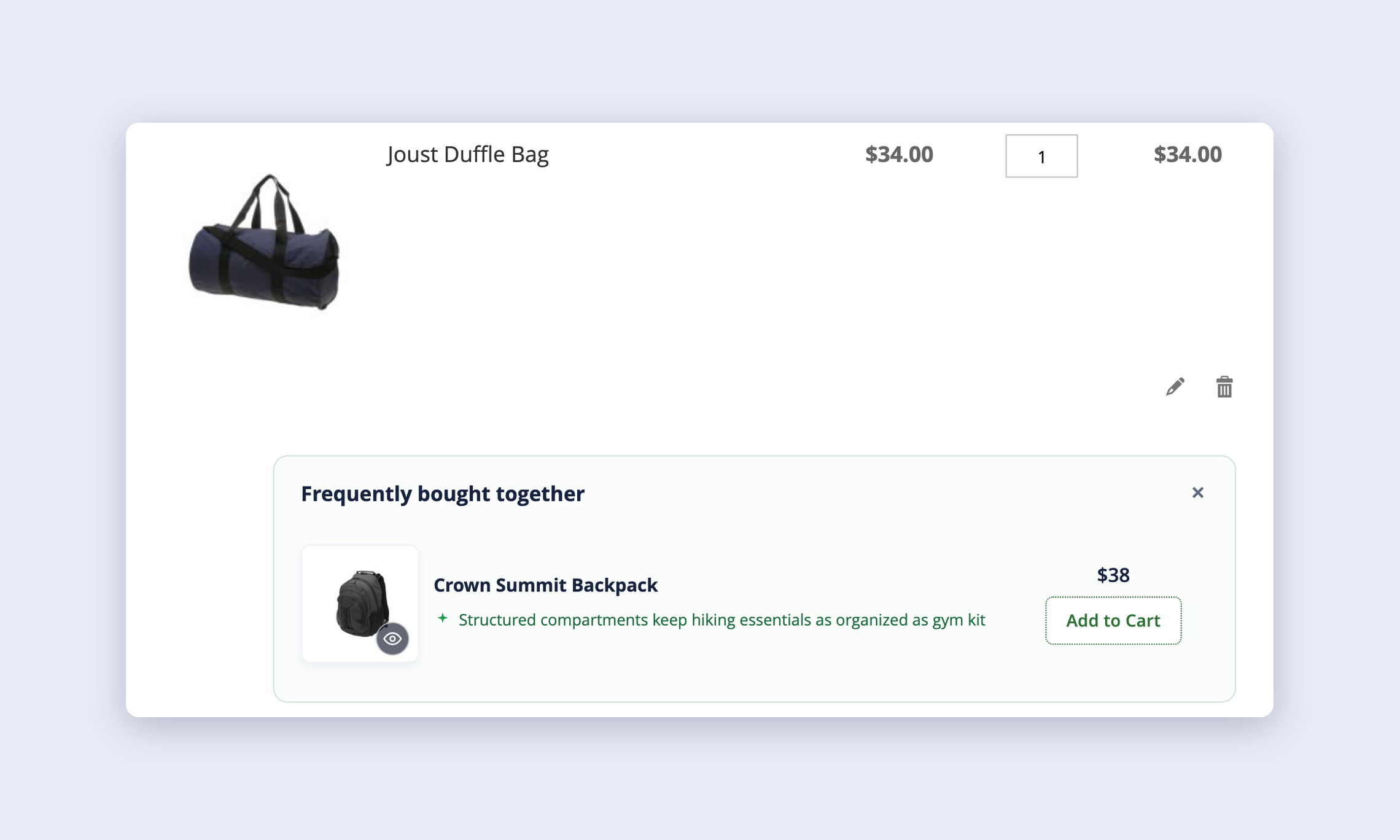
SmartCart suggests complementary add-on products when customers have items in their cart. It uses a deterministic rule engine to match cart contents against configurable triggers, then recommends products from defined pools – filtered through guardrails that ensure every pick is in stock, eligible, and relevant. No guesswork, no random output.

How does SmartCart decide which products to recommend?

SmartCart evaluates rules in priority order against the current cart context. Each rule has a trigger (what must be in the cart) and a pool (what to recommend). Candidates pass through guardrails – stock checks, exclusion lists, type filters, customer group restrictions – then history suppression removes already-purchased products. The highest-priority, highest-position candidates are shown.

Will this Magento extension slow down my store?

No. The entire recommendation pipeline runs locally with no external API calls. Results are cached using a SHA256 context hash that includes cart contents, customer group, and store ID. Cache TTL defaults to 300 seconds and invalidates automatically when the cart changes. AI features (tagging, mining) run exclusively via CLI – never during page loads.

Where do recommended products appear for the user?

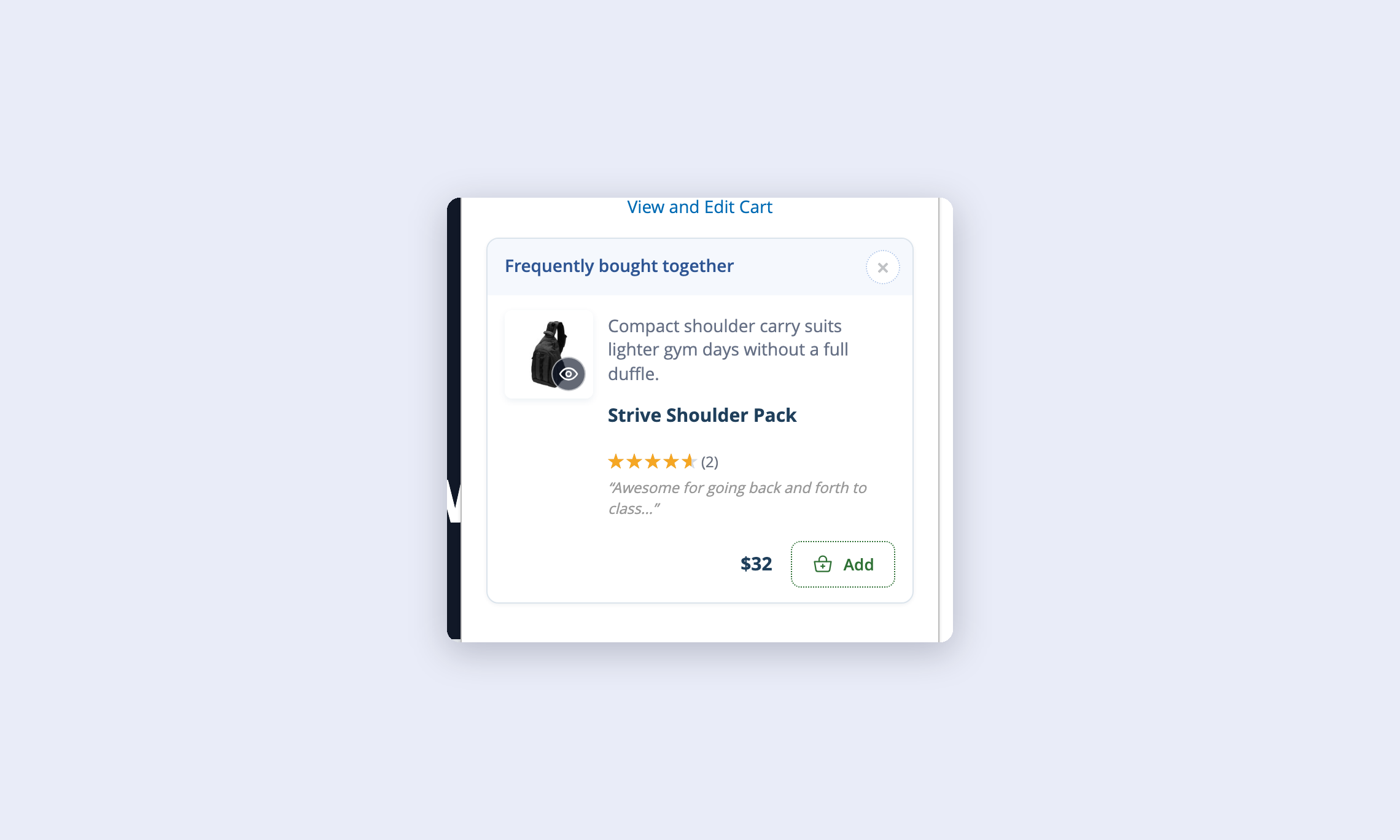
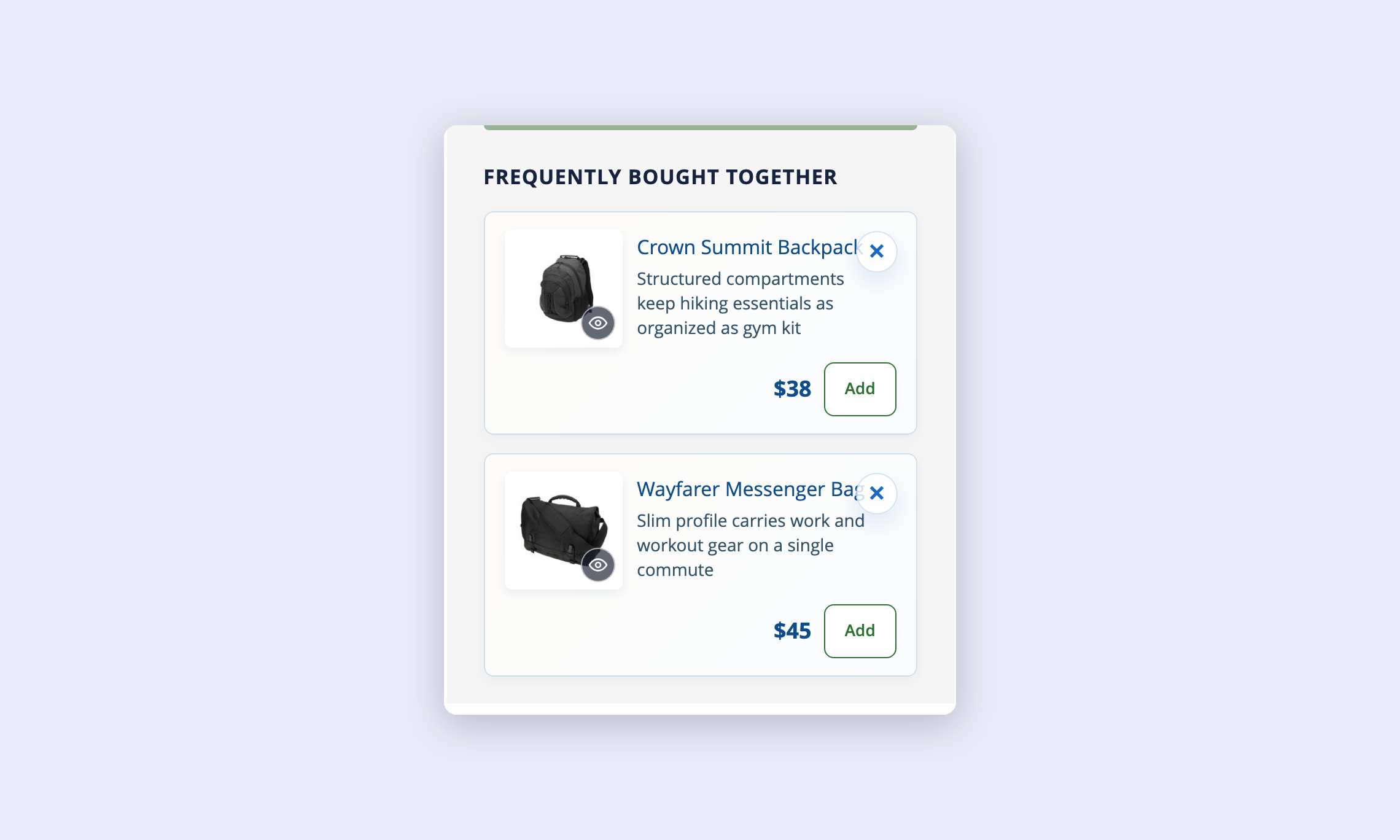
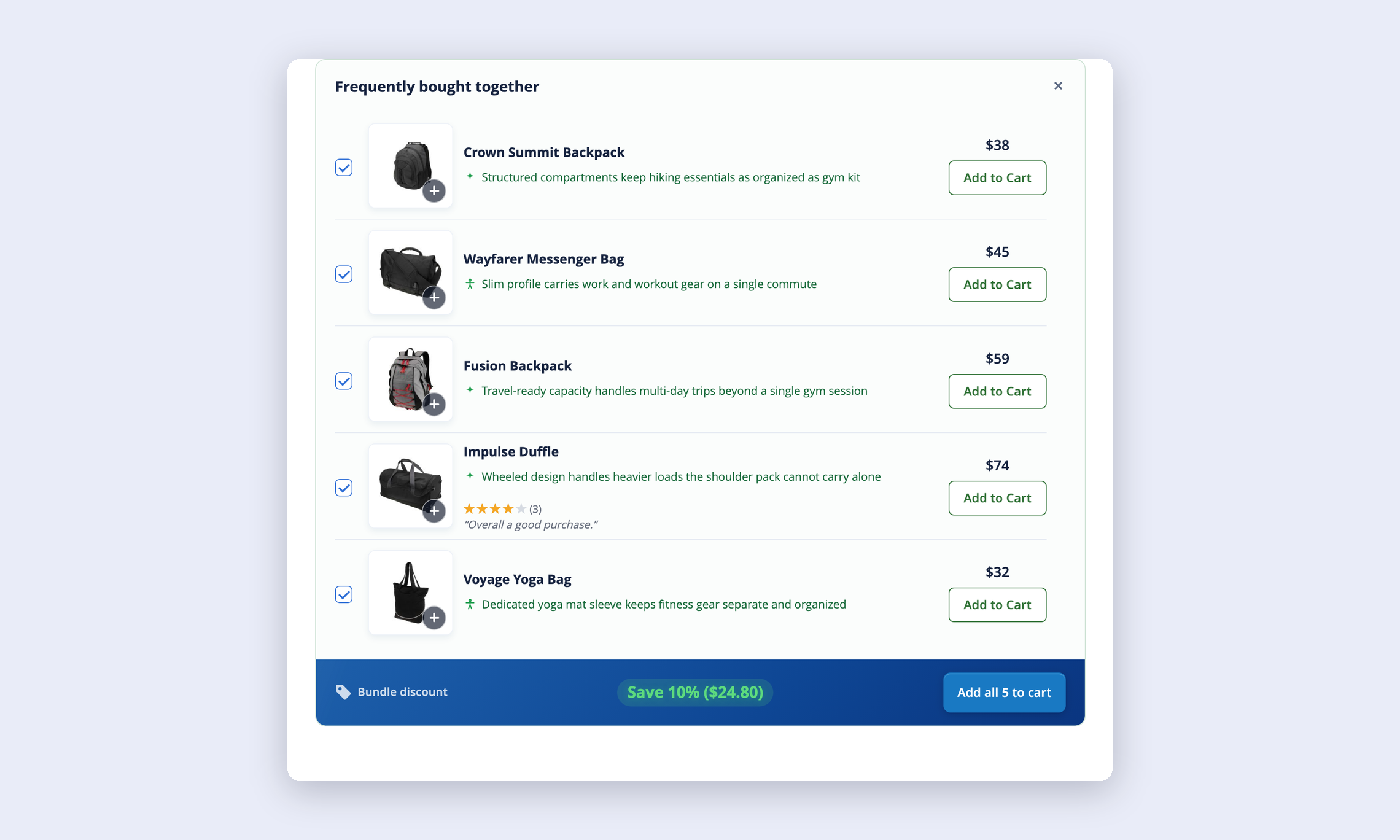
SmartCart displays recommended products in three placements: the basket page (full display with product images), the mini-cart dropdown (compact mode), and the checkout payment sidebar (compact mode). Each placement adapts its view mode automatically. Merchants control which placements are active per store view.

Can I control exactly which products are recommended?

Yes. Rules let you define exact product IDs, category pools, or property-based pools. You can exclude specific SKUs and categories, restrict by customer group, set minimum cart totals, and disable offers when coupons are active. Every rule has configurable priority, so you decide which recommendations take precedence.

How does the AI integration work?

AI is used only in the Pro plan for two CLI tasks: product tagging and draft rule enhancement. Five providers are supported – Anthropic Claude, OpenAI, OpenRouter, Together, and Google Gemini. AI never runs during customer-facing page loads. All API keys are stored encrypted. You can dry-run any AI command before committing results.

What happens when a customer dismisses a recommendation?

Dismissed offers are hidden for a configurable TTL (default: 24 hours) using per-shopper, per-store localStorage. The dismissal is also logged as a tracking event for analytics. After the TTL expires, the offer can appear again. This prevents recommendation fatigue without permanently blocking potentially useful suggestions.

Does SmartCart track recommendation performance?

Yes – with the Growth plan and above. SmartCart captures four event types: impressions, clicks, dismissals, and purchases. Every product added via SmartCart is tagged with the originating rule code and cart context. Attribution persists from quote item through to order item, giving you per-rule income reporting, click-through rates, and conversion rates.

Is SmartCart GDPR compliant?

Yes. Event tracking includes a configurable retention period (default: 90 days) with automated daily cleanup. History suppression data is stored with a separate TTL. No customer data is sent to AI providers – all AI processing uses product data only, via CLI commands.

What’s the difference between the Seed, Growth, and Pro plans?

Seed covers the core rule engine: triggers, pools, guardrails, display copy, dismissal memory, and caching. Growth adds event tracking, purchase attribution, history suppression, compatibility filtering, and customer group restrictions. Pro adds association mining, AI product tagging, draft rule generation, and the full CLI toolkit. Check the pricing section above for full details.

Does it work with Hyvä, Luma, and custom themes?

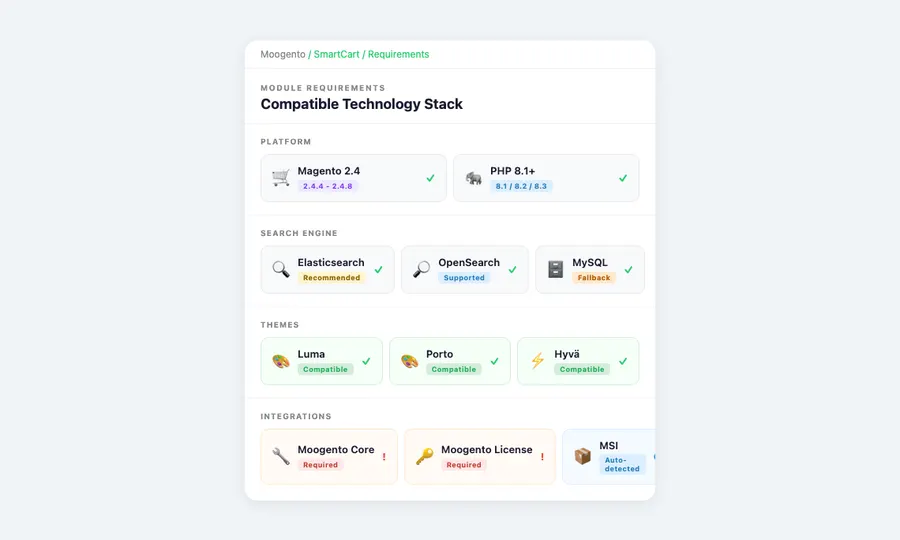
Yes. SmartCart renders through standard Magento layout XML and a jQuery-based JavaScript widget. It’s compatible with Luma, Porto, Hyvä, and custom themes. The widget handles both full and compact display modes and works on desktop and mobile views.

Can AI-generated rules go live without review?

No. AI insights generate pending draft rules only. Every draft must be approved by an admin who can see full evidence: pair count, confidence score, lift metric, and shared tags. Rejected drafts are discarded with no side effects. This human-in-the-loop approval workflow ensures you keep full control over what gets recommended.

How do I install SmartCart?

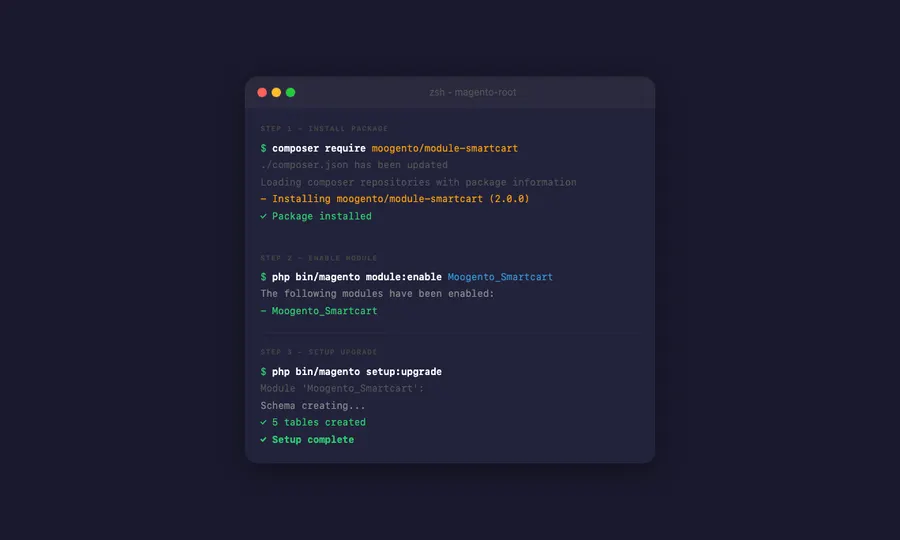
Standard Composer installation. Run the Composer require command, then setup:upgrade. SmartCart creates its database tables automatically and applies sensible defaults. Enable it per store view from the admin panel. No code changes needed.

How is SmartCart different from the default Magento related products feature?

Default Magento related products are static assignments per product. SmartCart uses cart-context triggers – recommendations change based on what’s actually in the cart, not just what product page you’re viewing. Plus SmartCart adds guardrails, history suppression, analytics, and AI-powered discovery that Magento’s native feature doesn’t offer.

Can SmartCart help increase average order value and profit?

That’s exactly what SmartCart is designed for. By showing relevant add-on product picks at the basket, mini-cart, and checkout, SmartCart encourages customers to add complementary items. Purchase attribution tracking lets you measure exactly how much incremental revenue each rule generates, so you can optimize for maximum AOV impact.

Does SmartCart support related items on the product page?

SmartCart focuses on cart-based recommendations – the basket, mini-cart, and checkout payment sidebar. For product page recommendations, Magento’s built-in related products or other extensions are better suited. SmartCart is specifically designed for the cart context where purchase intent is highest.

Is free installation included with SmartCart, and what is the streamlined Magento setup process?

SmartCart installs via a single Composer command followed by setup:upgrade – the standard Magento module installation process. The extension creates its database tables automatically and applies sensible defaults so you can start creating rules immediately. No manual file transfers or code changes needed. If you need assistance, Moogento’s support team can help with installation and initial setup.

Can SmartCart recommend bundled items or handle multi-brand stores?

SmartCart recommends only simple and virtual products to avoid confusing shoppers with configurable product option selection in a cart context. For multi-brand or multi-category stores, property-based triggers and pools let you match recommendations to the brand or category already in the cart. Store-scoped rules mean you can run different recommendation strategies per store view if your brands operate as separate storefronts.

Does SmartCart show a popup or use the add-to-basket area for product picks?

SmartCart does not use an overlay to present its picks. Instead, it places them inline within the basket view, mini-cart dropdown, and payment sidebar – areas where the shopper is already focused on their purchase. This avoids the annoyance of an overlay interrupting the buying flow. Each placement uses either a full or compact display mode, and shoppers can dismiss offers they’re not interested in.

Does SmartCart use browsing history or recently viewed products to generate picks?

No. SmartCart does not track past page views or use past-viewed items data to generate its picks. Instead, it relies on what is currently in the shopping cart – specific SKUs, categories, and properties – combined with rules you define and verified order data from your store. This approach is more privacy-friendly and avoids the cookie and tracking overhead that page-view-based features require. If you want to show past-viewed items separately, you can use Magento’s built-in widget for that alongside SmartCart without any conflict.

Can I use SmartCart as a recommended products extension alongside page builder themes?

Yes. SmartCart uses Magento’s standard layout XML system to inject its blocks into the basket, mini-cart, and checkout. This approach is compatible with page builder themes that respect Magento’s layout system. The extension doesn’t override theme templates – it adds its own blocks in designated positions, so it works alongside custom theme modifications.

Does SmartCart work with loyalty program rewards or abandoned cart recovery?

SmartCart focuses on real-time cart recommendations and doesn’t directly integrate with loyalty programs or abandoned cart recovery tools. However, it complements these strategies by increasing the value of each active shopping session. The recommendations SmartCart shows can help customers discover more products before they leave, potentially reducing abandonment by increasing engagement with relevant add-ons.

What cross-sell strategy should I use with SmartCart?

Start with rules that recommend complementary accessories for your top-selling products – trigger on the main product’s SKU or category, pool from related accessories. Use the Growth plan’s analytics to track which rules convert best, then expand. For the Pro plan, let association mining discover patterns you might miss. Set appropriate cart subtotal thresholds to avoid showing low-value add-ons on large orders.

How are “also bought” recommendations based on real order data?

SmartCart’s Pro plan includes association mining that analyzes your actual order history to find products frequently purchased together. The system calculates statistical confidence and lift for every product pair, then generates draft rules based on the strongest associations. This means your recommendations are based on proven purchase patterns from your own store, not generic algorithms.

Does SmartCart work on mobile devices?

Yes. SmartCart’s display modes adapt to the viewport. The compact mode used in mini-cart and checkout is designed for smaller screens. The full display mode on the basket page includes responsive product images. The JavaScript widget uses standard jQuery and works across mobile browsers without additional configuration.

How does SmartCart personalize the customer experience?

SmartCart personalizes the shopping experience through several layers. Customer group restrictions let you show different offers to wholesale versus retail shoppers. Purchase history suppression ensures returning customers see fresh picks, not repeats. Cart-context triggers mean every recommendation set is specific to what’s in the shopper’s basket right now. Combined with rule priority and pool configuration, each customer sees a tailored set of relevant add-ons.


How does checkout optimization work with SmartCart’s recommendations?

SmartCart places compact product picks in the checkout sidebar, giving customers one last opportunity to add complementary items before completing their order. The payment-step placement uses a compact display mode that doesn’t disrupt the purchasing flow. Since results are stored and served locally, they load instantly without slowing down the checkout process. This approach helps recover missed add-on opportunities at the final step of the shopping journey.

Is SmartCart available on the Magento Marketplace?

SmartCart is distributed through Moogento’s own store and installed via Composer, just like any standard Magento module. This allows for faster updates and direct support. The extension is built to the same quality standards as any officially listed plugin and follows Magento’s coding guidelines for reliable, long-term compatibility with the platform.

Live demo

Turn your cart page into a revenue engine

Annual
Monthly