Magento XML Sitemaps: What Belongs In Them (and What Doesn't)

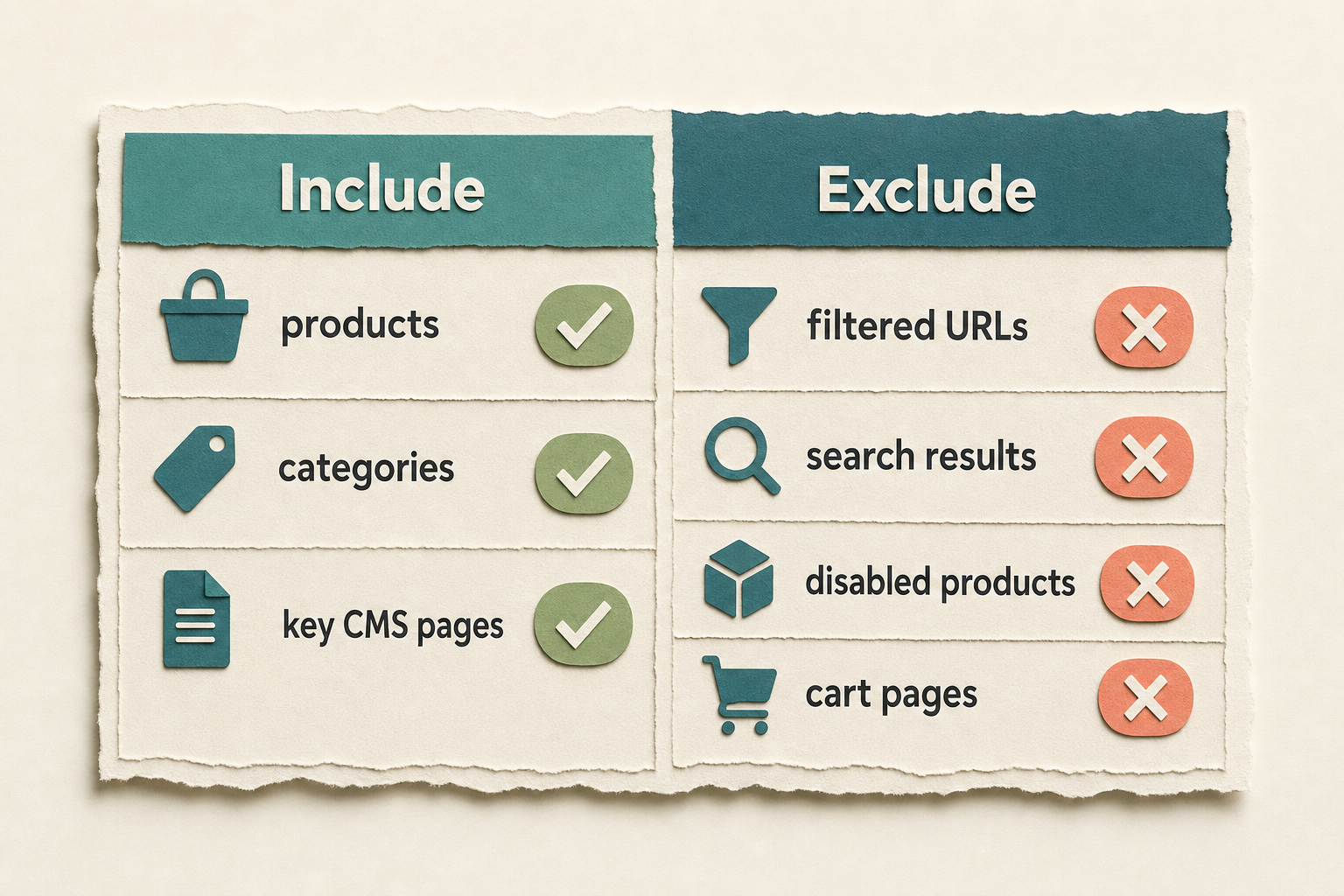
A Magento XML sitemap should list every canonical page you want indexed and nothing else: live products, browsable categories, and the CMS pages that matter (home, about, key landing pages). Leave out anything you wouldn't want a shopper to land on cold - filtered layered-navigation URLs, disabled products, login and cart pages, and search results. An out-of-stock product needs a decision: keep a temporary stock-out page when it is still a useful landing page, but remove a retired page. The sitemap is a hint to Google about what's worth crawling, not a dump of every URL your store can generate.
What is an XML sitemap actually for?
An XML sitemap is a machine-readable list of URLs you're telling search engines are worth crawling and indexing, each with optional hints about how often it changes and how important it is relative to your other pages. It doesn't force anything into the index, and it won't rescue a page Google has decided is thin or duplicated. What it does well is help a crawler discover pages it might otherwise reach slowly - deep products, newer categories - and give you a clean signal of intent. The same clean coverage helps public web crawlers find the pages that make an AI answer possible, although the page still needs a useful, self-contained answer of its own. Our guide to helping AI agents find a Magento store covers that second half.
The sitemaps.org protocol caps a single file at 50,000 URLs and 50MB uncompressed. Past that, use multiple files behind a sitemap index. Most mid-size Magento catalogues never hit the URL cap, but a store with tens of thousands of simple products plus every category and CMS page can. Check the configured file limits before you get there rather than discovering an oversized sitemap in Search Console.
What should a Magento XML sitemap include?
Include the pages that are canonical, indexable, and useful as a landing page. In practice that's three groups:
- Products - enabled, visible in catalog or catalog+search. This is the bulk of the file.
- Categories - anything a shopper can browse to. Anchor categories that only exist to hold layered-navigation filters can go in; empty categories should not.
- CMS pages - home, about, delivery/returns policy, and any content landing pages you'd be happy to rank. Not every CMS page: a "thank you" page or an internal test page has no business in the sitemap.
Magento 2 generates all three natively. Under Stores > Configuration > Catalog > XML Sitemap you set the frequency and priority for Categories, Products, and CMS Pages independently, and you can add product images to the sitemap ("Add Images into Sitemap": None, Base Only, or All). You generate and schedule the file from Marketing > SEO & Search > Site Map. Adobe's XML sitemap docs walk through the native settings.
What should you leave out?
Leave out any URL that's a duplicate, a dead end, or a machine artefact. These are the usual offenders on a Magento store:
| URL type | Why exclude it |
|---|---|
Layered-navigation filter URLs (?color=red&size=10) |
Near-infinite combinations, thin or duplicate content, canonicalise to the category |
Internal search results (/catalogsearch/result/) |
Google's own guidance is to keep search-within-search out of the index |
| Disabled or deliberately removed products | They are no longer useful landing pages, and may return a 404 or redirect |
| Cart, checkout, login, account | No index value, and you don't want them ranking |
Paginated ?p=2 pages |
The category's page one is the canonical entry point |
| Empty categories | A category with zero in-stock products is a poor landing page |
Magento's native sitemap already excludes disabled and not-visible products. The gaps it doesn't handle out of the box are the harder judgement calls: out-of-stock handling, filtered URLs, and how aggressively to exclude thin categories.
Should out-of-stock products be in the sitemap?
The practical rule: keep a short-term out-of-stock product in the sitemap when the page remains useful and has a clear route back to purchase, such as a back-in-stock alert. Remove genuinely dead products as you retire them. The key is to make that decision deliberately, rather than treating every stock-out as either a permanent SEO asset or a page to hide immediately.
How does a bloated sitemap waste crawl budget?
Crawl budget is the amount of crawl attention Googlebot gives a site over time. It is rarely a problem for small stores, but it matters on large or fast-changing Magento catalogues. Filtered URLs, retired product pages and paginated duplicates can compete with the pages you want discovered. A sitemap should reinforce your canonical set, not advertise those weaker variants.
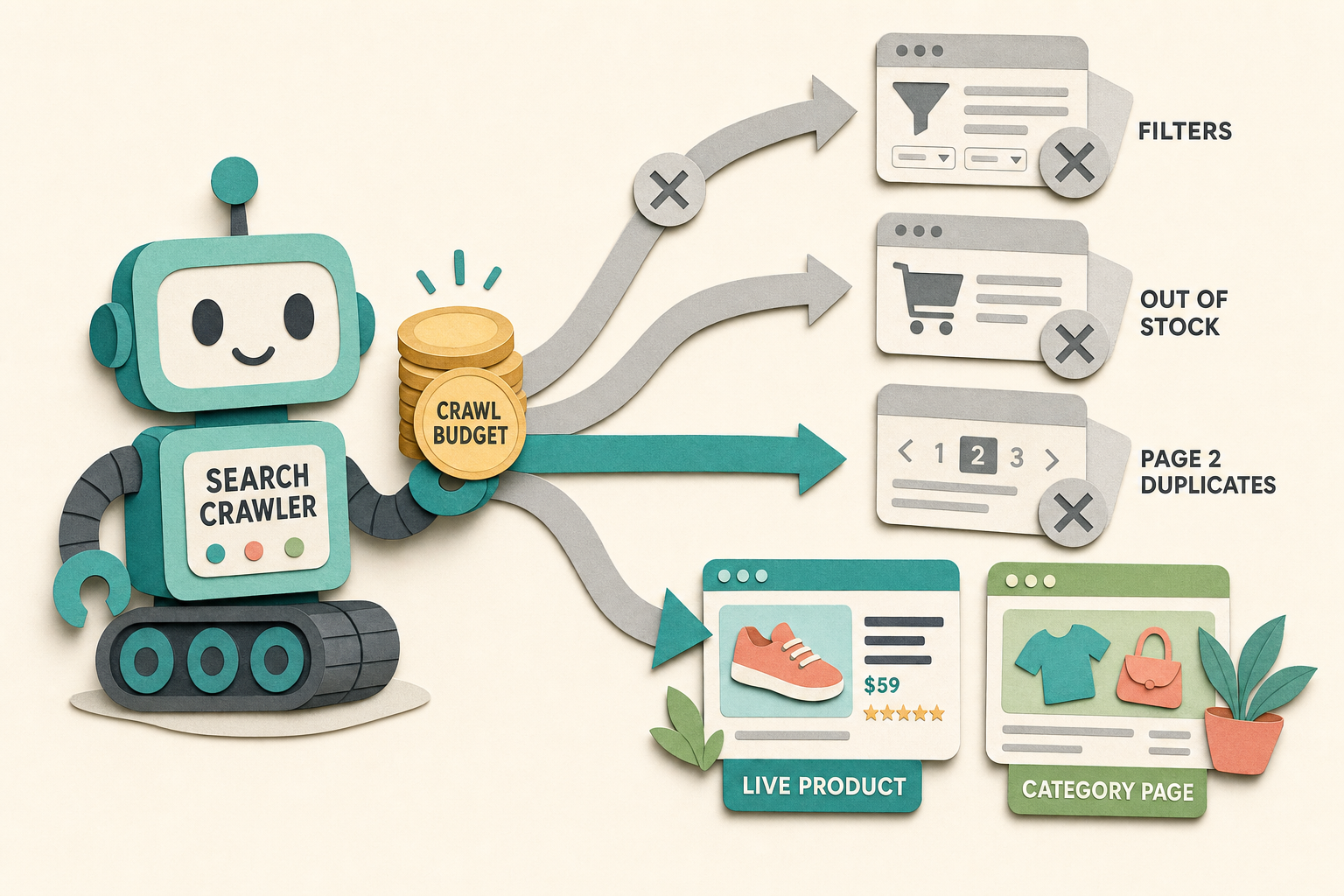
The fix isn't only the sitemap - filtered URLs need a canonical URL and may need a robots strategy too - but the sitemap is where you set the tone. If it only contains pages you'd defend in a search result, you've done most of the work.
How this applies to Magento 2
Native Magento 2.4.9 handles the basics well: separate frequency and priority per entity type, image inclusion, automatic exclusion of disabled and not-visible products, standard or batch generation, file limits, and scheduled regeneration through cron. Its sitemap index can split output when you exceed the configured limits. Where a more complex store may need help is coverage and control: FishPig blog posts, a human-facing HTML sitemap, custom URL groups, separate workflow choices for sitemap sections, and canonical improvements around category and CMS pages.
You can build the extra coverage yourself, because Magento's sitemap is extensible, but it can become a maintenance job. Check what your current sitemap actually contains before assuming it is fine. A quick audit often finds a missing content area, a stale URL pattern, or a product type that did not make it into the file.
Where Moogento helps
The free Moogento Sitemap module focuses on the human-facing HTML sitemap. Sitemap Pro adds XML sitemap workflow choices for combined or per-type files, separate image sitemap output, FishPig blog inclusion, custom URL groups, and category and CMS canonical improvements. It also generates JSON-LD schema for products and categories, which is a separate SEO win from the sitemap itself. It is most useful when a store needs those extra content sources and controls in one maintained workflow, rather than a replacement for basic Magento sitemap configuration.
For category pages specifically, thin or empty categories are a common reason a sitemap ends up pointing at weak landing pages. CategoryContent lets you add real intro and supporting copy to category pages so the ones you do include in the sitemap are worth ranking, rather than a bare grid of products.
Search Console sitemap audit checklist
- In Search Console, open Indexing > Sitemaps. Confirm your sitemap is submitted and its status is "Success", not "Couldn't fetch" or "Has errors".
- Compare "Discovered URLs" in the sitemap against your live product+category+CMS count. A big gap either way (far more or far fewer) means the sitemap is including junk or missing pages.
- Open Pages (the index coverage report) and filter by "Submitted URL" reasons. "Submitted URL marked noindex" or "Submitted URL not found (404)" means the sitemap is pointing at pages it shouldn't.
- Fetch the sitemap in a browser. Spot-check ten URLs: do any return 404, redirect, or land on a page you would not want indexed?
- Search for
?in the raw sitemap. Any filtered or query-string URLs are crawl waste - they shouldn't be there. - Check the file count. If you're near 50,000 URLs in one file, you need a sitemap index with split files before you exceed the protocol limit.
- Confirm your
robots.txtreferences the sitemap location and that the URL resolves.
FAQ
Does Magento generate an XML sitemap automatically?
Magento 2 can, but you have to configure it. Set the entity frequency and priority under Stores > Configuration > Catalog > XML Sitemap, then create and schedule the file under Marketing > SEO & Search > Site Map. It won't generate until you set that up, and it regenerates on the cron schedule you define.
Should I include out-of-stock products in my sitemap?
Keep a temporarily out-of-stock product in when the page is still useful, such as when shoppers can choose an alternative or request a back-in-stock alert. Remove a permanently discontinued product once its destination is no longer a page you want indexed, because you do not want the sitemap steering a crawler at a broken or irrelevant URL.
What happens if my sitemap has more than 50,000 URLs?
A single sitemap file is capped at 50,000 URLs and 50MB uncompressed. Beyond that, use multiple files behind a sitemap index. Current Magento supports configured file limits and sitemap indexes, so confirm those settings and test the generated files before adding custom logic or an extension.
Do filtered category URLs belong in the sitemap?
No. Layered-navigation filter URLs create near-infinite thin variations that canonicalise back to the category. Keep them out of the sitemap and canonical them on the page. Including them is one of the fastest ways to waste crawl budget on a large store.
Start by reading your current sitemap top to bottom. Most stores find at least one surprise in there - a whole product type missing, or disabled products from an old import still listed - and fixing that is a faster SEO win than anything you'd add.