Magento Hyvä Compatibility: What to Ask Before You Install

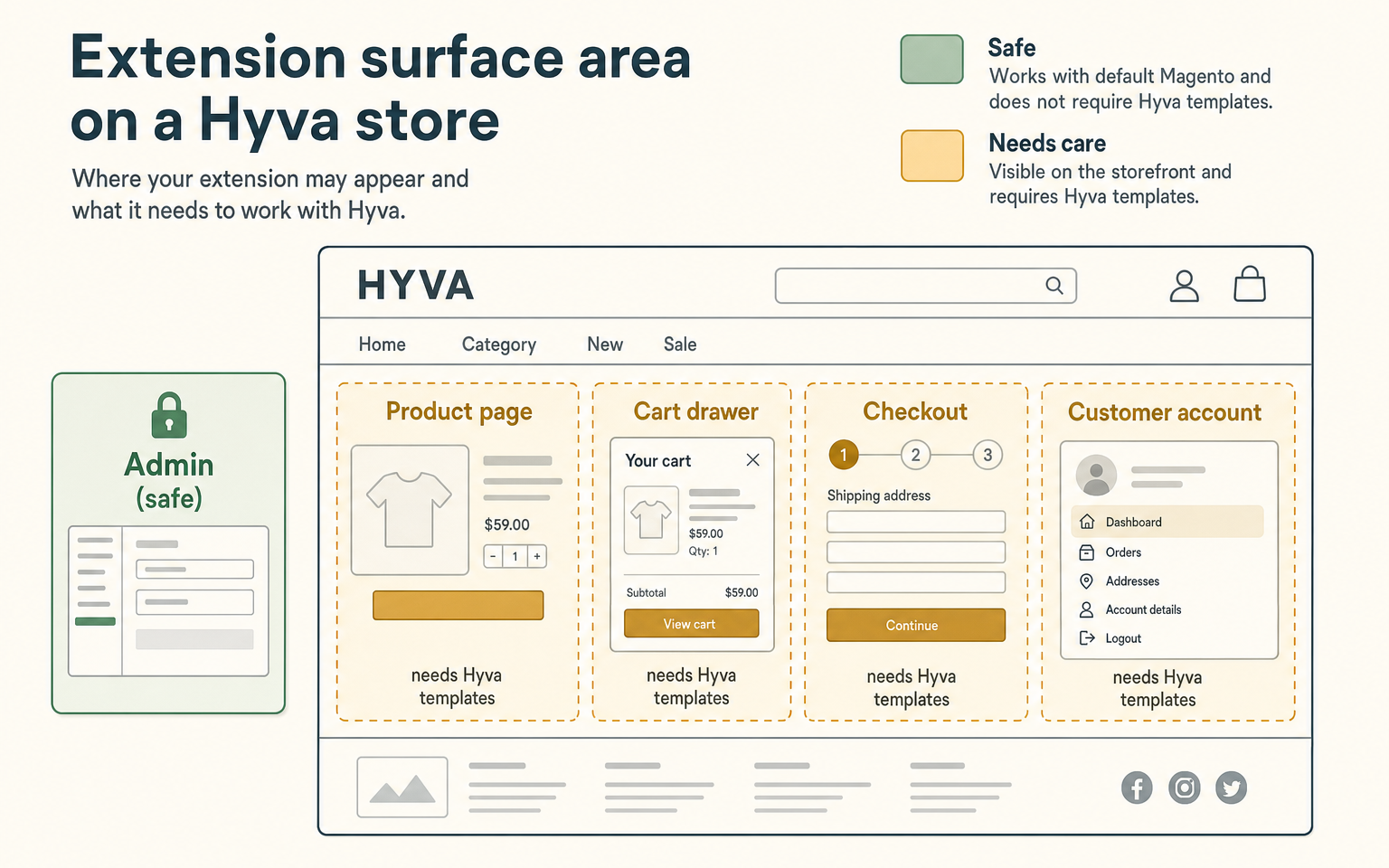
Whether a Magento extension works with Hyvä comes down to one question: does it draw anything on the storefront? Hyvä rebuilds Magento's entire front end, so a backend extension like a payment gateway or an admin tool usually works untouched, while a frontend extension - product badges, a cart drawer, a checkout change - often won't render until it has explicit Hyvä support. Before installing anything, ask the vendor whether the extension touches the storefront and whether they ship Hyvä-compatible templates.
Why do some extensions break on Hyvä and others don't?
Hyvä is a complete rebuild of Magento's frontend. Standard Magento themes (Luma) rely on KnockoutJS, RequireJS and jQuery, plus a lot of Luma-specific templates. Hyvä throws all of that out and uses Alpine.js and Tailwind CSS instead, which is what makes it dramatically lighter and faster. The catch is that any extension built to render through Luma's front end is speaking a language Hyvä no longer understands.
This is why the split is so clean. An extension's backend logic - the PHP that processes an order, calculates shipping, or logs data - runs the same regardless of theme. Its frontend output - the templates and JavaScript that draw something for the shopper - is exactly what Hyvä replaced. So backend-only extensions tend to work as-is, and frontend extensions need a Hyvä-specific version of their templates or they render broken, or not at all.
Which extensions need the most care on Hyvä?
The more customer-facing and JavaScript-driven the surface, the more care an extension needs. Four areas deserve the most scrutiny before you install anything on a Hyvä store:
- Checkout. Magento's checkout is heavily JavaScript-driven, and Hyvä often uses its own checkout. An extension that modifies checkout needs to support whichever checkout you run, or it can break the single most important page on the site.
- Cart. Cart drawers, mini-cart contents and add-on offers are interactive frontend components. On Hyvä they're built with Alpine, so a Luma-era cart extension won't slot in.
- Product page. Swatches, galleries, badges, custom add-to-cart behaviour - all frontend, all needing Hyvä templates to render correctly.
- Customer account. Account and form-heavy pages render through the theme too, so anything customising them needs Hyvä-aware output.
How do you judge an extension's Hyvä compatibility?
Sort every extension into one of four buckets before you install it. This taxonomy is the quickest way to know how much work an extension will be:
| Bucket | What it means | What you do |
|---|---|---|
| Fully compatible | Backend-only, or ships native Hyvä templates | Install and test as normal |
| Compatible via a module | Needs a separate Hyvä compatibility module | Confirm the module exists and is maintained |
| Custom integration needed | Backend works, frontend must be rebuilt | Budget developer time before buying |
| Not compatible | Deep Luma dependency, not worth adapting | Find a Hyvä-native alternative |
Most disappointment comes from assuming an extension is in the first bucket when it's really in the third. The questions below are how you find out before money changes hands.
What should you ask a vendor about Hyvä?
You don't need to read code to get a straight answer. Ask these, and a vendor who supports Hyvä properly will answer without hedging:
- Is this extension officially Hyvä compatible, and do you have documentation or a compatibility module for it?
- Does it render anything on the storefront, or is it admin-only?
- If it's frontend, does it touch the cart, checkout, product page or account area?
- Does it depend on KnockoutJS, RequireJS or jQuery for its frontend logic?
- Which Hyvä checkout does it support, if it touches checkout?
- Can I test it on a Hyvä staging site before I commit?
If a vendor can't say whether their extension is frontend or backend, that's a meaningful answer on its own. The Hyvä project keeps its own developer documentation if you want to understand the technical side, and our Hyvä compatibility guide goes deeper on the strategy.
A simple Hyvä test plan
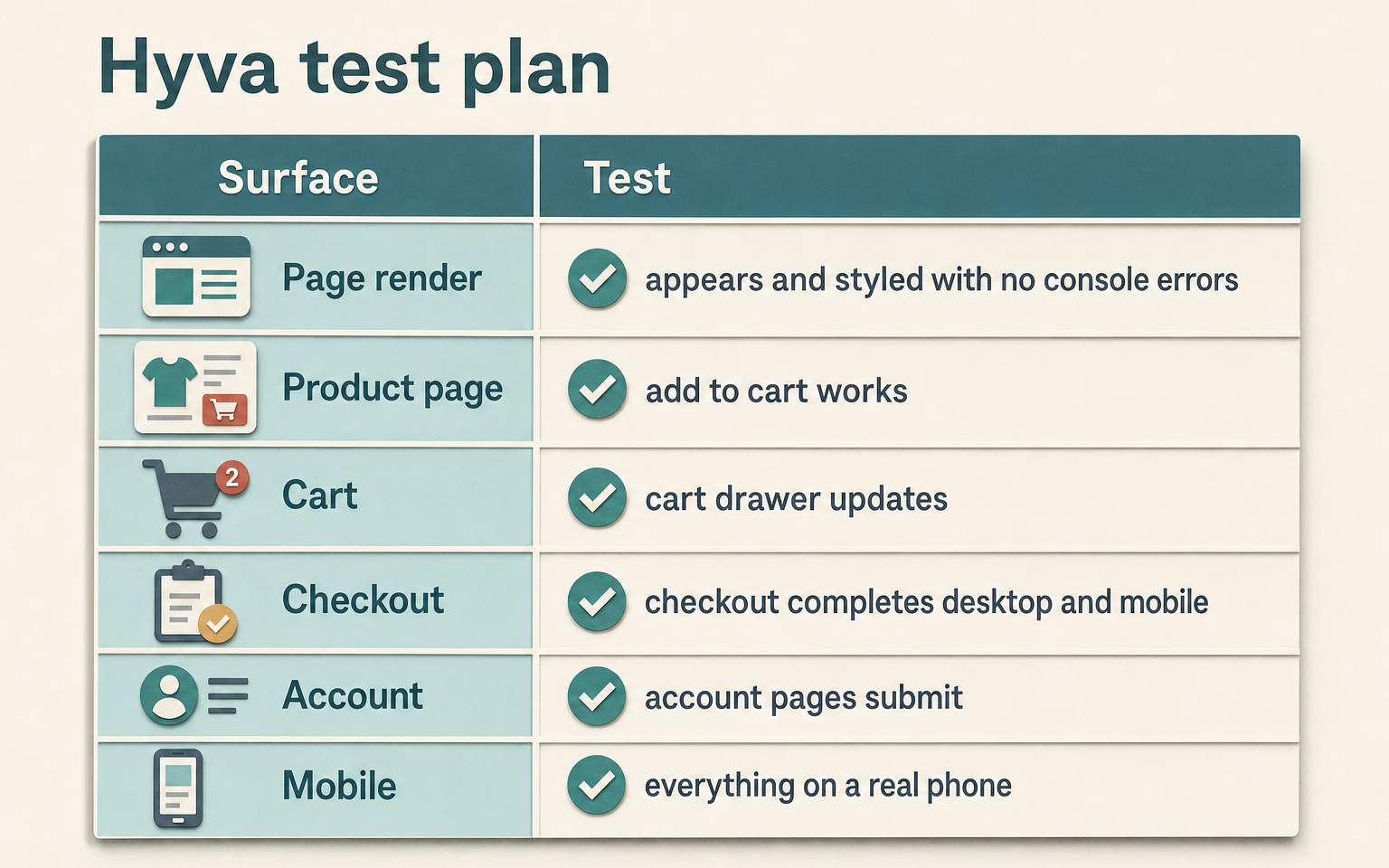
Once an extension is on a Hyvä staging site, test the surfaces it touches - not the whole store, just the ones the vendor said it affects, plus checkout to be safe:
| Surface | Check |
|---|---|
| Page render | Does the feature appear, styled correctly, with no console errors? |
| Product page | Add to cart, swatches and gallery still work? |
| Cart | Cart drawer and totals update correctly? |
| Checkout | Full checkout completes on desktop and mobile? |
| Account | Account pages the extension touches render and submit? |
| Mobile | Everything above on a real phone, not just resized desktop? |
How this applies to Magento 2
On a standard Luma Magento 2 store, extension compatibility is rarely a theme question - most extensions are built for Luma by default. Hyvä changes the default, so the compatibility check becomes essential rather than optional. The good news is that the check is mechanical: because Hyvä uses its own layout and template files, a Hyvä-ready extension ships a parallel set of them (a hyva_default.xml layout, Hyvä versions of its .phtml templates). Their presence is a concrete, verifiable signal that a vendor did the work - as of Magento 2.4.9 with Hyvä, that's what "compatible" actually looks like under the hood. You can ask a developer to confirm those files exist rather than take a compatibility badge on faith.
Where Moogento helps
Our own frontend modules are a useful example of what proper Hyvä support looks like, because both sit squarely in the care zone above. SmartCart is a cart and add-on offer tool - exactly the interactive frontend surface that breaks on Hyvä if it isn't built for it - and it ships dedicated Hyvä layouts and templates, including a cart drawer and checkout components rendered for Hyvä, with theme detection so it serves the right templates for the theme in use. ThanksEasy customises the order confirmation page, another frontend surface, and ships its own Hyvä templates for that page too. The point isn't just that these work on Hyvä; it's that "shipping a parallel set of Hyvä templates" is the standard to hold every frontend extension to, ours included. When you ask a vendor the questions above, this is the answer you're listening for.
FAQ
Do all Magento extensions work with Hyvä?
No. Backend-only extensions (payment gateways, shipping logic, admin tools) generally work without changes because their logic is theme-independent. Frontend extensions that render on the storefront need Hyvä-specific templates, or they render incorrectly or not at all. The dividing line is whether the extension draws anything a shopper sees.
How can I tell if an extension is Hyvä compatible before buying?
Ask the vendor directly whether it's officially Hyvä compatible and whether it touches the storefront, and look for a compatibility module or documentation. The concrete technical signal is that the extension ships Hyvä layout and template files alongside its Luma ones. If a vendor can't confirm either, treat it as not yet compatible.
Why does checkout need extra care on Hyvä?
Checkout is the most JavaScript-heavy part of Magento, and Hyvä often replaces it with its own checkout. An extension that modifies checkout has to support the specific checkout you run, or it can break the page where you least want problems. Always test the full checkout, on desktop and mobile, after installing anything that touches it.
Is switching to Hyvä worth the extension hassle?
For most stores chasing front-end performance and Core Web Vitals, yes - the speed gain is substantial. The trade-off is that your frontend extensions need Hyvä-compatible versions, so the migration is partly an audit of what you run and whether each piece has a Hyvä path. Stores that keep a lean, well-chosen extension set have the easiest time of it.
Before you install anything on Hyvä, ask the one question that sorts it: does this touch the storefront? Everything else - the vendor questions, the test plan - follows from the answer.