

How to Spot a Magento Revenue Drop Before It's a Crisis

Most Magento revenue drops aren't a gradual decline you can watch coming - they're a sudden break that stays invisible until someone checks the numbers. A payment method stops authorising, a shipping method vanishes from checkout, a template change throws an error, and orders quietly stop while traffic looks normal. You catch a revenue drop early by watching orders per hour against the expected pattern, not by waiting for a bad daily total.
Why revenue drops stay hidden
The dangerous drops are the silent ones. Traffic keeps arriving, the site looks fine on the homepage, analytics still counts sessions - but conversions have fallen off a cliff because something between the product page and the thank-you page is broken. Nobody gets an error report, because from the store's point of view nothing crashed; customers just couldn't complete an order and left.
The reason it hides is that most merchants monitor the wrong cadence. A daily revenue figure is a lagging indicator: by the time today's total looks wrong, you've already lost today. And a slow trickle of orders can look normal for hours if you're only glancing at a running total rather than comparing this hour to what this hour usually does.
What causes a sudden Magento revenue drop?
Eight scenarios cover most sudden drops. What they share: the site stays up, so uptime monitoring says everything's fine while orders fall.
| Scenario | What breaks | Early signal |
|---|---|---|
| Checkout error | A JS error or extension conflict stops the checkout completing | Add-to-cart normal, orders near zero |
| Payment method down | Gateway rejects or times out; one or all methods fail | Orders start but never reach paid |
| Shipping method missing | A rate or method vanishes, so customers can't pick delivery | Checkout entered, abandoned at shipping step |
| Key product out of stock | A hero product or whole category shows unavailable | Traffic to those pages up, orders down |
| Campaign ended | A paid campaign paused or ran out of budget overnight | Traffic down, conversion rate steady |
| Search broken | Search returns nothing or errors after a reindex | High exit rate from search, fewer product views |
| Tracking script broken | Analytics stops recording, so revenue looks like it dropped | Orders fine in Magento, zero in analytics |
| Site slow | A slow response or partial outage drives customers away | Higher bounce, longer time-to-first-byte, fewer completed orders |
Notice the last-but-one row. Sometimes revenue hasn't dropped at all - your tracking broke and the report dropped. Always confirm a suspected drop against real orders in Magento before you go hunting a cause, or you'll spend an afternoon debugging a checkout that was never broken.
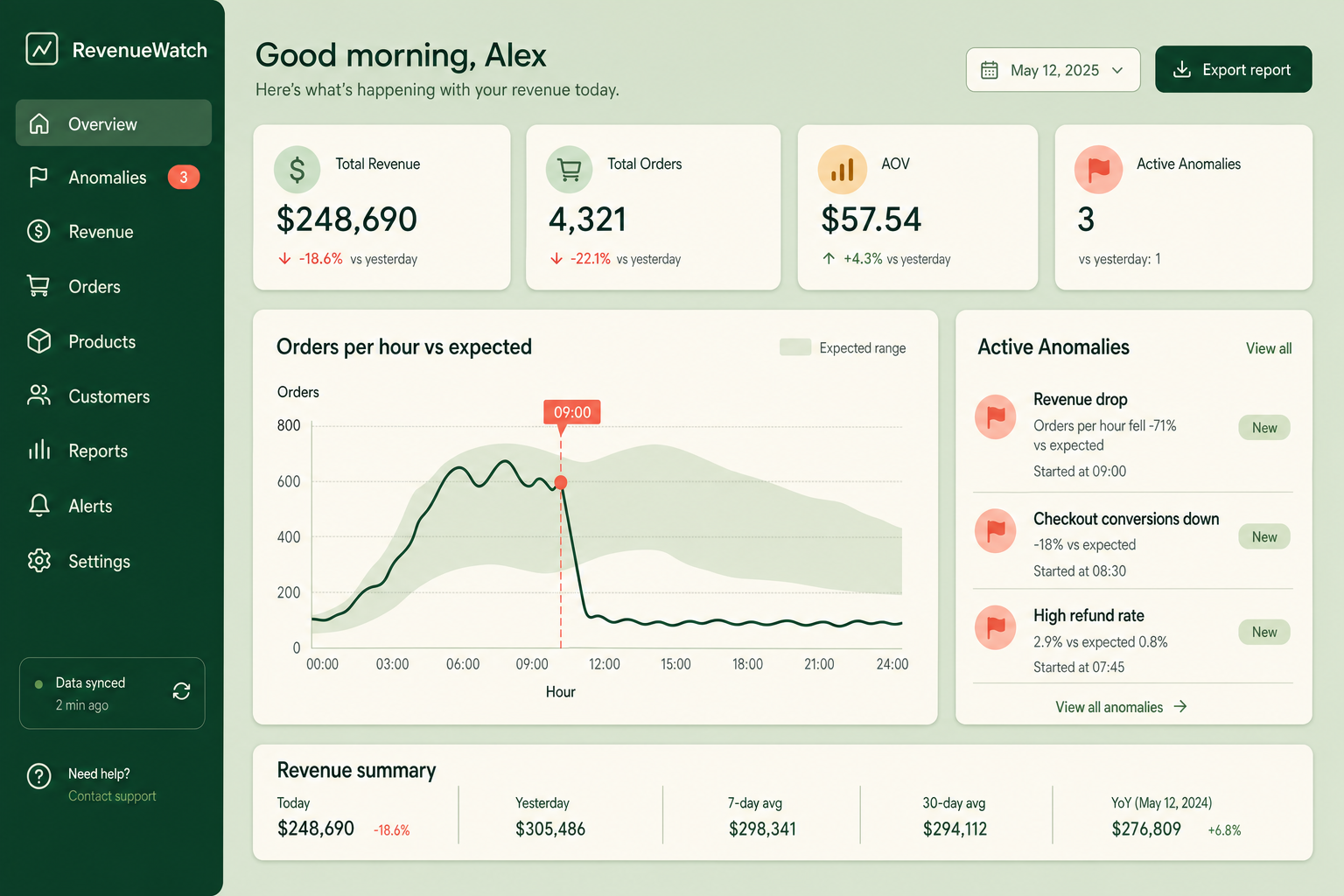
The anomaly checklist: what to compare against what
Detecting a drop is really about comparison. A raw number means nothing without a baseline. The comparisons that catch problems early:
- Orders this hour vs the same hour, typical day. The fastest signal. Most stores have a stable hourly shape, so a zero hour at a normally-busy time is loud.
- Conversion rate vs baseline. Splits a demand problem (traffic down, conversion steady) from a broken-store problem (traffic steady, conversion down).
- Orders started vs orders paid. A widening gap points straight at payment or a checkout step failing after the customer committed.
- Revenue in Magento vs revenue in analytics. A gap means a tracking break, not a sales break.
- Refunds this period vs baseline. A refund spike is its own kind of revenue drop, and a signal of a product or fulfilment fault.
- Add-to-cart rate vs checkout completion. Healthy carts that never convert isolate the problem to checkout.
The cost of slow detection
The gap between a problem starting and someone noticing is where the money goes. Consider the same broken checkout, detected two ways:
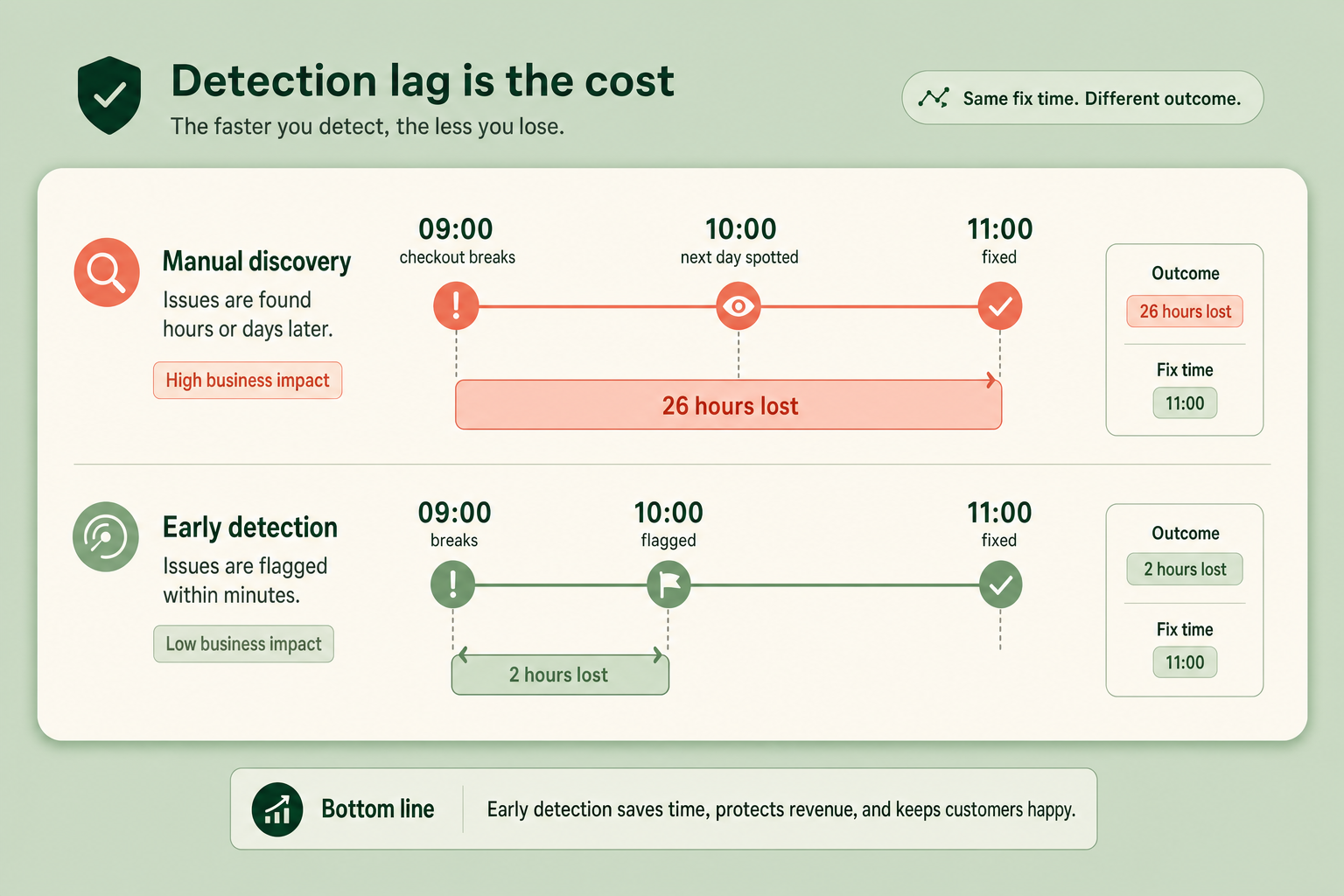
In the slow version, a template change breaks checkout at 9am, nobody looks at numbers until the next morning, the drop is spotted at 10am the following day, fixed by 11am. That's 26 hours of lost orders. In the fast version, an hourly-orders check flags a zero hour by 10am the same day, someone investigates, it's fixed by 11am. Two hours lost instead of twenty-six. The fix took the same ten minutes either way. Everything else was detection lag.
A troubleshooting decision tree
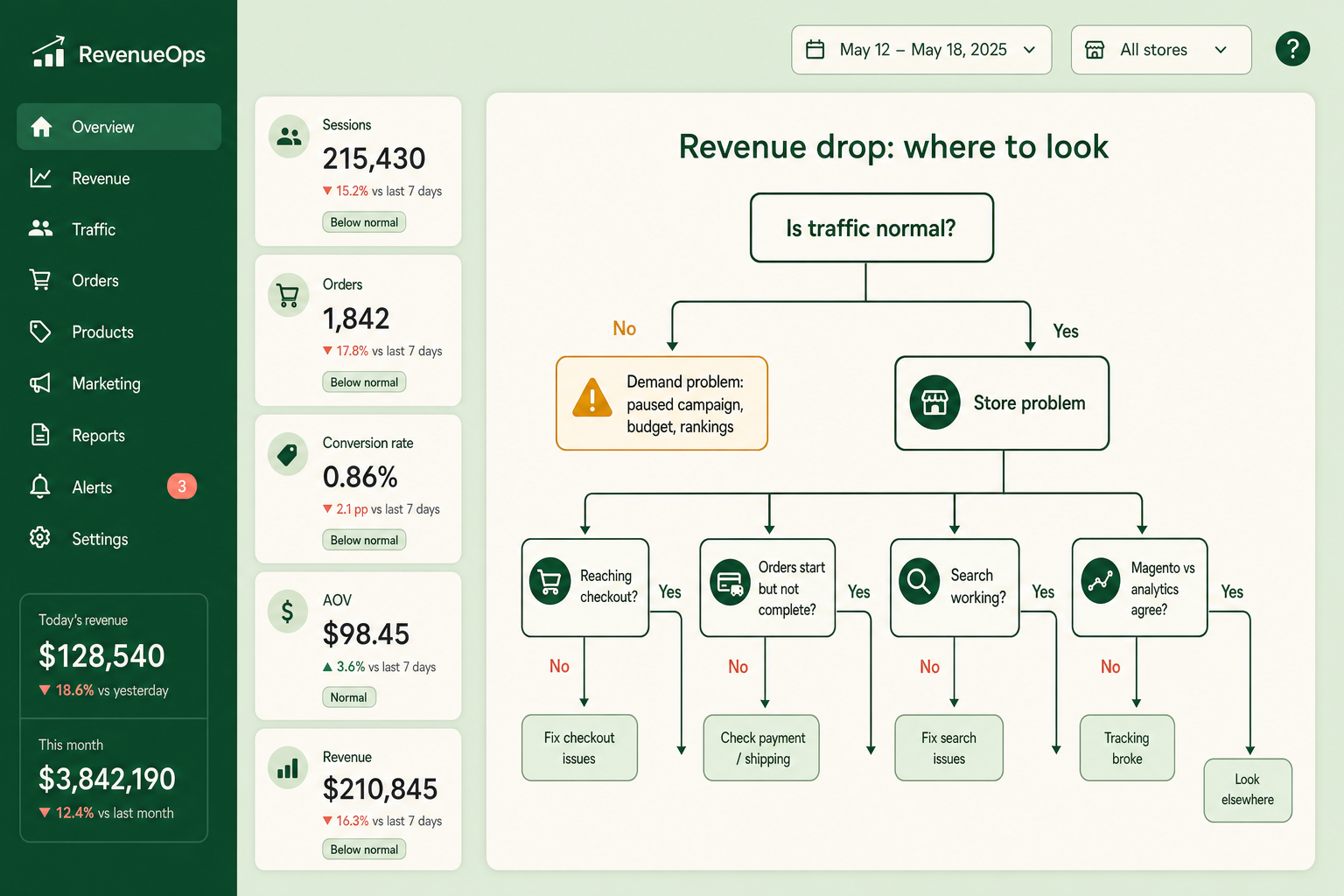
Once you know orders are genuinely down, a fast diagnosis follows a branch. Start with the one question that halves the problem space:
- Is traffic normal? If traffic is down, it's a demand or acquisition problem - check for a paused campaign, a budget cap, a search-ranking change, or a referral source that dried up. If traffic is normal, it's a store problem - keep going.
- Are customers reaching checkout? If add-to-cart is normal but checkout starts are low, the product or cart page broke. If checkout starts are normal, go deeper.
- Do orders start but not complete? If yes, it's payment or a checkout step. Place a test order and watch where it fails - a payment method, a shipping rate, a validation error.
- Is search working? Run a real query. No results or an error after a recent reindex is a common silent killer.
- Do Magento and analytics agree? If Magento shows normal orders but analytics shows a drop, your tracking broke, not your store. Fix the script, not the checkout.
How this applies to Magento 2
Magento 2 won't tell you revenue dropped. The default dashboard is a daily, backward-looking view (and its chart is often turned off for performance), there's no hourly-orders trend, no baseline comparison, and no anomaly flag anywhere in the admin. Uptime monitors tell you the site responds, not that checkout works - a store can return HTTP 200 on every page while its payment method silently rejects every card. As of Magento 2.4.9, early revenue-drop detection is entirely something you add.
You can build a crude version yourself: a scheduled query that counts paid orders per hour and emails you when a normally-busy hour comes back empty. It's worth doing even roughly, because the alternative is finding out from tomorrow's total or, worse, from a customer.
Where Moogento helps
Pulse runs a set of background detectors every half hour that watch for exactly these patterns - a sharp revenue drop, an order slowdown, a refund spike, a zero-revenue stretch, a demand surge, stock and fulfilment risk - each against a configurable threshold, and surfaces what it finds in an in-admin alert centre with the day's dashboard. One thing to be straight about: Pulse detects and displays, it doesn't push. The flags are waiting when you log in, not sent to your phone, so it shortens the "notice it" gap for anyone checking the admin daily rather than replacing an on-call pager. Because it also shows orders and revenue against trend, a hour that's fallen out of its normal band is visible where you already look.
For the configuration side of "what changed" - a payment method toggled off, a shipping method removed, a setting altered before the drop - AuditEasy logs admin changes so you can line up a revenue drop against the change that caused it instead of guessing. And ProfitEasy means the figure Pulse watches is profit, so a promotion that quietly turns a revenue rise into a margin loss shows up too, not just a fall in the headline.
Revenue-drop monitoring checklist
- Do you compare orders per hour to a baseline, or only look at daily totals?
- Would a broken checkout at 9am be caught before the next morning?
- Can you tell a traffic drop from a conversion drop at a glance?
- Do you watch the gap between orders started and orders paid?
- Does your revenue in Magento get sanity-checked against analytics?
- Is there a log of admin config changes to line up against a drop?
- When did you last place a real test order through the live checkout?
- Who sees the numbers first each day, and how early?
FAQ
How quickly should I detect a revenue drop?
Within an hour or two, not the next day. The fix for most sudden drops is quick; the cost is the detection lag. Watching orders per hour against a baseline catches a broken checkout the same morning, where a daily total loses you the whole day before it looks wrong.
Why does my store show normal traffic but low sales?
Something between browsing and the thank-you page is broken - a checkout error, a failing payment method, a missing shipping rate, or a key product out of stock. Traffic and even add-to-cart can look normal while orders fall. Check the gap between orders started and orders paid to narrow it down, and place a test order to find the failing step.
Can Magento alert me to a revenue drop?
Not natively. Magento 2 has no anomaly detection or alerting - the default dashboard is a daily backward-looking view with no hourly trend or baseline. You either build a scheduled check that counts paid orders per hour, or add an extension that detects abnormal patterns and surfaces them in the admin.
Is a revenue drop always a technical fault?
No. A drop can be demand-side - a paused campaign, a spent budget, a seasonal dip, a ranking change - rather than a broken store. That's why the first diagnostic question is whether traffic is normal. Traffic down points to acquisition; traffic steady with orders down points to something broken in the store.
Start with one hourly check: paid orders this hour against what this hour normally does. It's the cheapest early-warning system there is, and it turns a lost day into a lost hour.


