

Magento Shipping Cutoffs - Set Expectations, Keep Sales

A shipping cutoff is the daily deadline to order for same-day dispatch, and it only helps sales when you communicate it accurately at every step: product page, cart, checkout, confirmation page, and email. Vague "fast shipping" wins the click and loses the reorder when the parcel turns up late. A concrete date you actually hit does the opposite. In Magento 2, the cutoff itself is easy; keeping the message consistent and true across every surface is the hard part.
What is a shipping cutoff, and why does it matter?
A shipping cutoff is the time of day after which an order ships the next working day instead of today. "Order by 3pm for same-day dispatch" is a cutoff. It matters because it's the mechanism that turns a vague delivery hope into a specific promise the customer can plan around, and specificity is what converts - a shopper who knows the parcel arrives Thursday buys with more confidence than one told only that shipping is "fast".
The catch is that a cutoff is a promise, and a broken promise costs more than a vague one ever saved. Miss the dispatch you implied and you've bought a WISMO ticket, a disappointed customer, and a dent in the repeat purchase. So the cutoff has to be real, and every place you mention delivery has to agree with every other place.
Where should cutoff and delivery messaging appear?
Delivery messaging should appear at every point where the customer is deciding or worrying, and it should say the same thing each time. The five surfaces below each do a different job, and a gap or contradiction between any two of them is where trust leaks out:
| Surface | What to show | Common mistake |
|---|---|---|
| Product page | "Order within X hours for dispatch today" and an estimated arrival date | Only "fast shipping", no date, no cutoff |
| Cart | The delivery estimate carried through, updated if the cutoff has passed | Estimate silently disappears; customer re-guesses |
| Checkout | A delivered-by date tied to the chosen shipping method | Method names only ("Standard", "Express") with no dates |
| Confirmation page | The promised dispatch and delivery dates, restated | Order number only, no dates - so the customer emails to ask |
| Confirmation / dispatch email | The same dates, then a tracking link when it ships | Dates on the site but absent from the email of record |
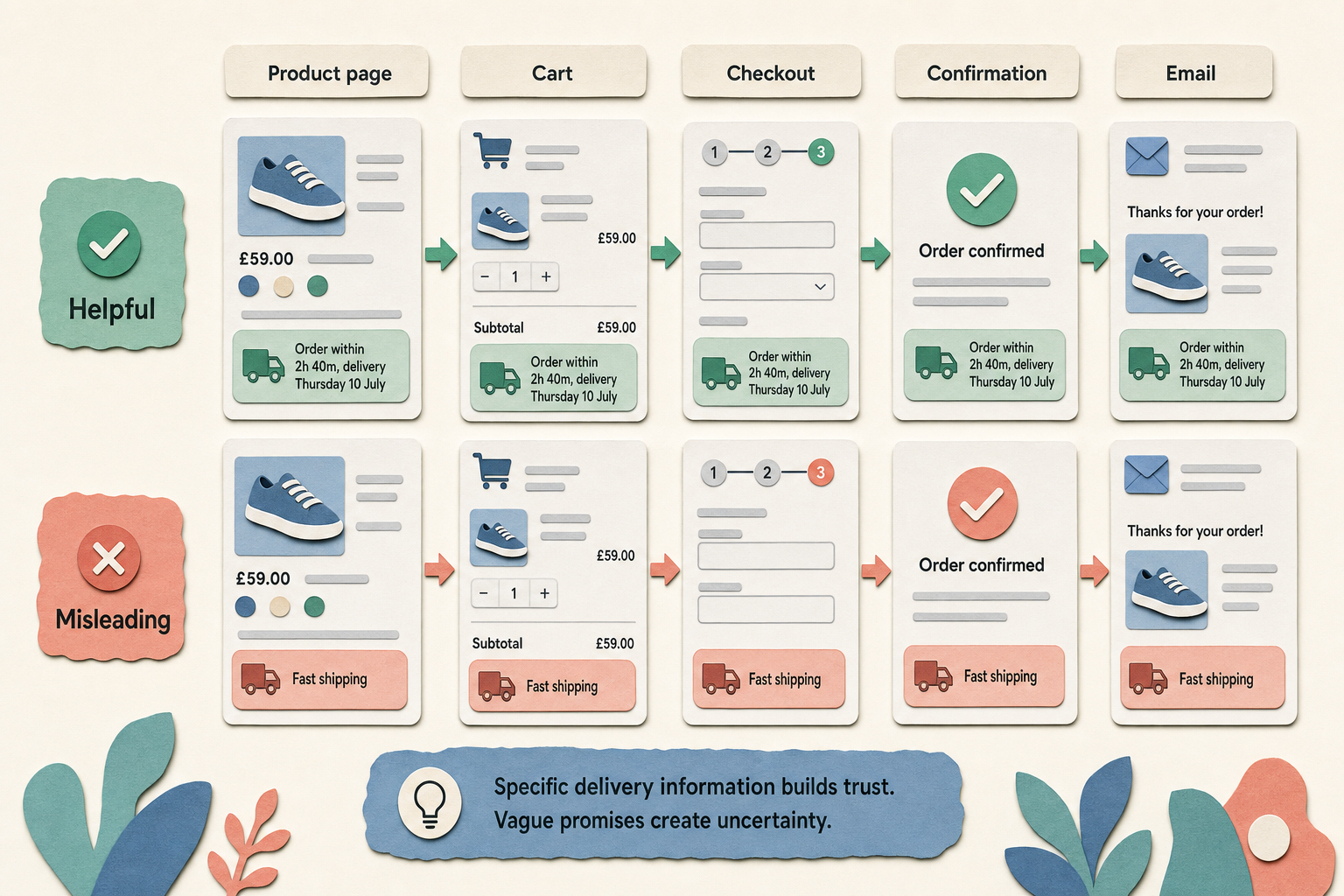
What makes cutoff messaging misleading versus helpful?
Helpful messaging is specific, upfront about working days, and consistent across surfaces. Misleading messaging is vague, hides the weekend, or promises a speed the operation can't hit. The difference is entirely in the detail:
- Helpful: "Order within 2 hours 40 minutes for dispatch today, estimated delivery Thursday 10 July." It states the cutoff, the working-day maths, and a real date.
- Misleading: "Fast, reliable shipping." No cutoff, no date, no accountability - it reads as filler and sets no expectation to meet.
- The weekend trap: "Next-day delivery" ordered Friday afternoon that actually arrives Monday or Tuesday. If you don't spell out working days and weekend handling, the customer counts calendar days and feels misled.
- The countdown done wrong: a timer that resets or keeps promising "today" after the cutoff has passed. A countdown only builds trust if it's accurate; a lying timer is worse than none.
- Sensible hedging: where you genuinely can't guarantee a date, a range ("2 to 4 working days") beats a false precision you'll miss.
How this applies to Magento 2
Magento 2 has no native shipping-cutoff feature. As of Magento 2.4.9, there's no built-in "order within X hours" countdown, no delivered-by date on the product page or checkout, and no automatic weekend-and-holiday handling in the delivery estimate. Shipping methods carry names and prices, not dates. Carriers publish their own transit times - UPS's transit-time guide is one example - but translating those into a reliable "arrives Thursday" on your storefront is work Magento leaves entirely to you.
The reality is that the pre-purchase countdown is custom or extension territory, and it's worth building only if your operation can actually hit the cutoff you'd advertise. Where Magento and add-ons genuinely help is the other half of the promise: making the dispatch real, restating the date after purchase, and telling the customer promptly if it slips.
Where Moogento helps
Be straight about this: none of the Moogento modules is a pre-purchase cutoff countdown timer for the product page. If that's the exact widget you want, it's a custom build. What the modules do is make the post-cutoff promise trustworthy, which is where broken cutoffs actually cost you.
TrackEasy sets a delivered-by date estimate on the order's tracking timeline and emails the customer when that date changes - so a cutoff you missed becomes a proactive "running a day late" message instead of a WISMO ticket. It can also update the estimate from the carrier's own API response as the parcel moves. ShipEasy is the operational side: it lets you define which order status counts as "shipped" and bulk-move orders there, so the dispatch moment your cutoff promised is a real, tracked event rather than a manual afterthought. It doesn't set cutoff times or handling windows itself - it's order management, not a rate or scheduling engine.
On the confirmation page, ThanksEasy owns the post-purchase moment - primarily as a place to make a time-limited add-on offer, but the same page is where restating the delivery promise keeps the customer from emailing to ask. Together these cover the after-the-click half of the cutoff: confirm the date, make dispatch real, and warn early if it moves.
Shipping cutoff checklist
- Confirm your operation can actually hit the cutoff you want to advertise, on your busiest day, before you promise it anywhere.
- Write one delivery promise and check it appears, worded consistently, on the product page, cart, checkout, confirmation page and email.
- Spell out working days and weekend handling. "Next working day" beats "next day" that quietly means Monday.
- If you run a countdown, test it after the cutoff passes - it must roll to the next dispatch day, not keep promising today.
- Tie the checkout delivery estimate to the chosen shipping method, not a single generic date.
- Put the promised dates in the confirmation email, not just on the website, so the customer has a record.
- Set up a proactive "your delivery date has changed" message so a missed cutoff is communicated, not discovered.
- Where you can't guarantee a date, show a range rather than a precise date you'll miss.
FAQ
Does Magento 2 have a shipping cutoff feature?
No. Magento 2 has no native "order within X hours for same-day dispatch" countdown, no delivered-by date on the product page or checkout, and no automatic weekend or holiday handling in delivery estimates. Shipping methods carry names and prices only. A cutoff countdown is a custom build or an extension.
Where should I show delivery dates in Magento?
On every surface where the customer decides or worries: the product page, cart, checkout, confirmation page, and the confirmation and dispatch emails. The exact same delivery promise should appear on all of them. Gaps and contradictions between surfaces are what erode trust and generate where-is-my-order tickets.
What's the most common shipping-message mistake?
Vague promises with no date - "fast shipping" or "quick dispatch" - that set no expectation and give the customer nothing to plan around. The second most common is the weekend trap: implying next-day delivery on a Friday order that actually arrives the following week because weekend handling wasn't stated.
Is a countdown timer worth adding?
Only if it's accurate and your operation can hit the cutoff it advertises. A correct countdown genuinely lifts urgency and confidence. A timer that resets or keeps promising same-day dispatch after the cutoff has passed damages trust more than having no timer at all.
Start by proving the cutoff is real on your busiest day. Once you can actually hit it, the job is consistency: one delivery promise you can keep, repeated wherever the customer looks, and a proactive message the moment it changes.


