

Magento Buying Guides: The Content Type Most Stores Underuse

A Magento buying guide is a page that helps a shopper choose between options in a category, then links them to the right products. It's the content type that pays off four ways at once: it ranks for research-stage searches, gets cited by AI assistants answering "which should I buy", converts undecided shoppers, and deflects pre-sales support questions. Most stores publish far too few because Magento has no native buying-guide content type, so nobody owns the job.
Why do buying guides earn their keep four ways?
Because they meet the shopper at the moment of indecision, which is where the other page types don't reach. A product page assumes you've already chosen; a category grid assumes you know how to compare. A buying guide does the comparison for you, and that single job serves four goals:
- SEO: it targets high-intent research queries ("best X for Y", "how to choose a Z") that product pages rarely rank for.
- AI citation: a guide that answers "which is right for me" in plain, structured text is exactly what an AI assistant lifts into an answer.
- Conversion: it removes the uncertainty that sends shoppers off-site to research, and links them straight to the recommended product.
- Support: it answers the pre-sales questions ("what's the difference between these two?") that otherwise land in your inbox.
Google's own guidance on creating helpful content describes exactly this kind of page: genuinely useful, first-hand, and written to help a decision rather than to rank.
What goes into a good buying guide?
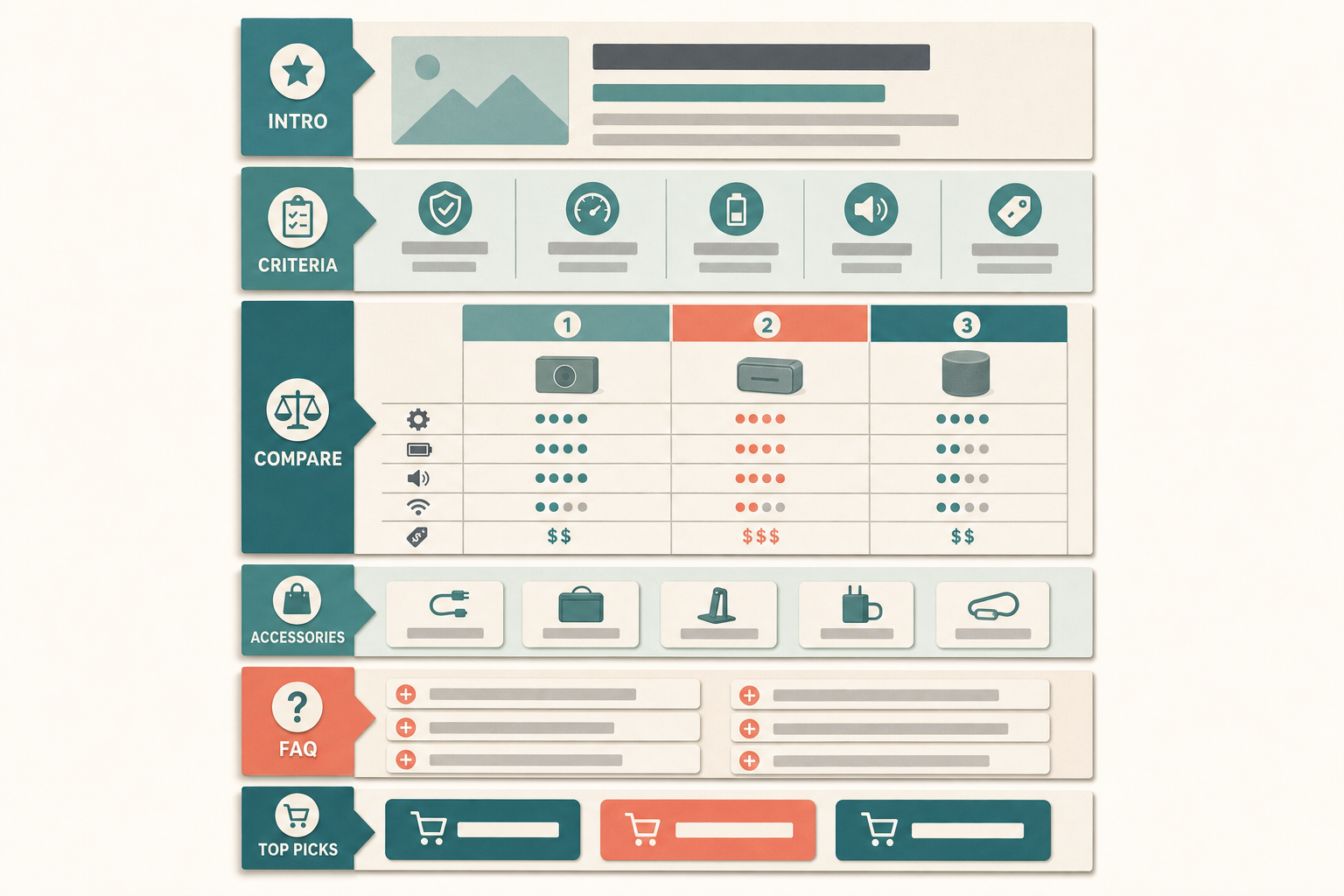
A strong buying guide follows a predictable structure, and predictable is good here - both shoppers and AI assistants know where to look. This is a reusable Magento template:
| Section | What it does | Keep it credible by |
|---|---|---|
| Answer-first intro | States who the guide is for and the short recommendation | Naming the top pick in the first 75 words |
| Decision criteria | The 3 to 5 factors that actually matter | Explaining the tradeoff, not just listing specs |
| Comparison table | Options scored against those criteria | Real attributes, links to each product |
| Recommendations by use case | "Best for small kitchens", "best on a budget" | One clear pick per scenario |
| Accessories and add-ons | What the buyer also needs | Only genuinely complementary items |
| FAQ | The recurring pre-sales questions | Full-sentence answers, real questions |
| Product links | Routes to buy the recommended items | Descriptive anchors, not "buy now" |
How this applies to Magento 2
Magento 2.4.9 has no dedicated buying-guide content type, and that's the reason so few stores publish them - there's no obvious place for one to live. Your realistic options are a CMS page, a blog post (via a WordPress integration like FishPig), or content attached above and below a category page. Each works; the point is to pick one home and commit, rather than leaving guides unwritten because the platform doesn't prompt you.
Wherever the guide lives, the mechanics are the same: write it answer-first, include a real comparison table as HTML (not an image), add a genuine FAQ, and link out to the products you recommend with descriptive anchors. Attaching a short guide to a category page has a bonus - it puts the advice exactly where an undecided shopper already is. And a guide only converts if it links to buy, so the internal linking from guide to product is as important as the guide itself.
Where Moogento helps
Guides live or die on the quality of the product content underneath them. ProductContent AI scores every product from 0 to 100 and drafts on-brand descriptions and FAQ content you approve, so when your guide links to a product, the destination page actually backs up the recommendation instead of showing a thin, spec-free stub. If you host guide-style content on category pages, CategoryContent AI gives you above-the-grid and below-title content areas plus a FAQ tab, and it emits FAQPage structured data - so a category-level buying guide becomes machine-readable to AI answer engines.
For the accessory and add-on section, SmartCart carries the same recommendation logic into the cart with rules you control, so the complementary items you suggest in the guide reinforce what appears at checkout rather than contradicting it.
Two neighbouring pieces make guides stronger: the comparison table is the guide's centrepiece and deserves its own care, and a well-structured guide is one of the most citable pages you can publish for generative engine optimisation.
Buying guide audit checklist
- Does the guide name its top recommendation in the first 75 words?
- Are the decision criteria explained as tradeoffs, not just a spec dump?
- Is there a real HTML comparison table with links to each product?
- Does it give a clear pick per use case ("best for X")?
- Is there an accessories section with genuinely complementary items?
- Does the FAQ answer real pre-sales questions in full sentences?
- Does every recommendation link to the product with a descriptive anchor?
- Is the guide linked from the relevant category so shoppers find it at decision time?
FAQ
How long should a Magento buying guide be?
Long enough to answer the decision, no longer. Most sit between 900 and 1,800 words: enough for an answer-first intro, decision criteria, a comparison table, use-case picks, and an FAQ. Padding to hit a word count hurts both readers and AI extraction.
Where should buying guides live on a Magento store?
Magento has no native buying-guide type, so pick one home: a CMS page, a blog post through a WordPress integration, or content attached to a category page. Category-attached guides have the advantage of sitting exactly where an undecided shopper already is.
Do buying guides really reduce support tickets?
They reduce the pre-sales kind - "what's the difference between these two", "which is right for a small space". If your support team keeps writing the same comparison by hand, that comparison belongs in a guide where every future shopper can read it first.
How is a buying guide different from a category page?
A category page lists products and assumes the shopper can compare them. A buying guide does the comparing: it explains the criteria that matter, scores the options, and recommends a pick per use case, then links to the products. One is a shelf; the other is a knowledgeable assistant standing next to it.
Pick the one category where your customers hesitate most and write its guide first. It'll tell you fast whether the format earns its place, and the template makes the second guide quicker than the first.


