

Magento Semantic Search: How Search by Meaning Works

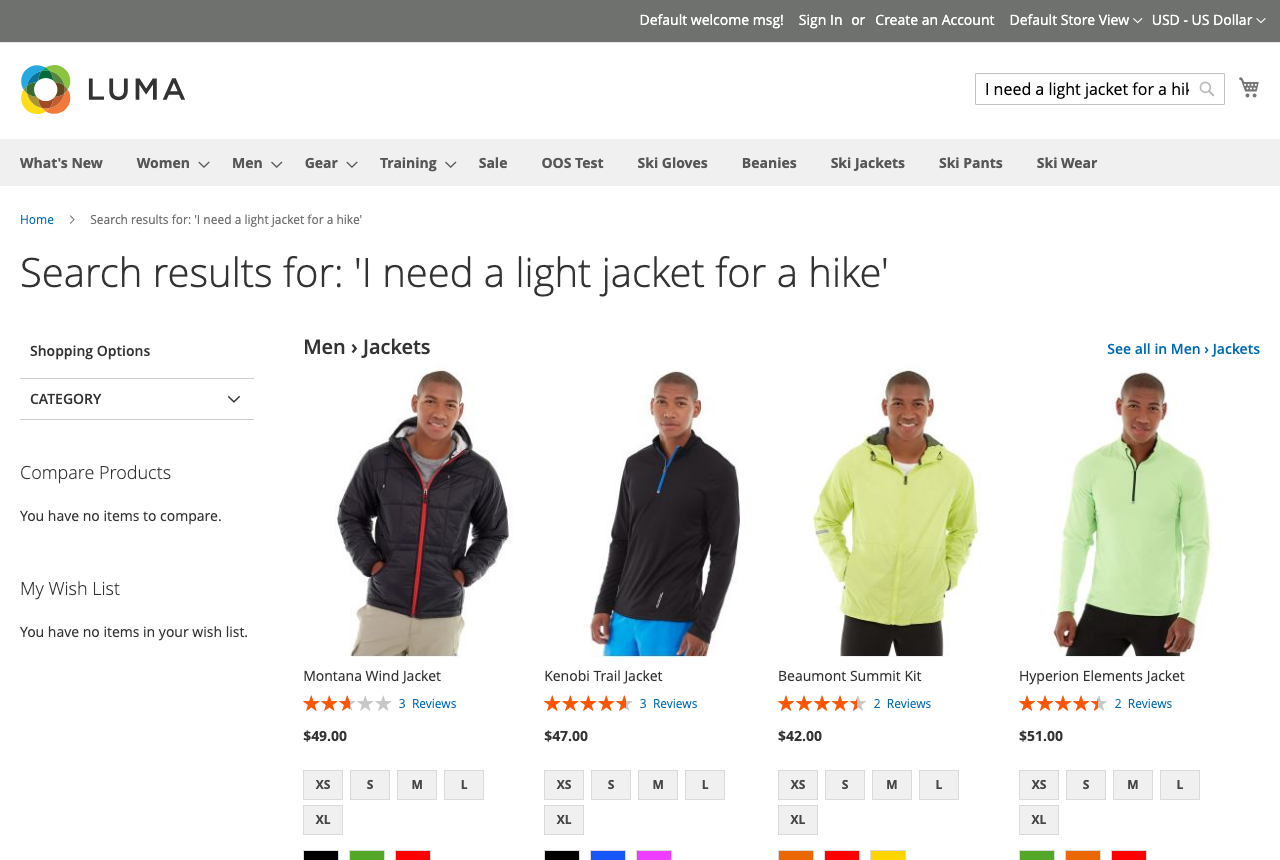
Magento semantic search finds products by what a shopper means, not only by the exact words they type. It runs normal keyword matching alongside vector matching, where product text is converted into numbers that capture meaning, and then ranks the best candidates. A search for "light jacket for a hike" can find a packable shell whose title never contains the word "light".
Why does Magento's default search miss descriptive queries?
Magento 2 search matches the words a shopper types against the product attributes you've marked as searchable, using OpenSearch or Elasticsearch. That works well when shoppers know your product names. It works badly when they describe a job, a problem or a person: "gift for someone who runs in the rain", "something warm for camping", "shoes for standing all day".
Shoppers describe what they want in their own words, and catalogue text is written in yours. When the two don't overlap, the search returns nothing or a grid of loosely related products, and the shopper leaves. Baymard's 2026 search benchmark rated 56% of the 170+ sites and apps it scored as mediocre or worse for search usability, so the gap isn't unusual.
Adobe documents the native settings in its catalogue search guide. Tune those first: searchable attributes, synonyms and a current index fix a lot. Semantic search is for what's left over.
How does Magento semantic search work?
Semantic search in Magento works in two phases: it builds a meaning index of your catalogue ahead of time, then combines three kinds of matching when a shopper searches and checks the best candidates before showing them. The shopper still sees a normal results page with your theme, filters and sorting.
| Step | What happens |
|---|---|
| 1. Index | Product text (name, short description, description, categories and attributes such as brand, colour and material) is converted into embeddings and stored for the store view. |
| 2. Retrieve | Three searches run for each query: exact SKU and name matches, Magento's own keyword search, and a vector search by meaning. |
| 3. Judge | An AI model reviews up to 40 candidate products and marks which ones fit what the shopper asked for. |
| 4. Rank | Products the check approves come first, keyword-only matches follow, and exact SKU matches stay on top. |
If a provider is slow or unavailable, shoppers get ordinary keyword results instead of an error. A search that hasn't been seen before can take several seconds while candidates are judged. Repeat searches are answered from a cache.
What can't semantic search do?
Semantic search ranks the products you already have; it doesn't invent data you haven't entered. A product with an empty description and no useful attributes gives the index very little to work with, so thin catalogue text still limits results.
Three limits to plan around:
- No spelling correction. Searches such as "watr bottle" or "yoga pnts" are often matched by meaning, but nothing rewrites the query or shows a "did you mean" line.
- It needs a modern search engine. Moogento's Semantic Search requires OpenSearch or Elasticsearch 8 as the catalogue search engine, and Magento cron running.
- The first search of a phrase is slower. The relevance check adds time before the result is cached.
What does semantic search send to AI providers?
The shopper's query goes to the embedding provider, and for the relevance check a short list of candidate product names and text goes to the judgment provider. Product text is sent when the index is built. The relevance check doesn't receive SKUs, and no shopper browsing history goes to either provider.
You choose the providers and which text fields count as "meaning" for your products. If you'd rather not send a field, such as a long supplier description, leave it out of the list. Our Semantic Search user guide covers the connection settings step by step.
How do you test Magento semantic search before shoppers see it?
Run it in Preview mode first. Under Stores > Configuration > Moogento > Semantic Search, set Search mode to Preview. The index builds while shoppers keep seeing native results, and the Operations page (Moogento > Semantic Search > Operations) lets you compare keyword and hybrid results for any query.
Use real queries from Marketing > SEO & Search > Search Terms, plus these five:
- A descriptive need: "waterproof jacket for walking the dog".
- A full question: "what should I wear for a rainy hike?"
- A misspelling of a bestseller.
- An exact SKU, to confirm it still lands first.
- A search that should return nothing, so you can see how it fails.
Switch Search mode to On once the comparisons look right. The Search readiness panel on the same configuration page tells you whether shoppers are getting semantic or keyword results, and why.
Where Moogento helps
Semantic Search is our hybrid search module for Magento 2, working on Luma and Hyvä themes. Plans differ by catalogue size and monthly searches:
| Plan | Products in the index | Semantic searches a month | Adds |
|---|---|---|---|
| Seed | 5,000 | 10,000 | Semantic results page |
| Growth | 25,000 | 50,000 | Type-ahead dropdown |
| Pro | 100,000 | 200,000 | Pages and guides in search |
A Custom plan has no limits. Products beyond your allowance are still found by keyword search, and when the monthly allowance runs out shoppers get keyword results until the next month. If you're still choosing between approaches, our guide to choosing Magento extensions covers how to vet any module before you install it.
FAQ
Is semantic search the same as AI search?
Semantic search is the part that matches by meaning. In Moogento's module an AI model also reviews the top candidates for relevance, so the results use both techniques, with keyword matching as the safety net.
Does semantic search replace Magento's built-in search?
No. Magento's OpenSearch or Elasticsearch keeps running, and keyword results are one of the three inputs. If anything fails, shoppers get native keyword results.
Will it find products with misspelled searches?
Often, because matching by meaning tolerates small spelling errors. It doesn't correct the spelling or suggest the right word, so treat misspelling support as a bonus rather than a guarantee.
Does it work with a large catalogue?
Yes, within your plan's product allowance. Only products that are enabled and visible in search count. Anything beyond the allowance is still searchable by keyword, and a Custom plan covers larger catalogues.


