

Server-Side GA4 for Magento: When Is It Actually Worth It?

Server-side GA4 is worth it for a Magento store when a measurable slice of your conversions is going missing from client-side tracking - usually because of ad blockers, Safari's tracking limits, or a strict consent banner - and that gap is large enough to distort decisions you make on the data. For a low-volume store with clean tracking, it's usually overkill. The catch is that "server-side" means two different architectures, and only one of them is simple to run on Magento.
What does server-side GA4 actually mean?
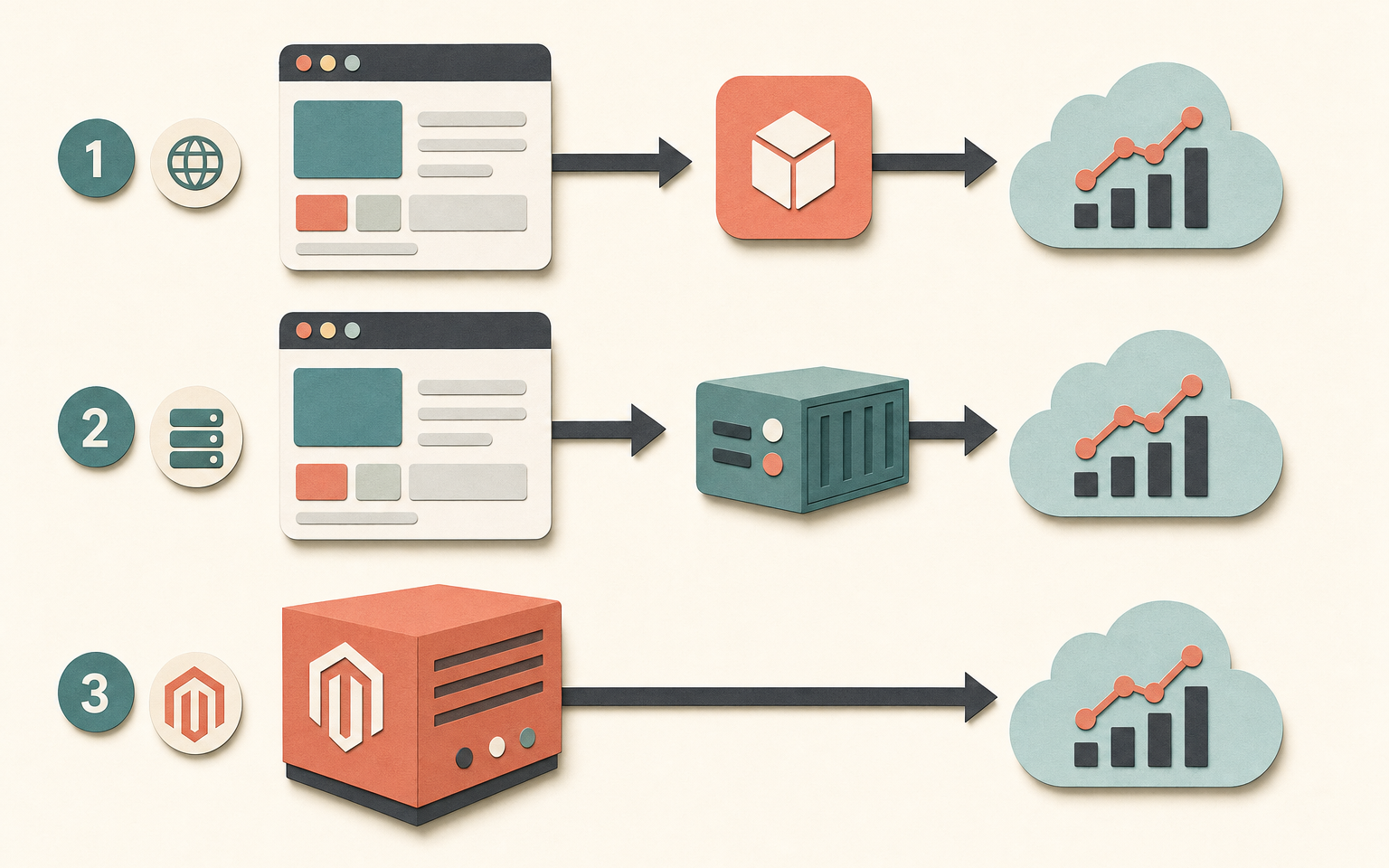
Two different setups both get called "server-side GA4", and they solve the same problem in very different ways.
The first is a server-side GTM container: you run a Google Tag Manager container on your own cloud server, the browser sends events to that server instead of straight to Google, and the server forwards them on. It's the setup most "server-side tracking" articles describe. It's powerful and flexible, and it means hosting and maintaining a tagging server, which is real infrastructure with a real monthly bill.
The second is the Measurement Protocol: your application sends events to GA4 directly, server to server, over an HTTP API. No tagging server to host - the event leaves your Magento server and lands at Google. For a Magento store this is the lighter, more practical path, because Magento already knows when an order was placed and what was in it. It doesn't need a browser to tell it.
What problem does server-side tracking fix?
Client-side tracking loses data before it ever reaches Google, and server-side recovers some of it. Three things eat client-side events. Ad blockers and privacy extensions stop the GA4 script loading at all for a share of visitors. Safari's Intelligent Tracking Prevention and similar browser rules shorten or delete the cookies GA4 relies on. And consent banners, where analytics is gated behind an opt-in, drop every visitor who declines.
The size of that loss varies a lot by audience - a technical or privacy-conscious customer base blocks more than a mainstream retail one - so the sensible move is to measure your own gap rather than assume a headline percentage. Compare GA4's purchase count against actual orders in Magento admin for the same period. If GA4 is materially short, that gap is what server-side can recover, because an order placed on the server can be reported from the server regardless of what the browser blocked.
When is server-side GA4 overkill?
Server-side is overkill when the data you'd recover wouldn't change a single decision. A store doing a handful of orders a day, with client-side tracking that already reconciles closely against Magento's order count, gains almost nothing - you'd add complexity to recover a rounding error. It's also premature if your client-side setup is broken: fix duplicate purchases, missing transaction IDs and inconsistent values first, because server-side tracking built on a broken foundation just moves the errors to a new place.
And server-side doesn't exempt you from consent law. Sending an event from your server instead of the browser doesn't make it lawful to track a customer who declined - if anything it raises the stakes, because the data leaves your infrastructure directly. Consent handling has to travel with the server-side setup, not get left behind by it.
Server-side GA4 decision matrix
Weigh it on four factors. If most of these point the same way, your answer is clear.
| Factor | Client-side is fine | Server-side earns its keep |
|---|---|---|
| Order volume | Low - a few orders a day | High enough that a few percent of lost data is real money |
| GA4 vs Magento order gap | Small, reconciles closely | Materially short - GA4 undercounts orders |
| Audience | Mainstream, low ad-block rate | Technical or privacy-conscious, high blocking |
| Ad spend decisions | Little paid media | Significant paid budget optimised on this data |
| Developer resource | None to maintain it | In-house or agency support available |

How this applies to Magento 2
Magento 2 has no native server-side GA4 support as of version 2.4.9, so both architectures are custom or extension territory. The Measurement Protocol route fits Magento particularly well, because the events that matter most - purchase and refund - happen server-side already. When an order is submitted, Magento fires an internal event; a Measurement Protocol integration listens for that and posts the purchase straight to GA4, so the sale is recorded whether or not the shopper's browser ran a single line of tracking script.
The trade-off is that some events are inherently browser-side. A page view or a scroll only exists in the browser, so a purely server-side setup can't see them - most stores run a hybrid: client-side for browsing behaviour, server-side for the money events where accuracy matters most. The thing to avoid is sending the same event from both the browser and the server, which double-counts it. A good integration lets you pick, per event, which path it takes.
Where Moogento helps
AnalyticsEasy Pro takes the Measurement Protocol route, not the server-container one. It sends GA4 events - purchase, refund, sign-up, view_item, add_to_cart, begin_checkout, add_shipping_info, add_payment_info and more - directly from your Magento server to Google over the Measurement Protocol, and lets you choose per event whether it goes server-side or stays client-side. That per-event switch is the part that matters: you keep browsing events in the browser and move the order events server-side, without double-counting, all from Stores > Configuration > Moogento > AnalyticsEasy. It's worth being clear that this is direct Measurement Protocol, not a hosted server-side GTM container - so there's no tagging server for you to run and pay for, which is the whole appeal for most Magento merchants.
It ships Consent Mode v2 alongside, so the consent question travels with the tracking rather than being an afterthought - storefront server-side sends can be gated on consent acceptance. Two neighbouring tools help you act on the recovered data: Pulse gives you a Magento-native dashboard of sales and campaign attribution so you're not rebuilding every view in GA4, and ProfitEasy layers per-order cost and margin on top - because once your revenue numbers are accurate, the next question is which of those sales actually made money.
Server-side GA4 readiness checklist
- Reconcile GA4's purchase count against Magento's order count for the last full month. Note the gap - that's your recoverable data.
- Confirm client-side tracking is already clean: no duplicate purchases, unique transaction IDs, consistent value basis. Fix this first.
- Estimate the money value of the gap. A few percent on high volume is worth it; a few percent on low volume usually isn't.
- Decide the architecture: Measurement Protocol (no server to host) versus a server-side GTM container (infrastructure to run and pay for).
- Plan which events go server-side (purchase, refund) and which stay client-side (page views, scrolls). Avoid sending any event from both.
- Carry consent through the server-side path - server-side is not a consent loophole.
- Confirm you have the developer or agency resource to maintain it, not just to switch it on.
FAQ
Is server-side tracking the same as a server-side GTM container?
Not necessarily. "Server-side" covers two architectures: a server-side GTM container, where you host a tagging server that receives and forwards events, and the Measurement Protocol, where your application sends events directly to GA4 over an API with no server to host. For Magento, the Measurement Protocol is usually the simpler, cheaper path because order events already happen on the server.
Does server-side GA4 get around ad blockers completely?
For the events sent server-side, largely yes - an event posted from your Magento server never touches the shopper's browser, so a browser-side blocker can't stop it. But events that only exist in the browser, like page views and scrolls, still rely on client-side tracking. Most stores run a hybrid rather than moving everything server-side.
Will server-side tracking help with consent and GDPR?
It doesn't remove the obligation. Sending an event from your server rather than the browser doesn't make it lawful to track someone who declined consent, and arguably raises the stakes since the data leaves your infrastructure directly. Any server-side setup needs consent handling built in, such as GA4's Consent Mode, not bolted on later.
How do I know if my store even needs it?
Compare GA4's purchase count with Magento's actual order count for the same period. If they reconcile closely, client-side tracking is working and server-side adds little. If GA4 is materially short and you spend real money on paid media optimised against that data, the recovered accuracy is worth the setup.
Measure the gap before you build anything. If GA4 already matches your Magento order count, server-side GA4 is a solution looking for a problem - and your effort is better spent elsewhere.


