

How Out-of-Stock Products Can Still Create Revenue in Magento 2

An out-of-stock product page in Magento 2 doesn't have to be a dead end. The visitor who lands on it still wants that product, so the page should do three jobs: capture their email for a back-in-stock alert, offer in-stock alternatives, and keep its URL live so the ranking and any inbound links survive the stockout. Get those right and a "sold out" page becomes a recovered sale later instead of a bounce now.
What should an out-of-stock product page do instead of just saying "sold out"?
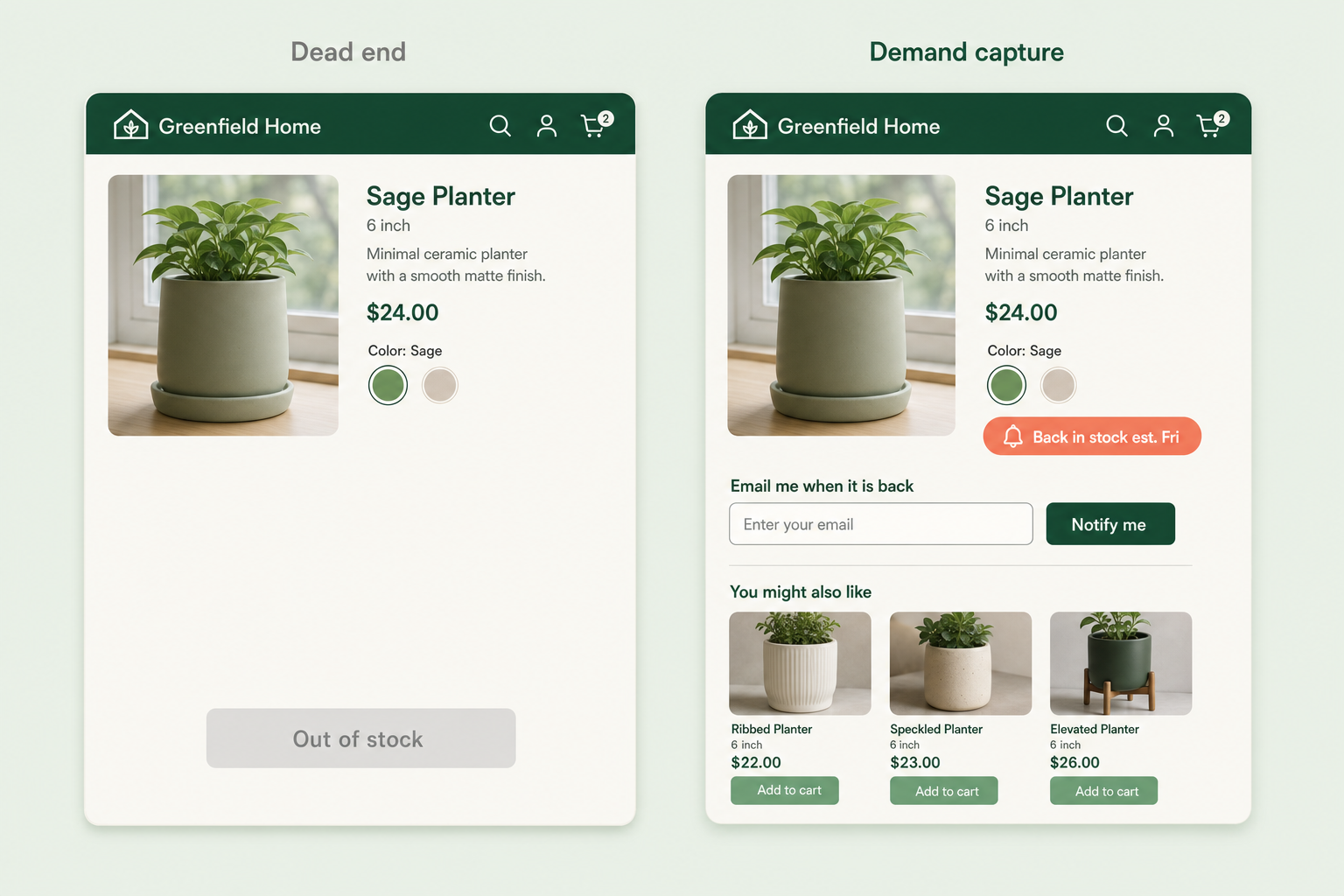
A good out-of-stock page answers the question the shopper actually has: "can I still get this, and if not, what's close?" That means a clear restock signal, a way to be told when it's back, and a visible route to something they can buy today. A bare "Out of stock" label with a greyed-out button answers none of that, so the shopper leaves and rarely comes back.
Here's the difference between a dead end and a demand-capture page, feature by feature:
| Element | Dead-end page | Demand-capture page |
|---|---|---|
| Availability | "Out of stock", greyed button | Same, plus a restock estimate if you have one |
| Alert | None | "Email me when it's back" with one field |
| Alternatives | None, or a random bestseller rail | In-stock products in the same category or spec |
| Wishlist | Hidden or removed | Save-for-later kept visible |
| Page status | Sometimes 404 or redirect | Stays live at a 200, keeps its ranking |
Why does deleting or hiding an out-of-stock page hurt SEO?
Because the URL is often the most valuable thing about the product, and a stockout is temporary while a deletion is permanent in Google's eyes. If a ranking product page starts returning a 404, or gets redirected to a category, the accumulated ranking signals and any inbound links point at nothing. When the product comes back weeks later, you're rebuilding from zero.
The safer pattern for a temporary stockout is to keep the page live at a normal 200 status, keep it indexable, and let it carry a clear "currently out of stock" state. Reserve removal or redirects for products that are genuinely discontinued. If a product is gone for good and has a natural successor, a 301 to that successor passes the ranking on; a 301 to a generic category usually doesn't.
What does the out-of-stock conversion path look like?
Think of an out-of-stock visitor as three possible outcomes, not one. Some will wait for the exact product, some will switch to an alternative, and some will save it and leave. A good page gives each of those a clear next step rather than forcing everyone down a single route.
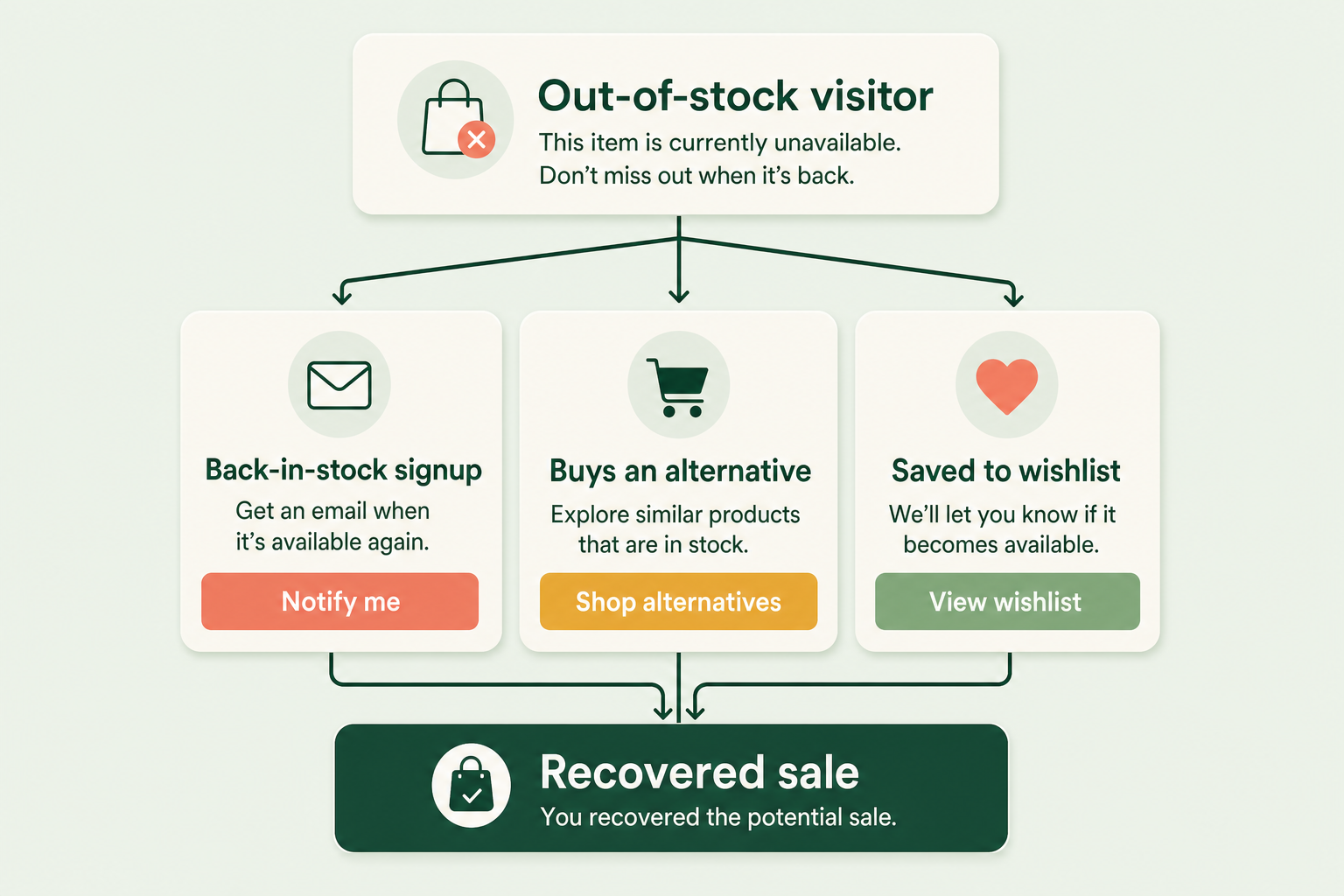
The back-in-stock alert is the highest-intent of the three. Someone who types their email to be told when a specific product returns has told you exactly what they want and when they'll buy. That list is worth more than a generic newsletter signup, because the trigger to email them is an event you control: the restock.
How this applies to Magento 2
Magento 2's default handling of out-of-stock products is thin, and one setting decides whether the page even exists. Under Stores > Configuration > Catalog > Inventory > Stock Options, the Display Out of Stock Products setting is off by default. With it off, a sold-out product's page returns a 404 and drops out of category listings, which is exactly the SEO problem above. Turn it on and the page stays live, but Magento gives you a static "Out of stock" label and nothing else - no alert signup, no restock date, no curated alternatives.
Magento does ship a core "product alert" feature (Stores > Configuration > Catalog > Catalog > Product Alerts) that can email customers when a product is back in stock, but it's a plain opt-in link with no demand reporting, and it leans on registered customers rather than capturing guests well. So the practical Magento out-of-stock plan is: keep the page live, add a proper back-in-stock capture that works for guests, surface in-stock alternatives, and demote sold-out items in category grids so they don't dominate the top of the page.
Where Moogento helps
NotifyMe turns the sold-out page into the capture point. The signup form only renders on products that are genuinely out of stock or unavailable - it stays hidden on anything a shopper can already buy, so it never clutters an in-stock page. A cron job checks the waitlist every minute and emails subscribers once their product is salable again, sending in batches of ten with a seven-day guard so nobody gets the same alert twice. Guests can sign up, not just logged-in customers, and there's a GDPR-consent option and an optional newsletter opt-in on the same form.
The part merchants underrate is the reporting. NotifyMe's admin dashboard counts total demand, unique products being watched, how many customers are waiting, how many back-in-stock emails have gone out, and how many of those turned into orders. That last number is the real test of whether an out-of-stock page is earning its keep - and it's demand data you can use to decide what to reorder, sorted by the products people are actually waiting for.
For the "switch to an alternative" exit, SmartCart surfaces complementary and related products with stock-aware filtering, so an out-of-stock item never sends someone toward another out-of-stock item. And Smartlistings handles the category-grid side: it can push out-of-stock products to the bottom of a category listing so the top of the page shows things people can buy, while the sold-out pages stay live and keep capturing demand in the background.
Out-of-stock audit checklist
- Pick a currently sold-out product and load its page. Does it return a 200, or a 404 that loses the ranking?
- Is there a way to be emailed when it's back, and does that work without an account?
- Are the alternatives shown actually in stock, or does the rail push toward more sold-out items?
- Is a restock date or estimate shown anywhere, even a rough one?
- On the category page, do out-of-stock products sit at the top, pushing buyable items below the fold?
- Do you have a report of which out-of-stock products people are waiting for? If reordering is a guess, that's the gap.
- For a discontinued product, is there a 301 to a real successor, not a generic category?
FAQ
Should I delete out-of-stock product pages in Magento?
Not for a temporary stockout. Keep the page live at a 200 status so it holds its ranking and inbound links, and let it show an "out of stock" state with a back-in-stock alert. Only remove or redirect pages for products that are permanently discontinued, and prefer a 301 to a genuine successor over a redirect to a category.
Does Magento 2 have a back-in-stock notification feature?
Magento has a basic core product-alert feature under Stores > Configuration > Catalog > Product Alerts that can email customers when an item returns. It works but it's minimal: a plain opt-in with no demand reporting and weak guest support. A module such as NotifyMe adds a guest-friendly signup that only appears on out-of-stock products and a dashboard showing which products people are waiting for.
Why does my out-of-stock product page return a 404?
Because the Display Out of Stock Products setting (Stores > Configuration > Catalog > Inventory > Stock Options) is off by default in Magento 2. Turn it on to keep sold-out product pages live and in category listings. Flush the cache and reindex after changing it.
What's the most valuable thing to capture on an out-of-stock page?
The back-in-stock email. Someone who asks to be told when a specific product returns is high-intent by definition, and the restock is a trigger you control. Those addresses convert better than a generic newsletter signup because the message is timely and exactly what they asked for.
Start with one sold-out product and walk its page as a customer would. If the only thing it offers is a greyed-out button, you're bouncing demand you already paid to acquire - and the fix is a capture form and a live URL, not a discount.


