

Magento Support Deflection - How Storefront Info Cuts Tickets

Support deflection means answering a customer's question on the storefront before it becomes a ticket. Most ecommerce support volume isn't complaints - it's people who couldn't find an answer and had to ask. Each common ticket type maps to a specific piece of product, stock or post-purchase information, and when that information is present and clear, the ticket is never raised. In Magento 2, deflection is a content and post-purchase job, not a helpdesk one.
What is support deflection, and what isn't it?
Support deflection is reducing inbound tickets by making the answer available before the customer needs to ask. It is not hiding your contact details or burying the "email us" link. Those tactics suppress tickets, which is different - the customer still has the unanswered question, they're just angrier by the time they reach you.
Real deflection removes the reason for the ticket. If a customer emails asking whether a coat is machine washable, the fix isn't a faster reply, it's putting the care instructions on the product page. Deflection done right makes the customer's experience better and your inbox lighter at the same time. Done wrong, it just moves the frustration around.
Which support tickets can storefront information actually deflect?
Most ecommerce tickets fall into eight categories, and nearly all of them trace back to information that was missing, unclear, or in the wrong place. Map each category to its storefront fix and "reduce support load" turns from a vague goal into a concrete list:
| Ticket type | What the customer couldn't find | Storefront fix |
|---|---|---|
| WISMO ("where is my order?") | Order status after purchase | Delivery date up front, a plain-language tracking page, proactive updates |
| Stock / availability | When an out-of-stock item returns | Back-in-stock signup, clear stock status, restock notifications |
| Sizing / specs | Whether it fits or is compatible | Complete specs, dimensions, compatibility notes, a sizing guide |
| Returns | How to send something back | Returns policy linked from the product and confirmation page |
| Payment | Which methods work, why one failed | Accepted methods shown at checkout, clear decline messaging |
| Order changes | How to change address or cancel | A stated edit window and a self-service or clear-contact path |
| Warranty / after-sales | What's covered and for how long | Warranty terms on the product page and in the confirmation email |
| Damaged / wrong item | What to do when it arrives wrong | A clear "something's wrong?" path and accurate picking so it happens less |
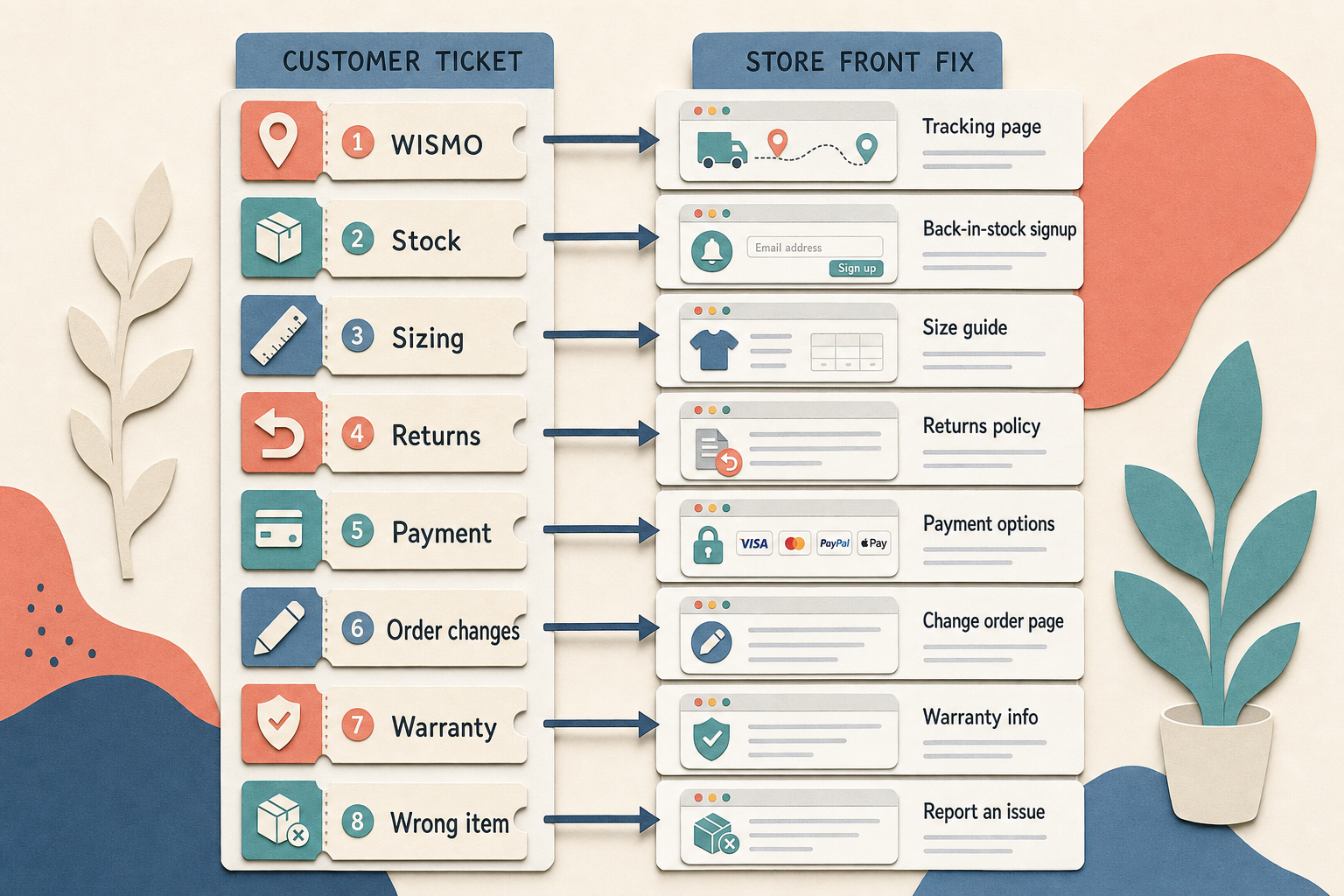
The single biggest category for most stores is WISMO, and it has its own set of fixes - we cover them in depth in the guide to reducing where-is-my-order tickets in Magento. The rest of this article is about the categories that live on the product page and the storefront.
How this applies to Magento 2
Magento 2 gives you the fields but not the discipline. You can hold rich product data in attributes - Adobe's attribute documentation covers the setup - but Magento won't tell you that half your catalogue is missing dimensions, or that your care instructions live in a PDF nobody opens. Out of the box there's no back-in-stock capture, no branded tracking page, and no prompt to fill the content gaps that generate tickets.
So the Magento-specific deflection plan is practical: audit which product attributes are actually populated and shown, add a way for customers to register interest in out-of-stock items, and give the post-purchase stretch a tracking destination that answers WISMO before it's asked. Each of these removes a ticket category rather than trimming reply time.
Where Moogento helps
The stock category is where NotifyMe earns its place. It adds a back-in-stock signup to out-of-stock products (simple, configurable, bundle and grouped types), takes the customer's email with optional GDPR and newsletter consent, and emails them automatically when the item returns via a per-minute cron check. That turns a stream of "when will you have this again?" tickets into a self-service signup, and it gives you a demand signal for restocking on top.
For sizing, spec and compatibility tickets, thin product pages are the root cause, and ProductContent helps fill them. It's an AI content tool that drafts product descriptions, specifications, meta fields and a product FAQ block from your catalogue data, within guardrails you set - brand tone, forbidden claims, allowed HTML, and SEO rules - with a review step before anything publishes (low-risk drafts can auto-apply). A product page that already answers "will this fit / does it work with X / how do I care for it" deflects the ticket that asks the same thing. And TrackEasy covers the WISMO category with a tokenised tracking page that translates carrier statuses into plain language, so the largest ticket type answers itself.
Support deflection checklist
- Tag a week of tickets against the eight categories above. The top two or three are your priority list.
- For your worst category, find the exact storefront element that would have answered it, and check whether it exists and is visible.
- Audit product attribute coverage: what percentage of your catalogue has complete dimensions, specs and compatibility data?
- Add a back-in-stock capture to out-of-stock products so "when's it back?" becomes a signup, not a ticket.
- Check your product FAQ: are the three questions support answers most often actually on the page?
- Time the gap between purchase and the first message that gives a delivery date. Silence there is WISMO waiting to happen.
- Read your own decline and error messages. A vague payment failure is a guaranteed ticket.
- Confirm the returns policy is reachable from the product page and the confirmation email, not just a footer link.
FAQ
What is ticket deflection in ecommerce?
Ticket deflection is answering a customer's question through self-service content - product pages, FAQs, stock alerts, tracking pages - so they never need to raise a support ticket. It's different from suppressing tickets by hiding contact options, which leaves the question unanswered and the customer more frustrated.
Which support tickets are easiest to deflect?
WISMO (where-is-my-order) and stock-availability tickets are usually the easiest wins because both have a single clear fix: a plain-language tracking page for WISMO, and a back-in-stock signup for availability. Sizing and spec tickets take more work because they depend on product content coverage across the catalogue.
Does Magento 2 have built-in support deflection tools?
Not really. Magento 2 provides product attributes and order data, but there's no native back-in-stock capture, branded tracking page, or product FAQ system. Deflection in Magento comes from populating product content properly and adding modules that turn common questions into self-service answers.
How do I know which tickets to deflect first?
Tag a representative week of support tickets against a fixed set of categories and count them. The largest one or two categories are where a storefront fix removes the most volume. Guessing which category dominates is where most deflection efforts pick the wrong target.
Start with the tally. A week of tagged tickets tells you which category is eating your support time, and every category on the list has a storefront fix that's a one-off piece of work rather than a permanent support cost.


