

How to Reduce "Where Is My Order?" Tickets in Magento 2

WISMO ("where is my order?") tickets are mostly a communication problem, not a delivery problem. The parcel is usually fine; the customer just can't see it. You reduce WISMO tickets in Magento 2 by setting a delivery date before purchase, giving customers a tracking page written in plain English instead of carrier jargon, and sending updates proactively so nobody has to come asking.
What is WISMO and why does it dominate support inboxes?
WISMO is the support industry's shorthand for "where is my order?" - every ticket, email, chat and call asking about a parcel's status. Shipping-tech vendors put WISMO at anywhere from 20% to 50% of ecommerce support volume depending on who's counting, and no single rigorous independent study pins down one figure. Treat the range as industry folklore with a true core: it's a lot, and it spikes at peak.
The cost side has better data: MaestroQA's call centre cost study puts retail support at roughly $2.70 to $5.60 per ticket, and self-service at a tenth of that. Narvar, the tracking platform, reports customers check tracking three to four times per order. Every one of those checks is a customer who wanted information and went looking. The only question is whether they find it on your page or in your inbox.
What actually causes WISMO tickets?
Six causes cover nearly every ticket. Each has a specific fix, which is why "improve communication" as a strategy goes nowhere but a cause-by-cause plan works:
| Cause | What the customer experienced | The fix |
|---|---|---|
| No expectation set | Bought with "fast shipping" promised, no date anywhere | Show a delivered-by date at checkout and on the confirmation page |
| No tracking number | Order confirmed days ago, silence since | Send the dispatch email the moment the label exists, with a link |
| Tracking not updating | Number exists but shows nothing for 48 hours | Explain scan gaps on the tracking page ("carriers scan at hubs, gaps are normal") |
| Jargon status | "Shipment exception" or "inward office of exchange" | Translate carrier codes into plain sentences |
| Partial shipment | One box arrived, order says "shipped", rest unknown | Show per-shipment status, tell customers the order is split |
| Delivered, not received | Status says delivered, doorstep says otherwise | Delivery photo where the carrier offers it, and a clear "not there?" path |
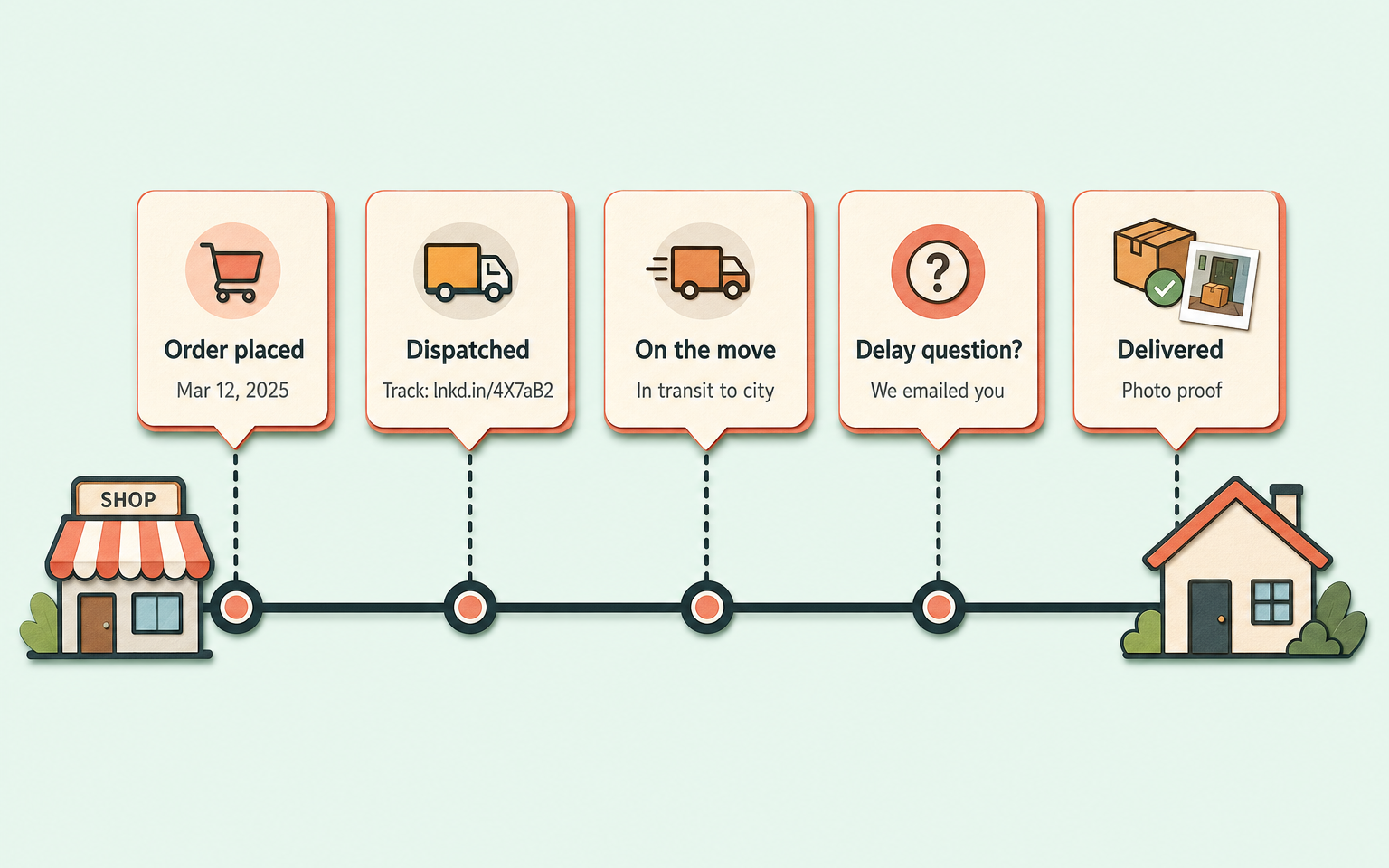
That last row is the one with hard numbers behind it: Security.org's 2025 package theft report found around 37 million packages stolen in the US in a year, with one in four Americans having experienced it - and 64% of victims contact the retailer. "Delivered but not received" tickets are real, rising, and land on your desk rather than the carrier's.
Why isn't a carrier tracking link enough?
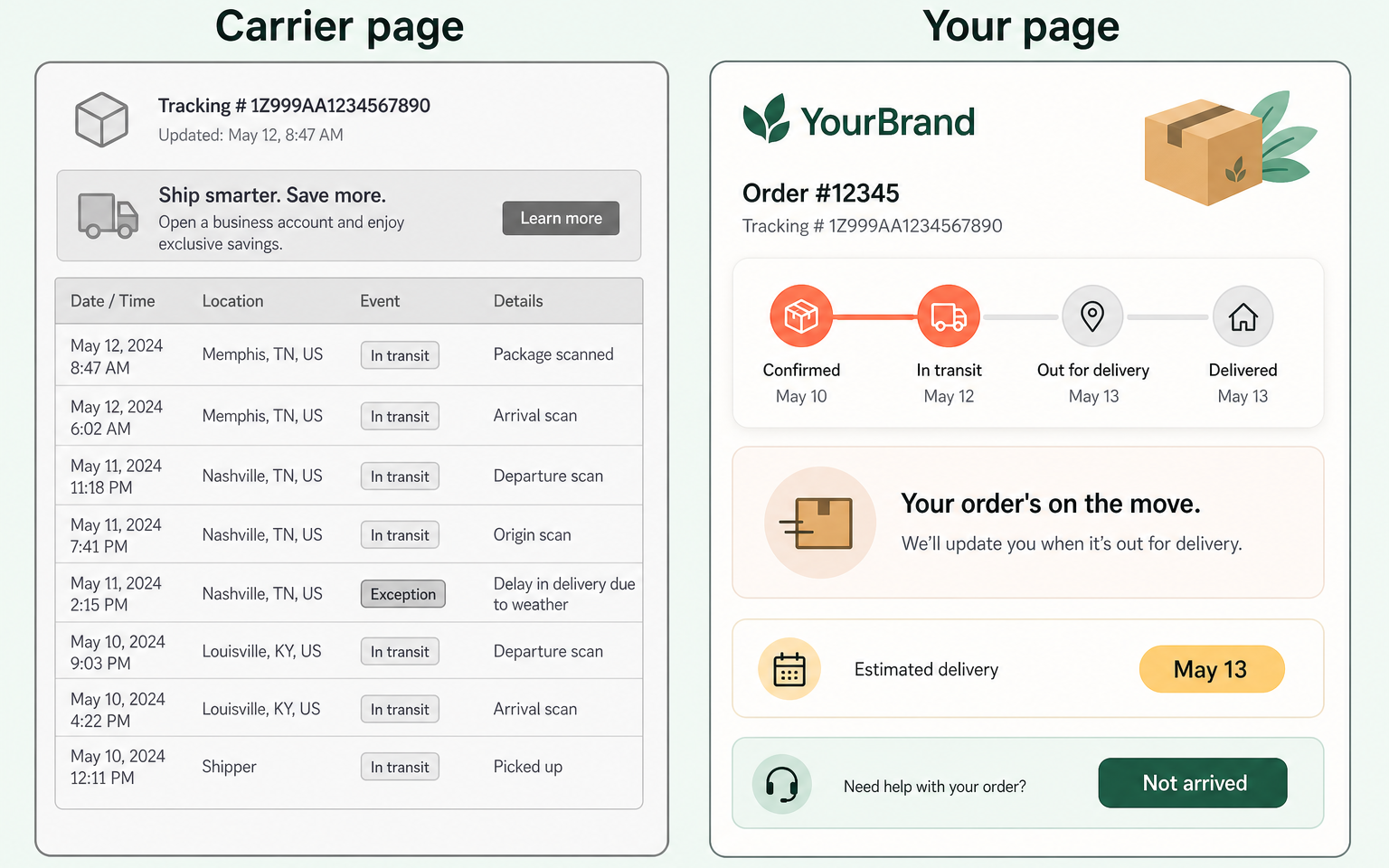
Because carrier pages are written for logistics people. UPS's own glossary has to explain that "in transit" doesn't mean the parcel is moving - it may sit at a hub for days, scanned once. "Exception" means anything from weather to a wrong address. International post can show "arrival at inward office of exchange" and then go silent through customs for a fortnight. The one phrase customers reliably understand is "out for delivery". Everything else generates tickets.
The brands famous for low delivery anxiety all did the same thing: they translated. Domino's pizza tracker (running since 2008, billions of orders tracked) shows five plain stages and is credited with cutting inbound status calls. Amazon shows a map and "5 stops away", plus a photo of the parcel on your doorstep. Apple pushes milestones to your phone via Wallet so you don't visit a page at all. John Lewis texts a two-hour window the night before, reconfirms in the morning, and has the driver call 30 minutes out. None of that is carrier data customers can't get; it's carrier data rewritten so they don't have to interpret it.
How this applies to Magento 2
Magento 2's default post-purchase communication is thin. When you create a shipment in the admin, you pick a carrier, enter the tracking number, and click Send Tracking Information; the customer gets an email with the number and a carrier link (Adobe's shipment docs cover the flow). There's no branded tracking page, no delivery estimate on the success page, no proactive updates between dispatch and doorstep, and no plain-language translation of carrier statuses - as of Magento 2.4.9, that's all custom or extension territory.
So the Magento-specific WISMO plan looks like this: put a delivered-by date on the checkout success page; make the dispatch email automatic and immediate; give the tracking number a branded destination that translates statuses; and cover the quiet stretch with one proactive update when the delivery date changes.
Where Moogento helps
TrackEasy builds the branded destination. Every order gets a tokenised tracking page on your own domain (no login needed, the link carries a secure token) showing a plain four-step timeline: Ordered, Packed, Shipped, Delivered. Carrier statuses are normalised into nine customer-readable states - Delivered, Out for Delivery, Available for Pickup, In Transit, Info Received, Delivery Failure, Exception, Expired, Not Found - so "arrival at inward office of exchange" never reaches your customer's eyes. It refreshes tracking on a 10-minute cron cycle with direct integrations for UPS, FedEx, DHL, USPS, Royal Mail, Evri, Australia Post and Toll, plus a universal 17TRACK fallback for everyone else, and sends a delivery-update email when the expected date changes.
Its sibling ThanksEasy puts "shipped by" and "delivered by" dates on the order confirmation page itself (you configure the day offsets), which kills the "no expectation set" ticket class at the source. Back on TrackEasy, two limits to note: its page is a timeline, not a live map, and there's no SMS channel - it's email plus the page. HelloCustomer handles the wider post-purchase email cadence - review requests grouped so a customer with three recent orders gets one email, not three, plus winback and welcome sequences - so your tracking messages aren't fighting your marketing messages for inbox attention.
WISMO audit checklist
- Tag a week of support tickets against the six causes above. Percentages beat hunches.
- Place a test order. Time the gap between payment and the first message that mentions a date.
- Read your dispatch email. Does it show a delivery estimate, or just a tracking number?
- Click the tracking link on a phone. Count the words a customer must interpret ("exception", "in transit", "manifest").
- Split an order into two shipments. Does the customer-facing status explain the split?
- Check the quiet stretch: between dispatch and delivery, do customers hear from you at all?
- Ask support: what do they send customers who ask "where's my order"? If it's a hand-written status translation, that's your gap.
- Look for a "delivered but not received" path: photo, neighbour note, claim process. If support improvises each time, write it down.
FAQ
What percentage of support tickets are WISMO?
Industry estimates from shipping and helpdesk vendors range from roughly 20% to 50% of ecommerce support volume, rising at peak season. No independent study pins a single figure, so measure your own: tag a week of tickets and count. Most stores that do this find WISMO is their single largest category.
Do proactive shipping notifications actually reduce tickets?
Vendor case studies consistently report WISMO reductions around a third to a half after adding proactive updates and a self-service tracking page. The numbers are vendor-reported, but the mechanism is plain: a customer who already knows the status has nothing to ask.
How do I add a branded order tracking page to Magento 2?
Magento 2 has no native tracking page - the default shipment email links to the carrier's site. You either build a custom controller that pulls carrier APIs and renders your own page, or use a module such as TrackEasy, which generates a tokenised per-order tracking page with normalised statuses and scheduled refreshes.
What should a shipping status actually say?
One plain sentence per state, written for the customer: "Your order's on the move" instead of "in transit"; "There's a short delay - here's what's happening" instead of "exception"; "Customs is processing your parcel, typically 3 to 5 days" instead of "inward office of exchange". If a status needs a glossary, it needs rewriting.
Start with the ticket tally. A week of tagged tickets tells you which of the six causes is eating your support time, and the fix for each one is a bounded, one-off piece of work rather than a support hire.


