

The Magento Operations Stack: Which Extension Categories Actually Save Time

The Magento extension categories that cut the most manual work, roughly in the order most stores should adopt them, are: bulk order actions (invoice and ship many orders at once), picking and packing documents (batch-printed pick lists and packing slips), barcode scanning (verify picks against the order), stock automation (scheduled imports and reorder calculations), order exports (scheduled CSV or API feeds), and an alert-and-dashboard layer (know something's wrong without checking). Which you add first depends on where your time actually goes, not on which is newest.
Why does the Magento admin create so much manual work?
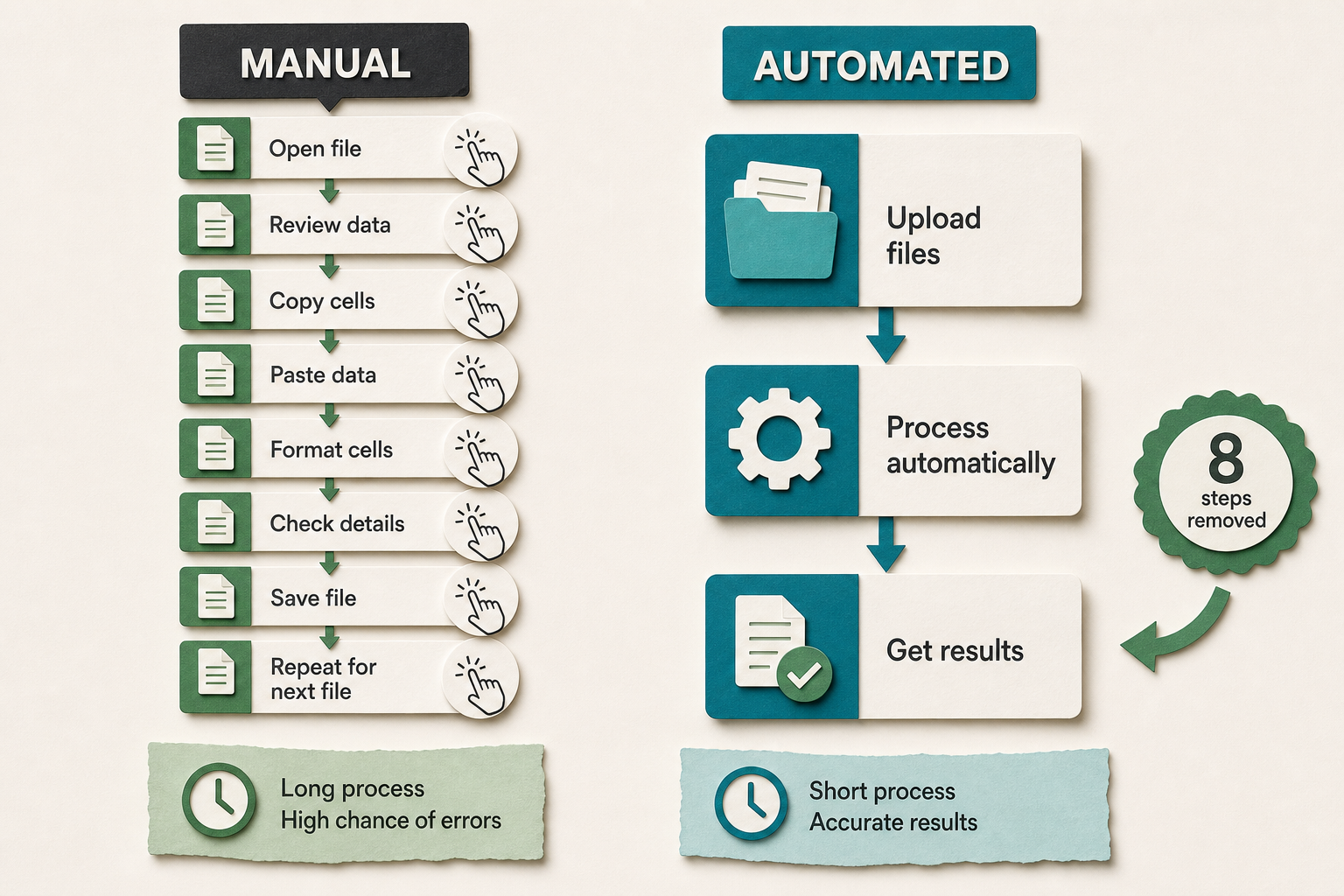
Because it's built to handle orders one at a time. The default order grid processes a single order per visit - open it, invoice it, ship it, enter the tracking number, repeat - and that's fine at ten orders a day and brutal at two hundred. Picking is a printed order at a time. Stock is edited product by product. Nothing about the base admin is broken; it's just built for a scale most growing stores pass through in a year, and the manual work scales linearly with orders while your day doesn't.
Operations extensions exist to break that one-at-a-time pattern. The good ones don't add features so much as remove clicks - turning fifty single-order actions into one bulk action, fifty printed pages into one batched document, fifty stock edits into one scheduled import. The question isn't whether to automate; it's which manual task is eating the most hours right now, because that's the one worth removing first.
What are the main Magento operations extension categories?
Six categories cover almost all the manual work in a typical store. Here's what each removes, and the rough time it gives back - the numbers are illustrative of the pattern, not a benchmark, since they scale with your order volume.
| Category | Manual task it removes | Typical time pattern |
|---|---|---|
| Bulk order actions | Invoicing and shipping orders one at a time from the grid | Minutes per order become seconds per batch |
| Picking & packing documents | Printing and reading one order per page in the warehouse | One batched pick list instead of fifty printouts |
| Barcode scanning | Eyeballing SKUs to confirm the right item was picked | Fewer mispicks, so fewer returns and reships |
| Stock automation | Manual stock edits and reorder maths | Scheduled imports and calculated reorder quantities |
| Order exports | Copy-pasting orders into a spreadsheet for a supplier or accountant | A scheduled feed instead of a daily export by hand |
| Alerts & dashboards | Checking the admin to see if anything's wrong | A notification instead of a manual look |
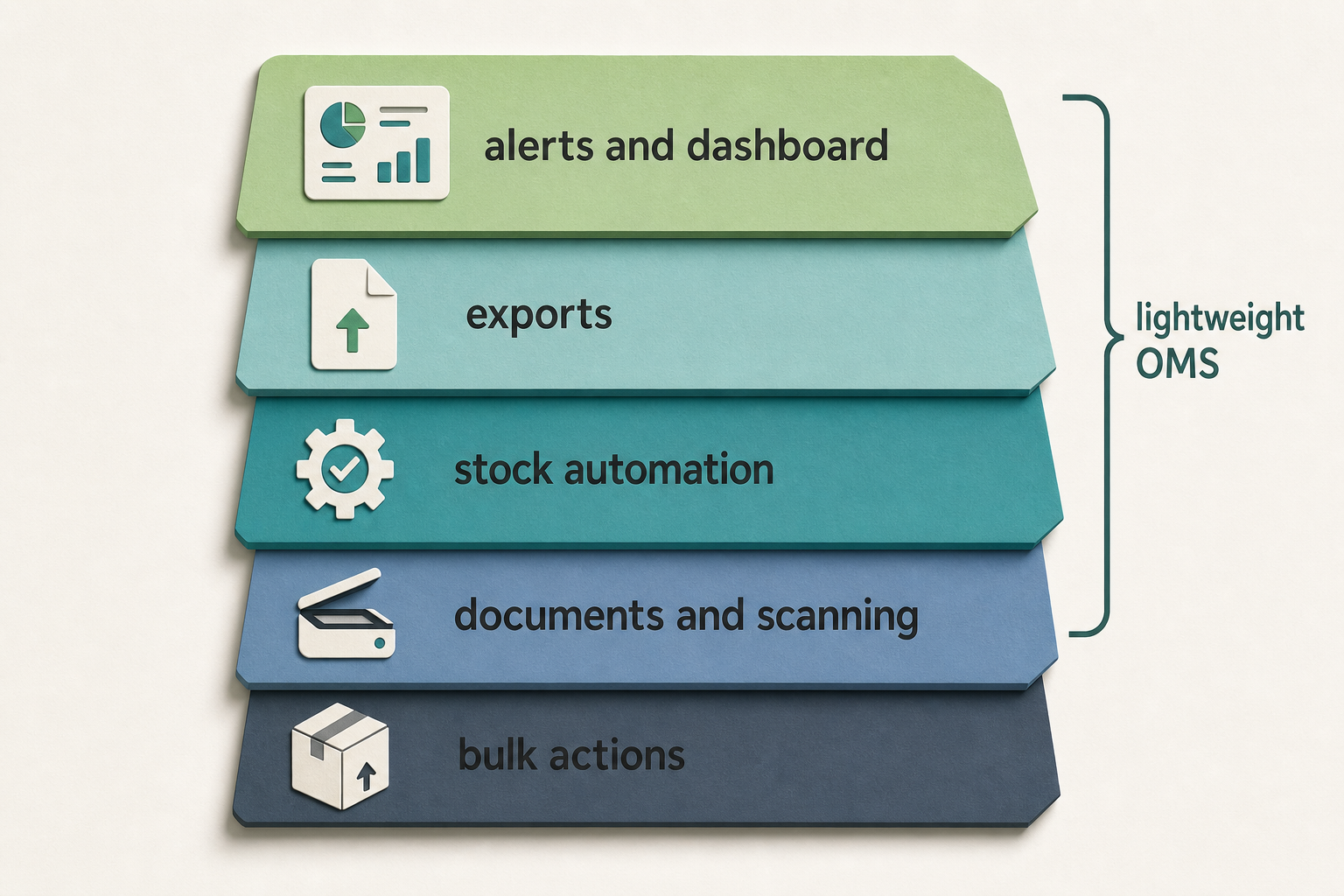
What's the maturity model from manual admin to a lightweight OMS?
Most stores move through five levels. Knowing which one you're at tells you what to add next better than any feature comparison.
- Level 0 - Manual admin. Every order processed by hand in the default grid. Fine under roughly a dozen orders a day.
- Level 1 - Bulk actions. Invoice, ship, and status-change many orders at once. The single biggest time saving for most stores, and the first thing to add.
- Level 2 - Documents and scanning. Batched pick lists and packing slips, plus barcode verification so the warehouse stops relying on reading SKUs by eye.
- Level 3 - Stock and export automation. Scheduled stock imports, calculated reorder quantities, and automatic order feeds to suppliers, accountants, or a shipping tool.
- Level 4 - Alerts and dashboards. A layer that tells you when something needs attention - a backlog building, stock running out, revenue dropping - so you stop checking manually.
A "lightweight OMS" is just Levels 1 through 4 working together inside Magento, rather than a separate order-management system bolted on the side. For a lot of stores that's the right ceiling: you get most of the time saving without the cost and integration work of a standalone platform. You only genuinely need a separate OMS when you outgrow what the admin can hold - multiple warehouses with complex allocation, marketplace order aggregation, or a fulfilment network Magento wasn't built to model.
What should you automate first?
Automate the task that scores highest on three things at once: how often you do it, how long each instance takes, and how error-prone it is. Frequency times duration times error rate. Order processing usually wins - it's daily, it's minutes per order, and manual entry gets tracking numbers wrong - which is why bulk order actions are the near-universal first move. Picking comes next if you ship physical goods, because a mispick costs a return, a reship, and a support ticket, not just the picker's time.
The trap is automating the interesting task instead of the expensive one. A fancy dashboard feels like progress, but if you're still shipping orders one at a time, the dashboard is watching a problem you haven't fixed. Fix the linear-with-volume manual work first - order processing, picking, stock - then add the alert layer that watches it. The Adobe Commerce order-processing docs are worth skimming to see exactly which steps the base admin makes you repeat per order; those repeated steps are your automation shortlist.
How this applies to Magento 2
Magento 2 gives you the hooks but not the automation. The order grid supports mass actions in principle, but the built-in ones are limited; there's no native batch pick list, no barcode-scanning pick workflow, no scheduled stock import, and no proactive alerting beyond email. As of Magento 2.4.9, closing those gaps means extensions - and the categories above map cleanly onto what's missing. The value of thinking in categories rather than products is that you can audit your own store's manual work first, then shop for the category that removes the most of it, instead of buying features you won't use.
Where Moogento helps
Moogento's operations modules line up with the maturity model, which makes them a concrete example of each category rather than a single do-everything tool. At Level 1, ShipEasy adds bulk actions to the order grid - invoice, ship, invoice-and-ship, change status, and tag orders in one action across a batch - plus CSV import of tracking numbers with carrier auto-detection, so you're not typing tracking data order by order. Batch sizes scale with the plan, from 50 orders per action up to 500.
At Level 2, PickPack generates the warehouse documents - packing sheets, pick lists, invoices, and address labels, including thermal/Zebra formats - from admin-editable templates, so a day's orders print as one batched pick list instead of fifty pages. Pick-n-Scan is the companion piece for barcode verification, confirming the picked item's barcode matches the order line before it's packed - turning "we think we picked right" into "we scanned and know we did". At Level 3, StockEasy handles the stock side: scheduled imports from CSV, API, or FTP, reorder-quantity calculators driven by sales velocity, and scheduled low-stock email reports, so restocking stops being a manual spreadsheet exercise.
At Level 4, the watching layer is two modules. Pulse replaces the static admin dashboard with a live one and adds alert detectors for a fulfilment backlog aging past a cutoff, a revenue drop, or a refund spike - the "tell me when I need to look" layer. And AuditEasy covers the accountability side, logging every admin action with who did what and from where, which matters more the more people touch the admin. One scope note: this stack is a lightweight in-admin OMS, not a replacement for a multi-warehouse enterprise order system - if you need complex cross-location allocation or marketplace aggregation, that's a different tier of tool.
Operations automation checklist
- Time yourself processing ten orders manually. Multiply by your daily volume. That number is your Level 1 opportunity.
- Count mispicks and their downstream cost (returns, reships, tickets) over a month before deciding scanning is worth it.
- Check whether your stock updates are manual edits or a scheduled import. Manual editing at scale is a Level 3 gap.
- List every place you export orders by hand - supplier, accountant, shipping tool. Each is a candidate for a scheduled feed.
- Ask what you currently check manually every morning. Anything on that list is a candidate for an alert instead.
- Rank your findings by frequency times duration times error rate, and automate the top one first.
- Stop before a full OMS unless multi-warehouse allocation or marketplace aggregation is genuinely the constraint.
FAQ
What should a Magento store automate first?
Order processing, in almost every case. It's daily, it takes minutes per order, and manual entry produces wrong tracking numbers - so bulk order actions (invoice and ship many orders at once) give back the most time for the least setup. Picking and packing documents come second if you ship physical goods, because a mispick costs a return and a reship on top of the picker's time.
Do I need a full order management system for Magento?
Usually not. A stack of operations extensions - bulk actions, batch documents, scanning, stock automation, and alerts - working inside Magento gives most stores a lightweight OMS without the cost and integration of a standalone platform. You only need a separate system when you outgrow what the admin can model: multiple warehouses with complex allocation, or aggregating orders across marketplaces.
Does barcode scanning actually reduce work in a Magento warehouse?
It reduces rework rather than picking time. Scanning each item's barcode against the order line catches the wrong-item pick before it ships, which removes the return, the reship, and the support ticket that a mispick generates. On a store with high SKU similarity or high volume, that downstream saving outweighs the couple of seconds the scan adds per line.
How do I know which operations extension is worth buying?
Audit your own manual work first. Time how long each repetitive task takes, multiply by how often you do it, weight it by how often it goes wrong, and buy the category that removes the highest-scoring task. Shopping by feature list leads to paying for automation you won't use; shopping by your own measured time leads to the one that pays for itself.
Measure before you buy. An hour spent timing your actual manual tasks tells you which category to add and in what order, and it turns "this extension looks useful" into "this removes the two hours a day we currently spend clicking through the order grid".


