

Batch Picking vs Single-Order Picking in Magento: Which Is Better?

Single-order picking wins on simplicity and error safety; batch picking wins on speed once volume climbs. Pick one order at a time when volume is low, items are large, or accuracy matters most. Switch to batch picking - pulling the same SKU for several orders in one pass - when the walking, not the picking, is your bottleneck. For most stores: start single, move to batch when order volume makes the walking hurt.
What is single-order picking, and when does it win?
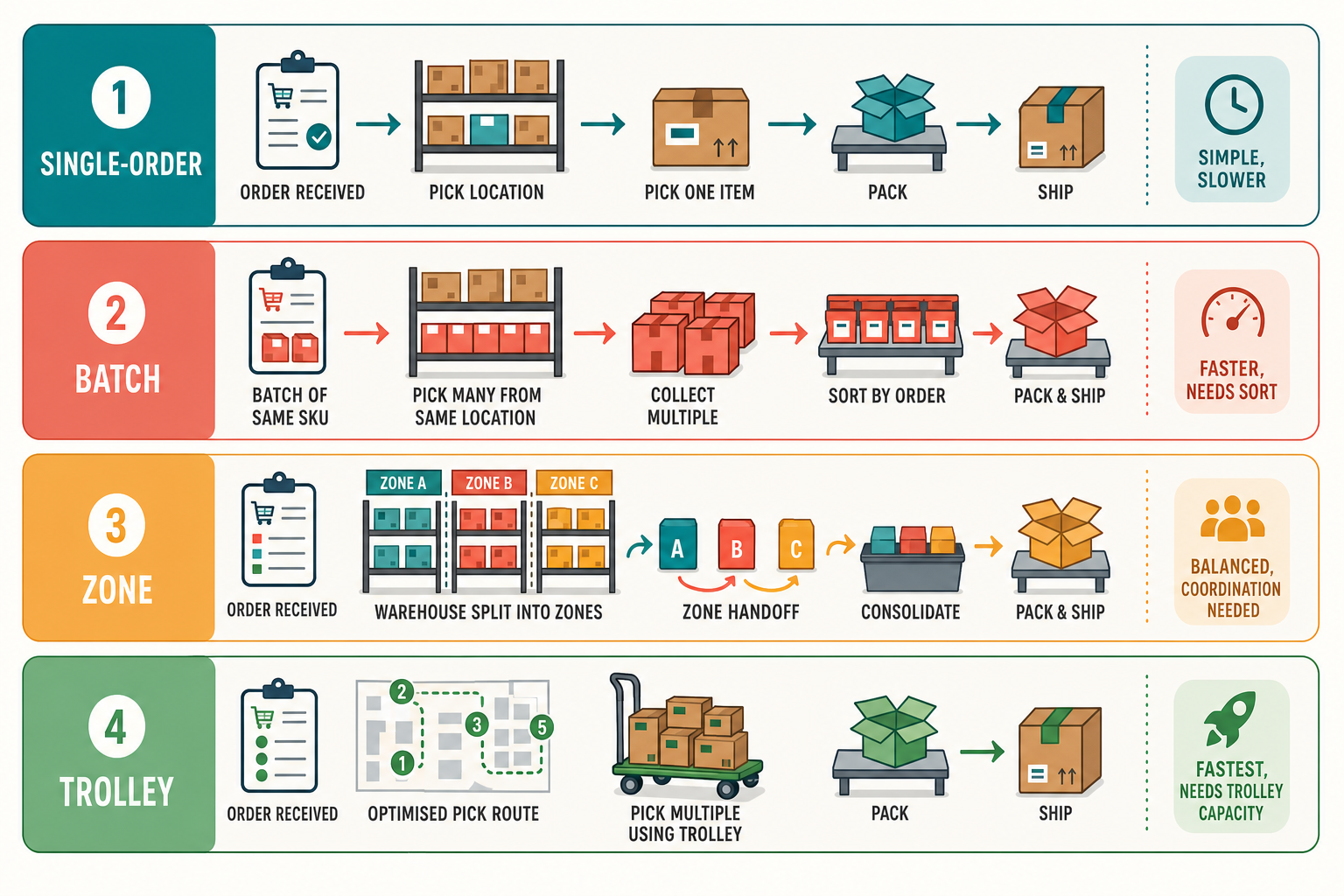
Single-order picking means one picker takes one order and walks the warehouse collecting every line on it before moving to the next order. It's the default because it's the simplest to run and the hardest to get wrong: the picked items and the order are together the whole time, so there's no sorting step where things get mixed up.
It wins when volume is low, when orders are physically large or fragile, when accuracy carries a high penalty (expensive or hazardous goods), or when your team is new and you'd rather trade speed for fewer mistakes. Its weakness is walking. If ten orders each need an item from the same far corner, a single-order picker walks to that corner ten times. At low volume that waste is invisible. At higher volume it's most of the day.
What is batch picking, and when does it win?
Batch picking means a picker collects items for several orders in one trip, then sorts them into individual orders at a packing station. Instead of walking per order, you walk per SKU: go to the corner once, pull all ten units, distribute them afterwards. The trade is obvious - fewer trips, but a sorting step that single-order picking doesn't have, and that sorting step is where batch picking's errors live.
Batch picking wins when volume is high enough that walking dominates, when orders are small (one or two lines each), and when you have a reliable way to sort at the end - ideally a scan-to-confirm step so a unit can't land in the wrong order unnoticed. Without that verification, batching trades a walking problem for a sorting problem, and the sorting problem ships wrong items to customers.
What about wave, zone, and trolley picking?
These are variations that sit between the two poles. Zone picking splits the warehouse into areas, each with its own picker; an order is completed as it passes between zones, which suits large catalogues but needs coordination. Wave picking releases groups of orders on a schedule (say, everything before the 2pm carrier cutoff) so picking aligns with dispatch. Trolley or tote picking is batch picking made practical: the picker pushes a trolley holding several order boxes and drops items into the right box as they go, so the sort happens during the walk rather than after it.
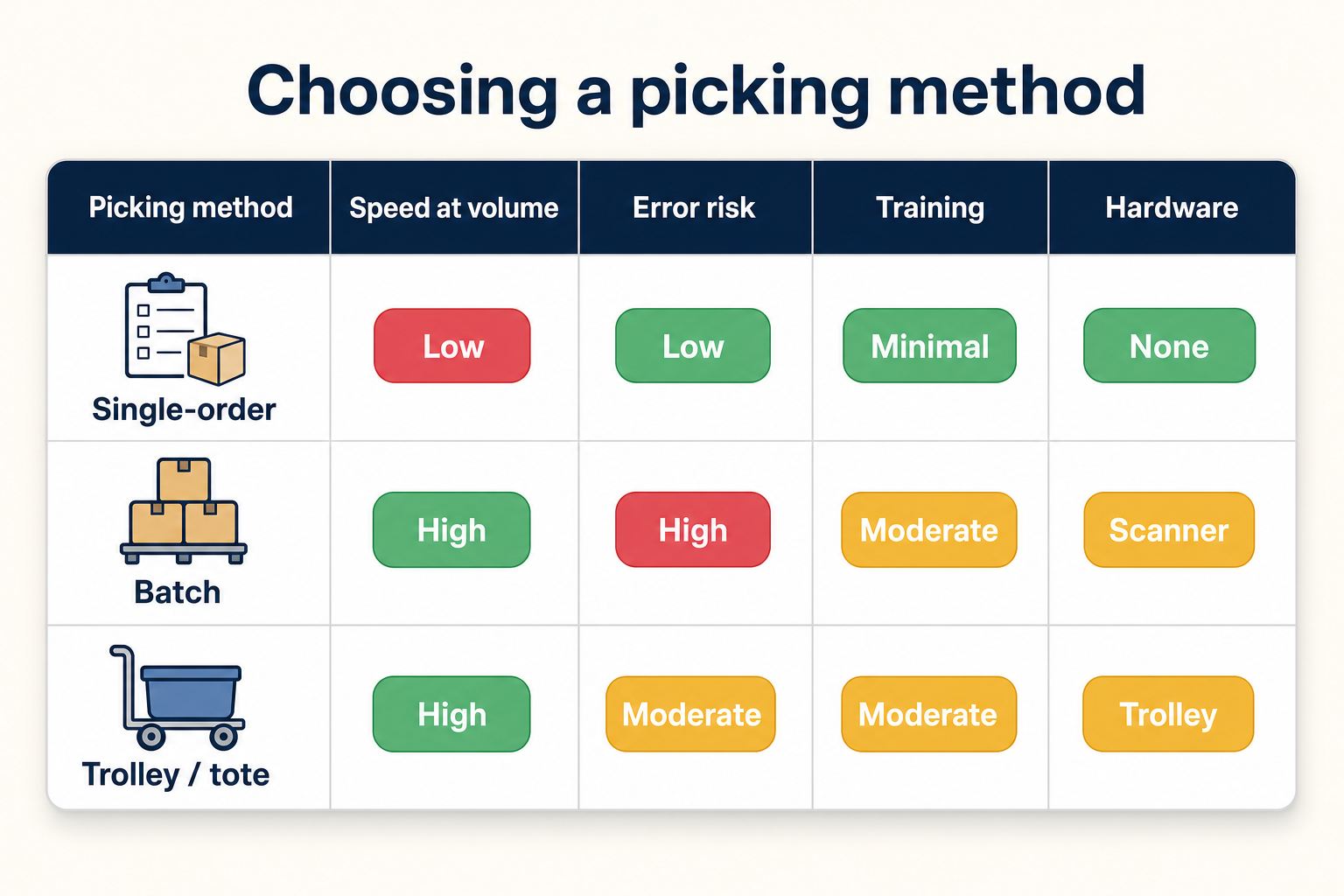
Trolley picking is usually the most useful step up from single-order for a growing Magento store, because it captures most of batching's speed gain while keeping each order in its own physical box - which limits how badly a mis-sort can go wrong. The scoring below compares the three you're most likely to actually choose between.
| Method | Speed at volume | Error risk | Training | Hardware needed |
|---|---|---|---|---|
| Single-order | Low | Low | Minimal | None (paper is enough) |
| Batch (sort after) | High | High without scanning | Moderate | Scanner strongly advised |
| Trolley / tote | High | Moderate | Moderate | Trolley, scanner advised |
How this applies to Magento 2
Magento 2 has no picking workflow of its own. The admin lets you select multiple orders in the Sales > Orders grid and run mass actions, and you can print packing slips in bulk, but there's no batch pick document that consolidates SKUs across orders, no trolley or tote model, and no scan-to-confirm step. As of Magento 2.4.9, choosing and running a picking method is entirely add-on territory - the platform gives you orders and shipments, not a warehouse process.
That means the decision isn't "which Magento setting" but "which document and workflow you bolt on". The starting point is a solid single-order pick document (covered in Magento picking lists); batching is the next layer, and it only pays off if you add the verification that stops sort errors.
Where Moogento helps
PickPack supports both ends directly. Its Separated document prints one order per section in a single PDF - single-order picking, batched onto one print run. Its Combined document does true batch picking: it merges matching SKUs across every selected order and sums the quantities, so you get one line reading "pull 14 of SKU X" instead of the same SKU scattered across fourteen order pages. You select the orders in the Magento grid and print either shape from the same selection.
For trolley picking, TrolleyBox (which builds on PickPack) processes multiple orders across a trolley: you set how many order boxes ride per trolley, and it sorts the items to be picked across all of those orders by a shelf or location attribute so the picker walks an optimised route rather than doubling back. Pick-n-Scan adds the verification layer - scanning the item against the line and refusing a quantity that exceeds what the order needs - which is exactly the safety net that makes batching viable rather than risky. Note that trolley and scan features layer on top of PickPack, so the sensible path is single-order first, then add batching once volume justifies it. Location-based routing also depends on real bin data on your products, which is where StockEasy helps keep the underlying attribute maintained.
Which method should you choose? A guide by volume
- Around 20 orders a day: single-order picking on a good paper document. Batching's overhead isn't worth it yet; your bottleneck is elsewhere.
- Around 100 orders a day: the walking is now real. Move to batch or trolley picking for your high-volume SKUs, and add scan verification before you trust the sort step.
- Around 500 orders a day: batch or trolley picking with scan-to-confirm is the baseline, often combined with zones for a large catalogue. At this scale, unverified batching will ship wrong items faster than you can apologise for them.
- Mixed order shapes: many stores run both - single-order for large or multi-line orders, batch for the flood of one-item orders. The method is per order type, not per store.
FAQ
Is batch picking always faster than single-order picking?
No. Batch picking is faster only when walking dominates your pick time - high volume, small orders, repeated trips to the same locations. At low volume, the sorting step batching adds can make it slower overall than simply walking each order once. Speed depends on your order shape, not on the method alone.
Does batch picking cause more errors?
It can, because it adds a sort step where an item can land in the wrong order. That risk is why batch picking pairs with barcode scan verification: scan each item against the order line and the sort error gets caught before the parcel ships. Batch picking without verification trades a speed problem for an accuracy problem.
Can Magento 2 do batch picking natively?
No. Magento 2 supports bulk mass actions and bulk packing-slip printing in the order grid, but it has no consolidated batch pick document, no trolley model, and no scan-to-confirm step. Batch picking on Magento requires an extension that generates a combined pick list and, ideally, a scanning workflow to verify the sort.
What is trolley picking and is it different from batch picking?
Trolley (or tote) picking is a practical form of batch picking where the picker pushes a trolley holding several separate order boxes and drops each item into the correct box during the walk. It keeps most of batching's speed while keeping orders physically separate, so a mis-sort is contained to one box rather than mixed through a shared bin.
If you're picking under about 50 orders a day, don't over-engineer this - single-order picking on a good document will serve you well past the point where it feels too simple. The signal to switch is when your pickers spend more time walking than picking. Measure that first; choose the method second.


