

Magento Picking Lists: How to Stop Warehouse Errors Before They Happen

Most warehouse picking errors are designed into the picking document long before a picker touches a shelf. A Magento pick list stops errors when it shows enough to identify the right item without guessing: a product image, an unambiguous SKU, the variant chosen, the bin location, a clear quantity, and a scannable barcode. Magento 2's default packing slip shows almost none of that, which is why it quietly generates mispicks at any real volume.
What makes a picking list cause errors instead of preventing them?
A picking list causes errors when it forces the picker to interpret, remember, or assume. Under warehouse conditions - moving fast, hands full, similar boxes on nearby shelves - anything ambiguous gets resolved by guessing, and a percentage of guesses are wrong.
The usual culprits are consistent across stores we've seen. A SKU that differs by one character from the item next to it. A configurable product printed as its parent name with no colour or size shown. A quantity of "12" that reads as "1, 2" because it sits jammed against the next column. No image, so a picker who doesn't know the catalogue by heart has nothing to confirm against. No bin location, so every pick is a hunt. These aren't picker failures. They're document failures that a picker absorbs until the day they don't.
What should a Magento pick list actually show?
A good Magento pick list shows six things per line, each of which closes off a specific class of error:
| Field | Error it prevents |
|---|---|
| Product image (thumbnail) | Wrong item pulled because two SKUs sound alike but look nothing alike |
| Unambiguous SKU | Near-identical codes (ABC-101 vs ABC-1O1) picked interchangeably |
| Variant / option | Right product, wrong size or colour - the single most common configurable-product mistake |
| Bin / shelf location | Time lost hunting, and substitution from the wrong nearby bin |
| Quantity, clearly separated | Under- and over-picking from a cramped or unclear number |
| Barcode | Confirms the pick by scan instead of by eye, catching the mistakes the other five miss |

Sorting matters as much as fields. A list ordered by bin location lets a picker walk the aisle once in sequence; a list in Magento's default item order sends them back and forth. For multi-line orders, grouping by location turns a scavenger hunt into a route.
Why do similar SKUs and variants cause the most mistakes?
Because Magento treats a configurable product as one catalogue entity with children underneath, and the default documents don't always surface which child was actually ordered. A customer buys a "Trail Jacket" in Green, Medium. If the pick list prints "Trail Jacket" with the SKU of the parent - or with a child SKU like TJ-GRN-M that means nothing at a glance - the picker has to decode it. On a rail of eight colours in five sizes, that decode is where the wrong-variant return is born.
SKUs invite their own errors. Codes that are meaningful only to a supplier, that mix easily-confused characters (0 and O, 1 and I), or that share a long common prefix all raise the odds of a swap. The pick list can't fix a bad SKU scheme, but it can show the option attributes in plain words next to it - "Green / Medium" - so the human doesn't rely on the code alone. Pair that with a barcode and the scan becomes the final arbiter: pick the wrong one and it won't match.
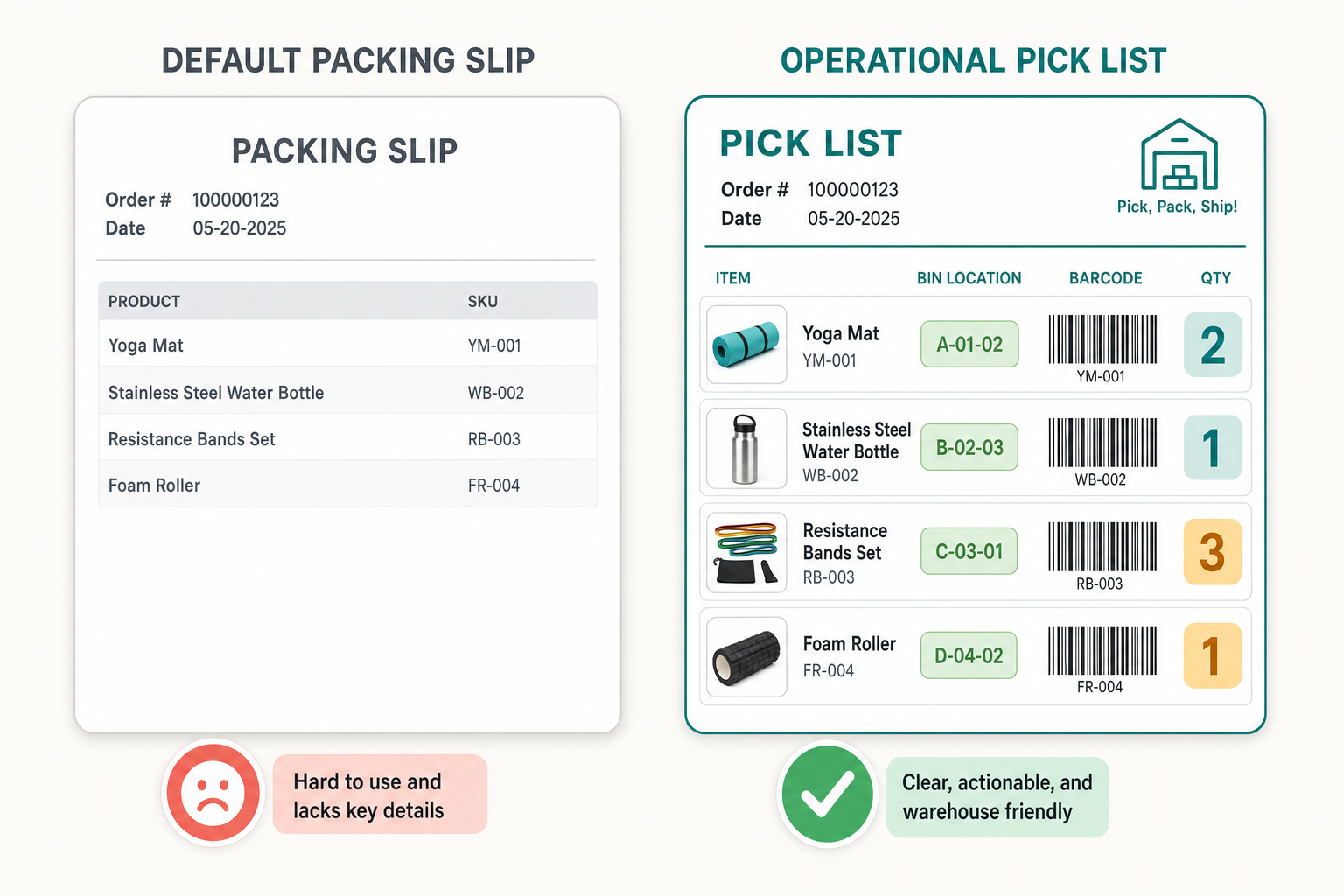
How this applies to Magento 2
Magento 2's stock documents are the invoice and the packing slip, and both are designed as customer-facing paperwork rather than warehouse tools. The default packing slip (Sales > Operations, then print from the order or shipment) lists product name, SKU, price and quantity. As of Magento 2.4.9 there is no product image, no barcode, no bin or shelf location, and no plain-language variant column on the native document, and no built-in pick-route sorting - the layout is fixed unless you override the template in code. Adobe's order processing documentation covers the flow, and it confirms the shape: the packing slip is a receipt for the box, not an instruction sheet for the shelf.
So on a default Magento store, the picker either memorises the catalogue, keeps a screen open alongside the paper, or picks by SKU alone and hopes. All three scale badly. The fix is a purpose-built pick document that carries the six fields above and sorts by location - which on Magento means either a custom PDF template or a module that generates one.
Where Moogento helps
PickPack replaces the default packing slip with configurable PDF documents built for the floor. Each line can carry a product thumbnail, the SKU (with control over whether configurables show the parent or child code), the ordered options in plain words, the ordered quantity, and a barcode - Code 128, Code 39, EAN-13 or QR, whichever your scanners read. A bin or shelf location column pulls from a product attribute so the list can be sorted into a pick route rather than order-line order. The layout is drag-and-drop, so you add, remove and reposition those columns per template instead of editing PHTML by hand, and there are separate Zebra templates for thermal label printers alongside the full-page documents.
You don't have to stop at a better printed document. Pick-n-Scan drops the paper entirely: pickers work through assigned orders on a barcode-driven screen inside the Magento admin, and every pick is validated against the order before it leaves the shelf. For teams picking several orders per walk, TrolleyBox adds multi-order trolley picking on top of PickPack and Pick-n-Scan: orders are grouped into labelled trolley boxes - each gets a trolley letter and box number, like A-2 - picked in one round from a combined picklist, and verified by box tag before dispatch.
Two notes before you buy. The bin-location (warehouse) column sits on the Growth and Pro tiers, not the entry Seed plan. And the trolley layer builds on the rest of the stack - TrolleyBox needs both PickPack and Pick-n-Scan installed, with multi-order picklists on the Growth plan or higher - so the sensible path is the printed document first, then the layers as volume justifies them. For the location data to be useful you also need it maintained on the products in the first place, which is where a stock tool like StockEasy earns its place. And once the single-order document is right, the next decision is whether to pick orders one at a time or in batches - covered in batch picking vs single-order picking in Magento.
Magento pick list audit checklist
- Pull your current packing slip and count how many of the six fields it shows. Most default setups show two.
- Find your two most similar SKUs. Print both on the current document and ask someone who doesn't know the catalogue to tell them apart.
- Order a configurable product. Check whether the picking document names the colour and size in words, or only in a code.
- Check the quantity column. Is a "12" ever going to read as "1 2" against the neighbouring column?
- Time a real pick against the paper. Note every moment the picker looks something up on a screen - each one is a missing field.
- Check the sort order. Does the list follow the aisle, or the order lines?
- If you print barcodes, scan one. Confirm the format your document prints is the format your scanners read.
FAQ
Does Magento 2 have a built-in pick list?
Not a dedicated one. Magento 2's native documents are the invoice and the packing slip, both customer-facing. The packing slip shows name, SKU, price and quantity with no image, barcode or bin location, so most warehouses either override the template in code or add a module that generates a proper pick document.
What is the difference between a packing slip and a pick list?
A packing slip travels with the parcel and confirms to the customer what's inside. A pick list is a work instruction for the warehouse: it tells a picker exactly which items to pull, in what quantity, from which location, and ideally lets them confirm the pick by scanning a barcode. The same order needs both, but they answer different questions.
How do I add product images to a Magento packing slip or pick list?
The default template has no image field, so you either override the packing slip PHTML/PDF template to render the product thumbnail, or use a module such as PickPack that adds an image column you can toggle per document. Images are the single highest-value addition for cutting wrong-item picks.
Do barcodes on a pick list actually reduce errors?
Yes, because they move the final check from the picker's eye to a scan. A printed barcode alone helps identify an item; barcodes become error-proofing when paired with a scan-to-confirm step that refuses a pick if the scanned item doesn't match the line. On its own, a barcode is a legibility aid; combined with scanning, it's a validation gate.
Start by counting the fields on your current document. If it shows fewer than four of the six, your picking errors are being printed for you every morning - and that's the cheapest problem in the warehouse to fix, because it's a template, not a process.


