How to Build Magento Cart Recommendation Rules (No Data Science Team Required)

You don't need machine learning to build cart recommendations that convert. A rule-based system - "if a printer is in the cart, offer its ink, in stock, under a clear label" - beats a black-box model on most Magento stores, because you know your catalogue and the model doesn't. Good Magento recommendation rules need five things: a trigger, a candidate pool, filters for stock and duplicates, a truthful label, and a way to measure the result.
Why do rules beat machine learning for most merchants?
Machine learning models need volume to be any good, and mid-size stores rarely have it. A model trained on 40 orders a day takes months to learn what you could write down in an afternoon: bikes need locks, aquarium filters need replacement cartridges, coffee machines need descalers. Even large retailers with real data science teams get this wrong more often than not, according to published UX research - which tells you the problem was never computing power. It's that nobody encoded what the products actually are.
Rules have a second advantage: when one misfires, you can see why and fix it. When a model misfires, you retrain and hope. Adobe Commerce ships a recommendations service on the paid tier, but as of Magento 2.4.9 there's nothing rule-driven for the cart in Open Source, so this is a build-or-buy decision either way.
What does a good recommendation rule look like?
Every rule worth keeping has the same anatomy:
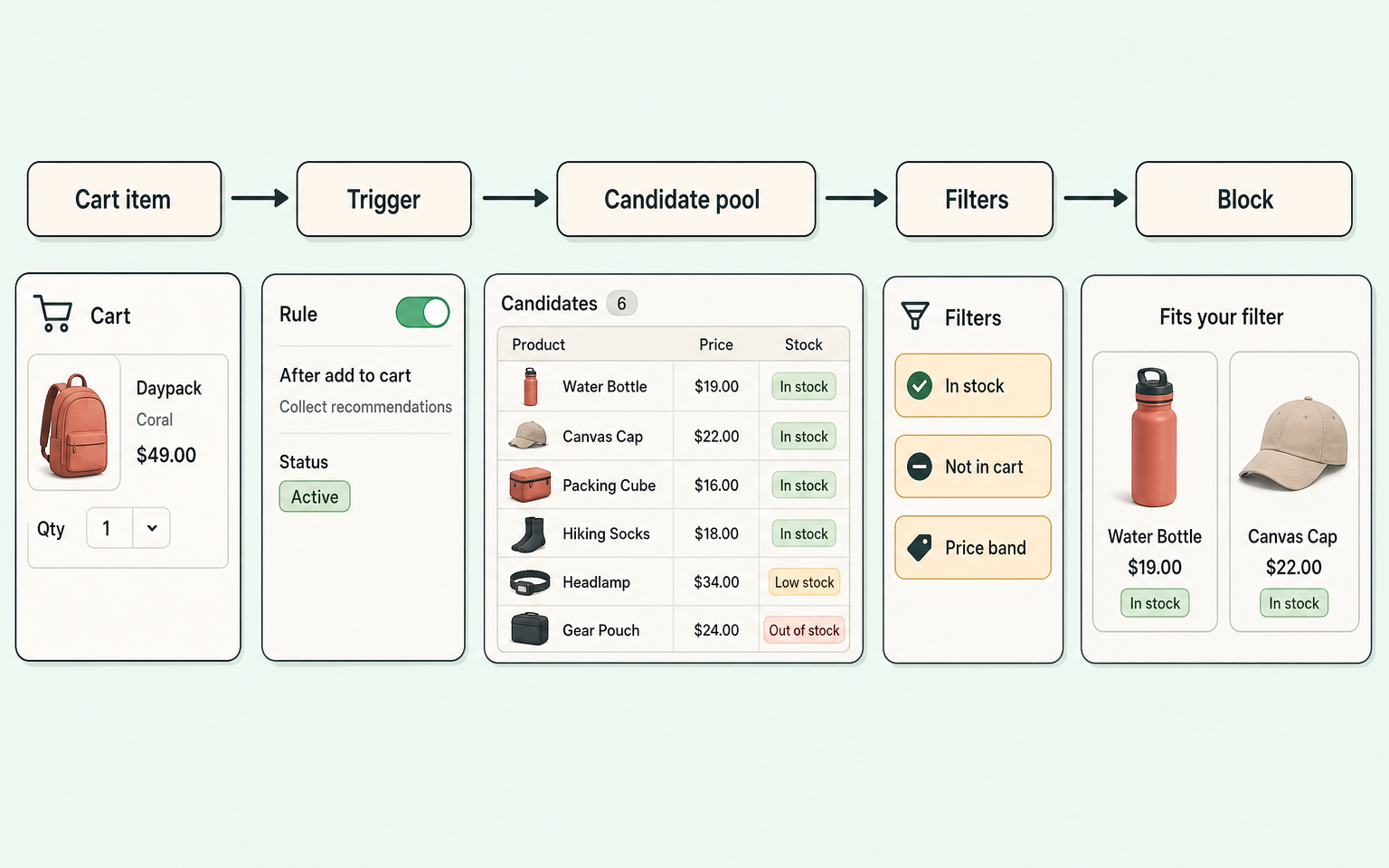
- Trigger - what in the cart fires the rule. A specific SKU, a category, or an attribute value ("fuel type = charcoal").
- Candidate pool - what's allowed to show. A hand-picked list, a category, or co-purchase pairs from your own order history.
- Exclusions - never suggest what's already in the cart, gift cards, or clearance dead-ends.
- Stock filter - out-of-stock suggestions train shoppers to ignore the block. This one should not be optional.
- Price band - keep add-ons below the cart item's price. A £300 suggestion on a £40 basket reads as greed.
- Label - say why: "Fits your filter", "Goes with your grinder". Unlabelled grids read as ads.
- Placement - cart page for considered add-ons, mini-cart for one quick consumable, checkout for almost nothing.
- Measurement - impressions, clicks, add-to-cart and purchase per rule, or you're guessing.
Worked examples: rules for eight catalogue types
These are deliberately boring. Boring rules are the ones that work.
| Catalogue | Trigger | Sensible rule | Label |
|---|---|---|---|
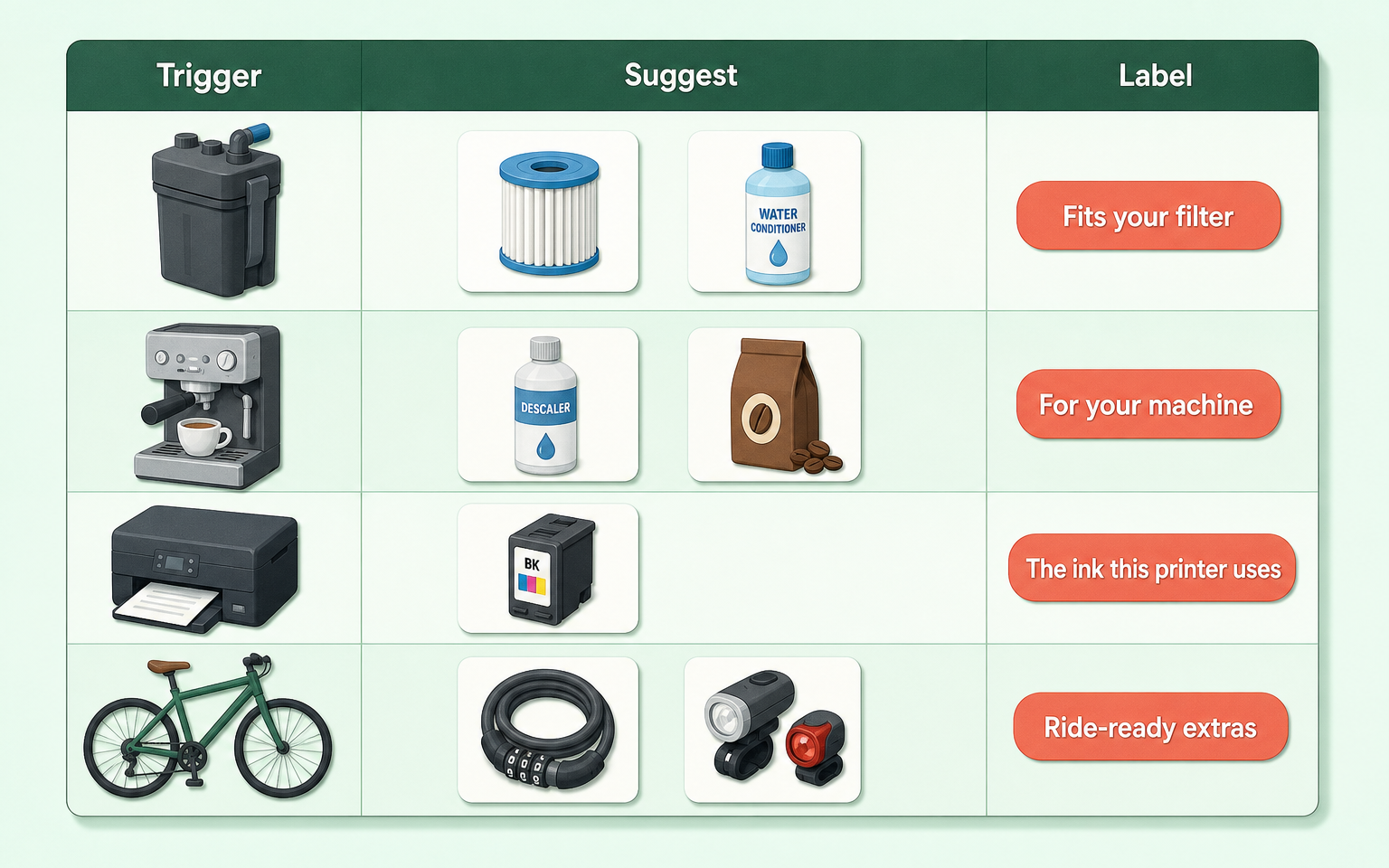
| Aquatics | Filter SKU in cart | Offer the matching cartridge multi-pack and water conditioner | "Fits your filter" |
| Pet food | Dry dog food category | Offer storage container and matching treats, same brand first | "Popular with this food" |
| Coffee | Espresso machine in cart | Offer descaler and fresh beans; suppress if beans already in cart | "For your machine" |
| Printers | Printer SKU in cart | Offer that model's ink only - never generic "ink" category | "The ink this printer uses" |
| BBQ | Attribute fuel=charcoal | Offer charcoal, chimney starter, cover sized to the model | "Charcoal essentials" |
| Bicycles | Bike category, cart over £200 | Offer lock, lights and pump; exclude bikes from the pool entirely | "Ride-ready extras" |
| Baby | Car seat in cart | Offer mirror and seat protector; never offer a second car seat | "Goes with your seat" |
| Home improvement | Paint category | Offer brushes, tray, tape; band rollers to the paint's surface type | "Finish the job" |
What do bad rules look like?
Bad rules are usually good intentions minus one filter:
- Category too broad. "Dog food in cart, suggest from Dog category" surfaces a dog bed for a shopper restocking kibble. Narrow the pool to consumables and accessories.
- Alternatives instead of additions. Suggesting a different coffee machine next to the one in the cart reopens the buying decision at the worst moment.
- No compatibility check. "Printer in cart, suggest ink category" puts Epson cartridges next to an HP printer. That single wrong suggestion poisons trust in every other one on the page, not just itself.
- No price ceiling. A rule that can suggest a £180 accessory on a £25 order will, eventually, do exactly that.
- Set and forgotten. Rules pointing at discontinued SKUs render empty blocks or stale picks. Put a quarterly review in the calendar.
How this applies to Magento 2
In Magento 2 Open Source, the native way to drive the cart block is hand-linking products on each product record. That's workable at 50 SKUs and hopeless at 5,000, and the links carry no logic: no stock awareness, no price bands, no labels, no per-rule stats. Merchants end up choosing between manual maintenance, a custom module, or an extension with a rule engine.
If you're evaluating any rule engine (ours included), test it against the anatomy above: can a rule trigger on category and attribute, not just SKU? Is the stock filter enforced or optional? Can you exclude categories and SKUs globally? Does it measure per rule? A tool that fails two of those will recreate the randomness you're trying to fix.
Where Moogento helps
SmartCart is that anatomy, shipped as a module. Rules trigger four ways: SKU in cart, category in cart, attribute value in cart, or co-purchase association mined from your own order history (you set the minimum confidence and how many past orders a pairing needs before it counts - the defaults are 10% and 2). Every candidate then passes one guardrail pipeline: stock checked (MSI-aware, always on), in-cart items and their parent products excluded, your excluded SKUs and categories dropped, gift cards skipped automatically.
The parts you'd expect to need a data team come free with the structure: compatibility rules can require attribute matches between the cart item and the suggestion (three modes, from strict match to "deny values already in cart"), variant matching picks the suggestion in the shopper's already-chosen size and colour, and each rule carries an intent level so checkout only ever shows essentials. Per-rule tracking logs impressions, clicks, adds and purchases when you switch it on, and you can read the revenue side in ProfitEasy. There's optional AI for drafting rules from your order history, but it runs offline on a schedule - the storefront never waits on an API, and rules work with it switched off entirely. Docs for the whole range live in the Moogento docs index.
Rule-writing checklist
- Write the rule in plain English first. If you can't say it in one sentence, split it.
- Name the trigger: SKU, category, or attribute. Prefer the narrowest that still fires often enough to matter.
- Define the pool explicitly. "Everything in category X" needs a second look; "these 12 accessories" rarely does.
- Confirm the stock filter applies. Test by zeroing a candidate's stock and reloading the cart.
- Set a price ceiling relative to the cart item.
- Write the label before you save the rule. If you can't write one that's true, the rule is probably wrong.
- Decide placement per rule: cart, mini-cart, or nowhere. Default to fewer surfaces.
- Check the block with one item, three items, and a cart that triggers two rules at once.
- Review stats monthly: a rule with impressions and no adds after a few hundred views is telling you something.
FAQ
Does Magento Open Source have rule-based recommendations built in?
No. As of Magento 2.4.9, Open Source offers hand-set product links only. Adobe Commerce (the paid edition) adds related-product rules and a recommendations service. Open Source merchants get rule logic through custom development or an extension.
How many orders do I need before co-purchase data is useful?
Less than you'd think for narrow pairings: a pairing that appears in even a handful of orders is a real signal on a small store. SmartCart's association mining defaults to counting a pair after 2 co-occurrences at 10% confidence, and hand-written rules cover the products that haven't sold together yet.
Should recommendation rules ever suggest a more expensive alternative?
On the product page, sometimes - that's a classic up-sell and the shopper is still comparing. In the cart, no. Cart suggestions should add to the decision that's already made, not compete with it.
How do I measure whether a rule is working?
Track four numbers per rule: impressions, clicks, add-to-cart, and purchases including the suggested item. Add rate (adds divided by impressions) is the headline number. Judge rules individually - a good average can hide one rule doing all the work and three doing damage.
Start with five rules for your five best-selling products, run them for a month, and keep the ones with an add rate you'd defend in a team meeting. That's the whole method.