

How to Improve the Magento Orders Grid Without Rebuilding Your Back Office

The default Magento orders grid is built for record-keeping, not for running fulfilment. It shows order number, date, customer, total and status - enough to find an order, not to work one. You improve it by adding the fields a team needs daily: what's in the order, whether it's profitable, and where it is in shipping. On Magento 2 that means better columns and bulk actions, not a separate order management system.
What's wrong with the default Magento orders grid?
Nothing, if all you need is a searchable list of orders. The problem is that the daily job of a fulfilment team isn't looking orders up - it's deciding which to ship first, spotting the ones that need attention, and processing them in bulk. The default grid supports none of that well.
It shows the order header (number, dates, names, total, status) but nothing about the order's contents. You can't see what was bought, how many items, or which SKUs without opening each order. There's no profit, so a team can't tell a healthy order from a loss-maker. There's no operational status beyond Magento's order state, so "picked", "packed", "priority" and "tracking added" are invisible. The result is a grid you read one order at a time, which is exactly the workflow that gets expensive at volume - the subject of our piece on the hidden cost of slow Magento order processing.
What should an operational orders grid show?
An operational grid answers, at a glance, the questions a fulfilment team asks all day. The useful additions cluster into four groups:
| Group | Fields | Question it answers |
|---|---|---|
| Contents | Product thumbnails, SKUs, quantities, weight | What am I actually shipping, without opening the order? |
| Money | Profit, shipping cost, payment method, paid status | Is this order worth what it costs to fulfil? |
| Fulfilment | Tracking status, priority, printed flag, ship rule, stock | What's the state of this order right now, and what's next? |
| Customer signal | Marketplace source, gift-message flag, customer notes, region | Anything special about this order I need to handle? |
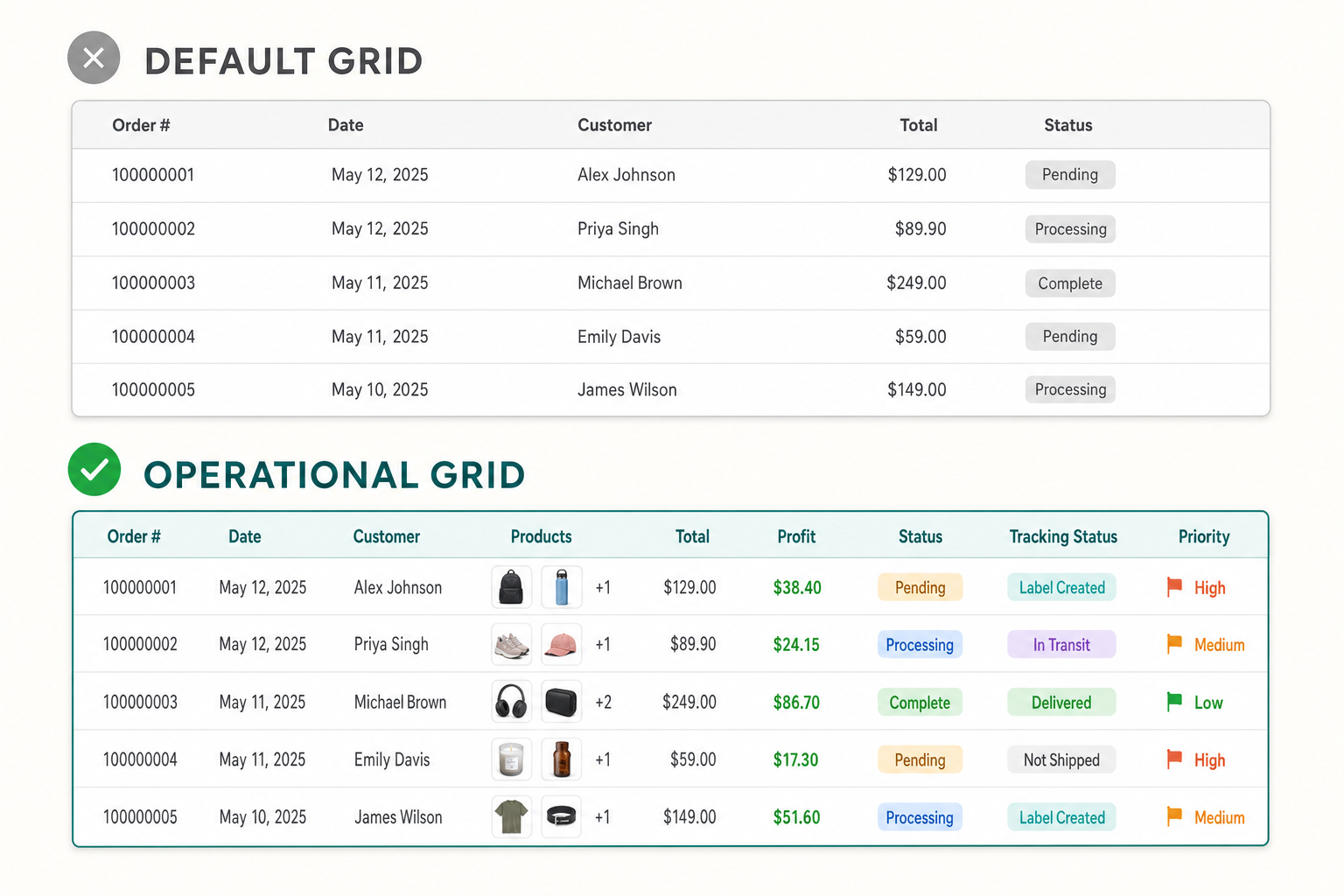
You don't add all of these. A 20-orders-a-day store selling one product type needs thumbnails and tracking status; a high-volume marketplace seller needs source, priority and profit. The point is that the grid should carry the fields your team looks up most, so the lookup becomes a glance.
Do you need a full order management system for this?
Usually not. There's a real gap between "the default grid is thin" and "we should migrate to an OMS", and most stores that feel the first pain jump too fast to the second. A dedicated OMS (ShipStation, Linnworks, Brightpearl and the like) is powerful but is a separate system to integrate, pay for, learn and keep in sync with Magento. For a lot of merchants, the real answer is that they need a better grid, not a second platform.
| Default grid | Enhanced grid (in Magento) | Full OMS | |
|---|---|---|---|
| Operational columns | Minimal | Rich, configurable | Rich |
| Bulk invoice / ship | Limited | Yes, in one pass | Yes |
| Setup effort | None | Low (install, configure) | High (integrate, migrate) |
| Second system to maintain | No | No | Yes |
| Best for | Very low volume | Most SME Magento stores | Complex multi-channel ops |

How this applies to Magento 2
The Magento 2 orders grid is a UI component (its layout is defined by sales_order_grid.xml) reading from the flat sales_order_grid table. That architecture matters because it's why the grid is fast but shallow: it shows what's denormalised into that one table. Adding operational data - product images, profit, tracking status - means either extending that grid with custom columns and their backing data, or installing a module that does it. As of Magento 2.4.9 the native mass actions are largely cancel, hold, and print documents; there's no built-in single-pass "invoice and ship these fifty orders" and no profit or per-line product column. Adobe's order management documentation describes the default grid, and it confirms the shape: a header-level list with document printing, not an operations console.
Where Moogento helps
ShipEasy rebuilds the orders grid as a fulfilment console. It replaces the grid's data source to add operational columns - product thumbnails, SKUs and quantities, tracking status, weight, paid status, marketplace source, gift-message flag, plus its own OrderTag columns for priority and a "printed" flag - and you toggle which columns show. More importantly it adds mass actions the default grid lacks: select a batch of orders and invoice them, ship them, or invoice and ship in a single pass that commits both in one database transaction, with a "sE: Invoice & Ship" menu action. There's a CSV tracking import and a barcode scan-to-process button too. One limit: per-batch action size is capped by licence tier (50 on Seed, 200 on Growth, 500 on Pro), and ShipEasy doesn't buy or print carrier labels - it drives Magento's invoice, shipment and tracking, not a courier's label API.
ProfitEasy adds the money view: a Profit column on the same grid, calculated as the order's grand total minus its real costs (product cost, shipping, payment fees, tax and any cost rules you define), alongside CLV, AOV and order-source columns. That's the field that turns "which orders shall we ship" into "which orders are worth shipping", and it's the one the default grid can't show at all. For the separate but related question of who changed an order, a price or a status, AuditEasy keeps an admin action log with before-and-after values - not a grid column, but the answer to the "who touched this order?" question a busy back office asks weekly.
Orders grid audit checklist
- Open your orders grid and count how many times a day your team clicks into an order just to see what's in it. Each click is a missing column.
- Ask whether anyone can tell a profitable order from a loss-maker on the grid. If not, add a profit column.
- Check for an operational status beyond Magento's order state - can you see picked, packed, printed, priority?
- Time a bulk invoice-and-ship of ten orders. If it's ten separate order screens, that's the biggest single time sink to fix.
- Look for the special-handling signals: gift messages, marketplace source, customer notes. Are they visible, or discovered mid-pack?
- List the five columns your team would actually use daily. If your grid shows fewer than three of them, it's under-configured.
- Before considering an OMS, price the gap: is it a missing-columns problem or a genuinely-multi-channel problem? Only the second needs a second system.
FAQ
Can you add custom columns to the Magento 2 orders grid?
Yes. The grid is a UI component reading from the sales_order_grid table, so you can add columns by extending that grid and supplying the backing data - through custom development or a module. Common additions are product thumbnails, SKUs, profit, tracking status and priority flags, none of which ship in the default grid.
Does the default Magento orders grid show products or SKUs?
No. The default grid shows order-header information - number, date, customer, total, status - but nothing about the order's contents. To see products, SKUs or quantities you open each order, or add per-line columns to the grid via a module such as ShipEasy.
Do I need an order management system to improve order processing?
Not for most SME Magento stores. A full OMS is a separate platform to integrate and maintain, justified by genuinely complex multi-channel operations. If your pain is a thin grid and slow bulk actions, enhancing the Magento grid in place gives most of the benefit without a second system to run.
Can Magento invoice and ship multiple orders at once?
The default grid's mass actions are limited (mostly hold, cancel and printing documents); there's no native single-pass bulk invoice-and-ship. Extensions add this - for example, selecting a batch and running one action that invoices, ships and optionally emails, within licence-based batch-size limits.
Start by counting the daily clicks-into-orders your team makes just to see contents or status. That number is your grid's shortfall, and closing it is a configuration job, not a re-platforming one.


