Magento Social Proof Popups: Useful Nudge or Annoying Pop-Up?

Social proof popups - the "someone in Leeds just bought this" notifications - help when they're true, relevant, spaced out and easy to dismiss, and annoy when they're constant, fake, or block the content a shopper came for. The line isn't the tactic; it's the execution. A single notification about a real recent purchase reassures; a rolling feed of invented urgency erodes trust and gets closed on reflex.
What are social proof popups?
Social proof popups are small on-page notifications that show other shoppers' activity: recent purchases, how many people are viewing an item, low-stock warnings, or countdown timers. The idea is straight from behavioural psychology - people look to others' behaviour when deciding, so showing that others are buying nudges a hesitant shopper towards the same choice.
The tactic works because it answers a real question a shopper has ("is this legit, is anyone actually buying here?"). That's also why it's so easy to abuse: the same slot that can reassure with a true recent sale can just as easily manufacture pressure with a fake one, and shoppers have been burned often enough to be suspicious of both.
What separates a helpful popup from an annoying one?
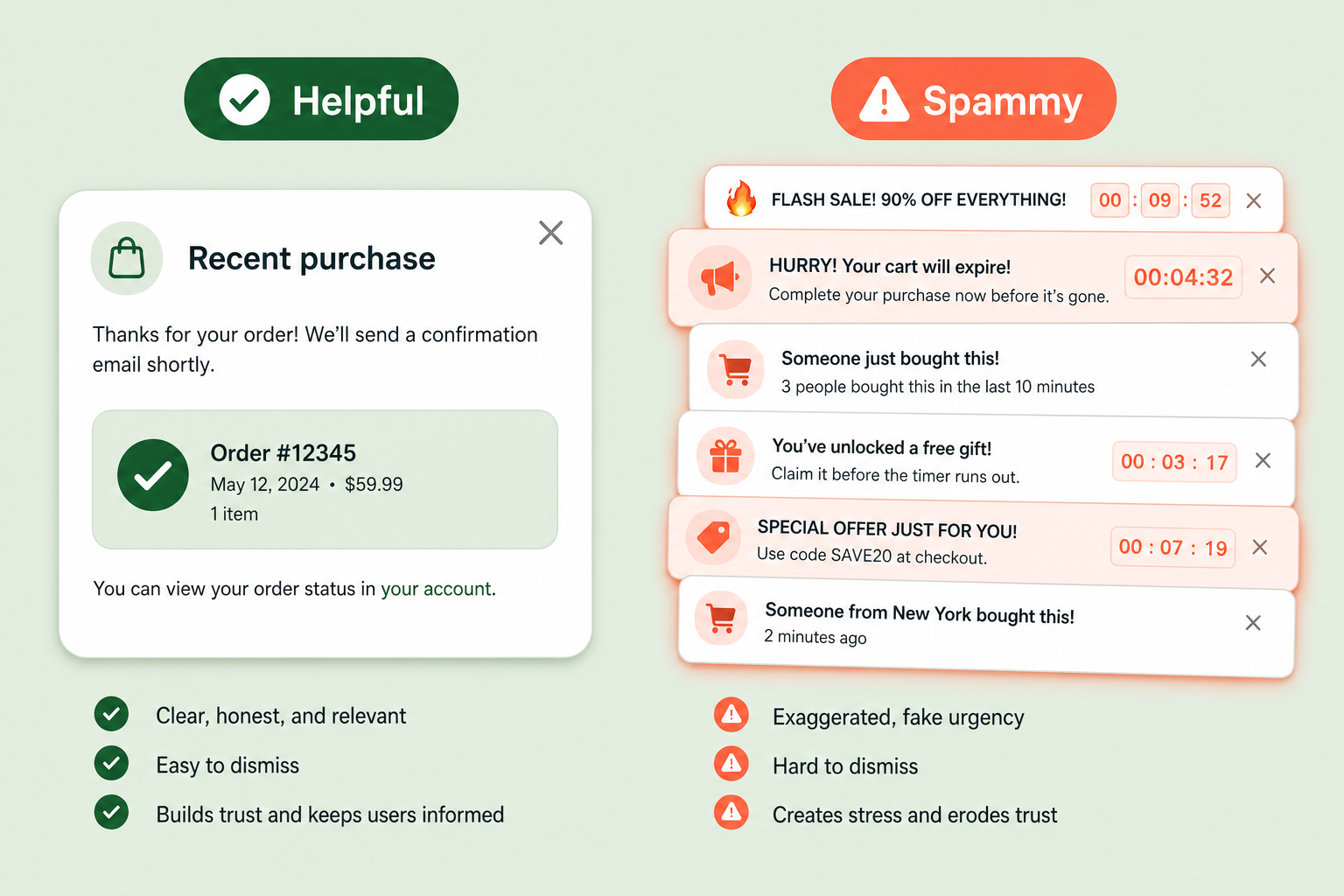
Truthfulness first, then restraint. A helpful notification reflects a real event, appears occasionally rather than constantly, sits where it doesn't cover the product or the buy button, closes with one obvious tap, and behaves on mobile. An annoying one invents activity, fires every few seconds, blocks content, and hides or omits the close control.
| Dimension | Tasteful | Spammy |
|---|---|---|
| Truthfulness | Real purchases, real view counts | Invented names, fake countdowns that reset on reload |
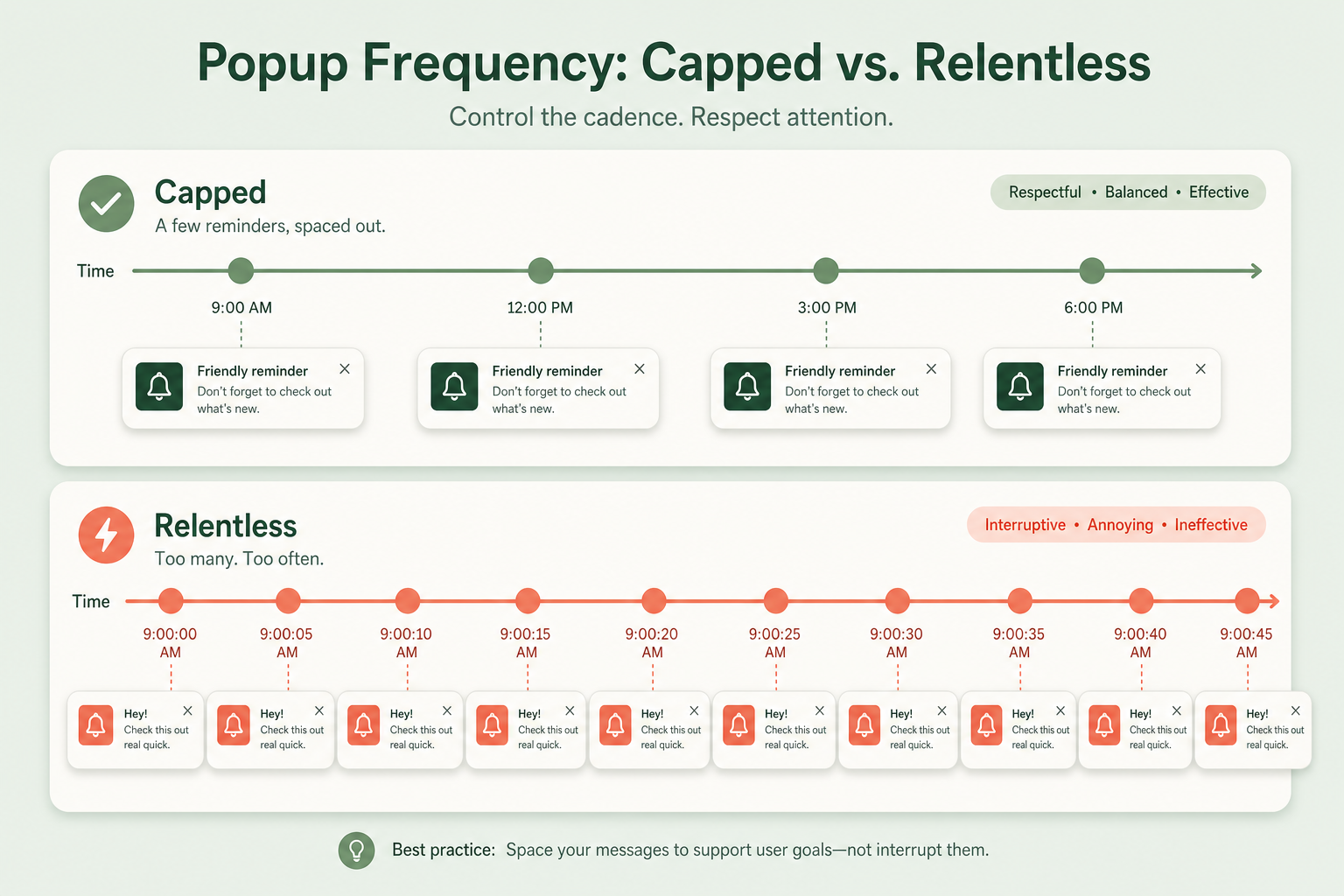
| Frequency | Occasional, capped per session | Every few seconds, relentless |
| Placement | Corner, clear of product and buy button | Over the content, blocking the buy button |
| Dismissal | One obvious close, stays closed | Hard-to-hit close, or reappears immediately |
| Mobile | Small, out of the thumb zone | Full-width, covering the add-to-cart |
| Relevance | Related to the product being viewed | Random SKUs unrelated to the page |
The countdown timer that resets when you reload the page is the clearest tell of the spammy end. Real scarcity doesn't reset. A shopper who catches one fake timer stops believing every urgency signal on the site, including the real ones, so a single fake widget can poison your genuine low-stock messaging too.
Why does fake urgency backfire?
Because it's a short-term conversion trick that costs long-term trust, and increasingly it's a legal risk. Invented scarcity ("only 2 left!" on an item that never runs out), fake countdowns, and made-up purchase names are exactly the kind of dark patterns that consumer-protection regulators have started fining. Beyond the legal exposure, shoppers are pattern-matching machines: once they spot one fake signal, they discount everything you show them.
Social proof built on real activity doesn't have this problem because it doesn't need to. If real people are buying, show that. If stock is genuinely low, say so. The reassurance comes from the truth of it, and truth doesn't get you a regulator's letter or a customer who never trusts your urgency messaging again.
How this applies to Magento 2
Magento 2 has no native social proof popup feature, so this is add-on territory - and how the add-on gets its data is the thing that matters most. A tool that pulls from your real Magento orders can only show true activity; a tool that lets you type in fake purchase names is handing you a way to lie to customers. When you evaluate one, the first question isn't "how flashy are the popups" but "where does the data come from, and can it fabricate events?"
The second question is control: can you cap frequency, choose placement, and give shoppers a real close button, and does it behave on mobile? A social proof widget with no frequency cap is a liability on a busy store, because "someone just bought this" every three seconds reads as noise, not proof. Relevance matters too - a notification about a product unrelated to the page the shopper is on is just distraction.
Where Moogento helps
SocialEasy adds real-time purchase notifications and promotional hellobars to a Magento storefront, and its notifications are built from your actual store orders - the module syncs genuine order data to the notification service, so the "someone just bought this" popups reflect real purchases rather than invented ones. That's the credible end of the spectrum by design: you're surfacing true activity, not fabricating it. Presentation controls (how often notifications show, where they sit, targeting by geography or visitor type) live in the notification service's own dashboard, so tune frequency and placement conservatively there - restraint is the whole game.
Two other modules cover the adjacent nudges without the popup baggage. NotifyMe is the inverse of a fake-scarcity widget: instead of inventing demand, it lets customers opt in to a back-in-stock alert on an out-of-stock product and emails them when it's genuinely available again. The demand signal is real because the customer created it. And SmartCart handles in-cart product suggestions with rules and stock filters, so complementary-product nudges are relevant to what's actually in the basket rather than a random popup over the page. Between them, the pattern is the same: reassure with something true, don't manufacture pressure.
Social proof audit checklist
- Check the data source. If your tool can display purchase events you didn't actually receive, it can lie for you - that's the risk, not a feature.
- Reload a product page twice. If a countdown or stock number resets, it's fake and shoppers will notice.
- Cap frequency. One occasional notification reassures; a constant feed harasses.
- Check placement on desktop and mobile. Nothing should cover the product image or the add-to-cart button.
- Test the close button on a phone. It should be easy to hit and stay closed.
- Confirm relevance. A notification about an unrelated SKU is distraction, not proof.
- Read your urgency copy against reality. If stock isn't genuinely low, don't say it is.
- Assume a regulator could read it. Invented scarcity and fake countdowns are the dark patterns getting fined.
FAQ
Do social proof popups actually increase conversions?
Ones built on true, relevant events can, because they answer a real shopper question - is anyone else buying here, and is this legit. The effect depends entirely on execution: true events, sensible frequency, and placement that doesn't block the buy button. Fake or relentless popups tend to hurt trust and get closed on reflex, which cancels any lift.
Is fake urgency illegal?
It's increasingly treated as an unfair commercial practice. Invented scarcity, fake countdown timers that reset, and made-up purchase notifications are dark patterns that consumer-protection regulators have started acting against. Beyond the legal risk, a shopper who spots one fake signal stops trusting all of them, including your genuine ones.
How often should a social proof notification appear?
Occasionally and capped per session, not continuously. There's no single correct number, but the test is simple: if the cadence reads as ambient reassurance it's about right; if it reads as harassment, dial it back. A notification firing every few seconds is noise, and it trains shoppers to close the widget without reading it.
Does Magento have built-in social proof popups?
No. Magento 2 has no native social proof or live-sales popup feature, so it's provided by an extension or third-party service. The most important thing to check is where the notification data comes from: a tool tied to your real Magento orders can only show true activity, while one that lets you enter arbitrary purchase names can fabricate it.
The truthful version of this tactic is also the durable one. Show real purchases, cap the frequency, keep the close button obvious, and never invent scarcity - a shopper who trusts your urgency signals is worth more than one you tricked once.