Reorder Reports for Magento: How to Know What to Buy Before You Run Out

A Magento reorder report tells you which products to buy and how much, before they sell out. The core of it is the reorder point: daily sales velocity multiplied by supplier lead time, plus a safety buffer. When stock drops to that number, you order. Get the lead time right and you never sell out mid-restock; get it wrong - or leave it out - and every reorder is a guess that ends in a stockout or a cash-draining pile of dead stock.
What a reorder report actually needs to know
A reorder report is only as good as its inputs, and there are four that matter. Miss any one and the numbers drift:
- Sales velocity - how fast the product sells, usually as units per day, measured over a recent window.
- Lead time - how long from placing a purchase order to the stock being on your shelf and sellable. This is the number merchants most often leave out, and it's the one that causes mid-restock stockouts.
- Safety stock - a buffer for the days when sales spike or the supplier is late. It's insurance, priced in stock.
- Minimum order quantity - what the supplier will actually let you buy. A reorder suggestion of 7 is useless if the MOQ is 24.
The reorder point formula in plain terms
The reorder point is the stock level that should trigger a new order. The plain version:
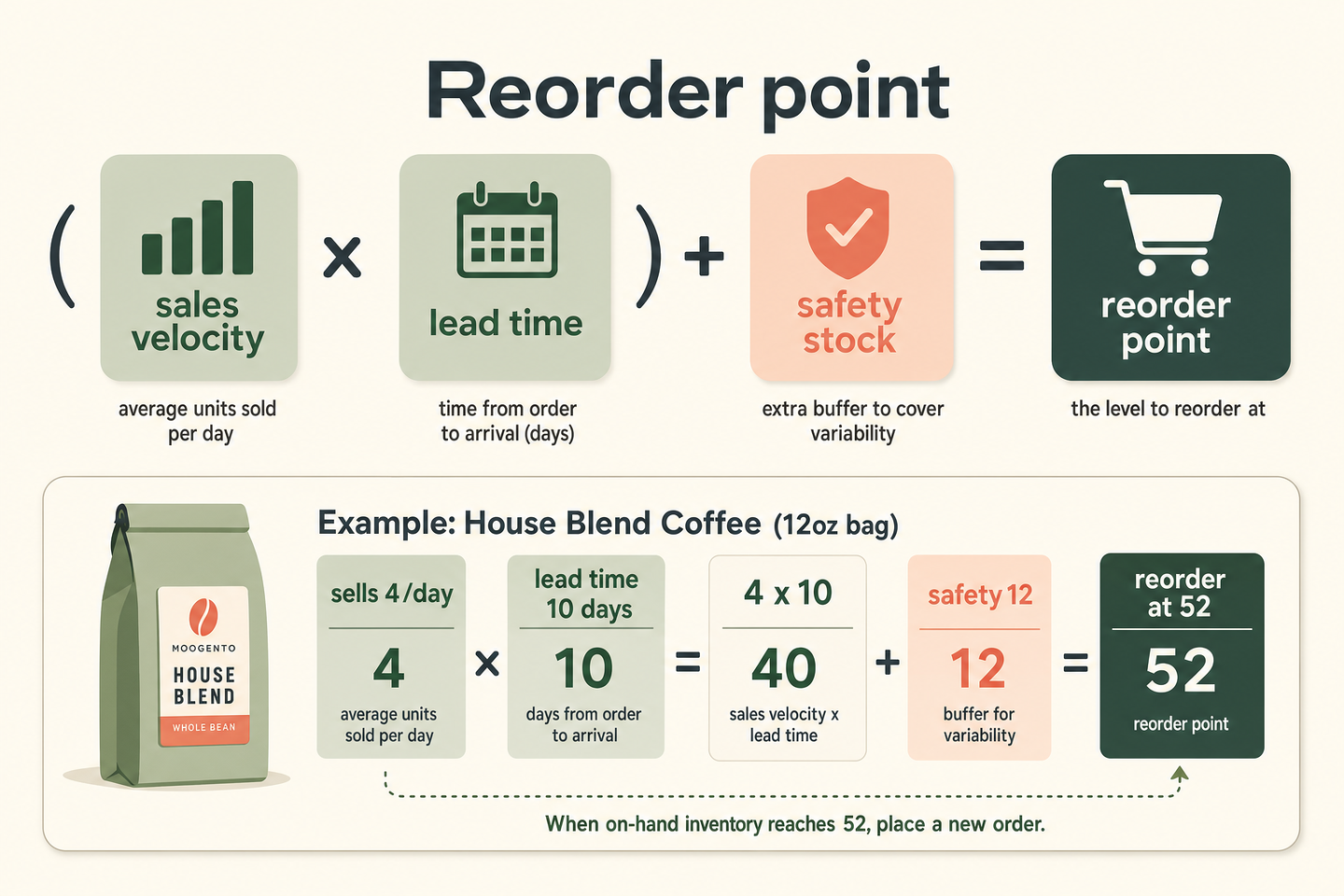
Reorder point = (daily sales velocity x lead time in days) + safety stock.
Say a coffee product sells 4 units a day and your supplier takes 10 days to deliver. You'll sell 40 units while you wait for the restock, so if you order when stock hits zero, you're out of stock for 10 days. The reorder point pulls the trigger earlier: order when stock drops to 40, plus a safety buffer of, say, 12 (three days' cover), so a reorder point of 52. Hit 52, place the order, and stock lands roughly as you're running low - not after you've already lost sales.
The reorder quantity - how much to buy - is a separate decision, shaped by supplier MOQ, your cash, storage, and how much cover you want before the next order. A common approach is to buy enough to reach a target days-of-cover figure, then round up to the supplier's MOQ.
Should you reorder by sales volume, profit, or stockout risk?
Ranking your reorder list by units sold is the obvious move and often the wrong one. A high-volume product on a thin margin can be less worth protecting than a slower one that earns three times the profit per unit. Three lenses give three different buying lists:
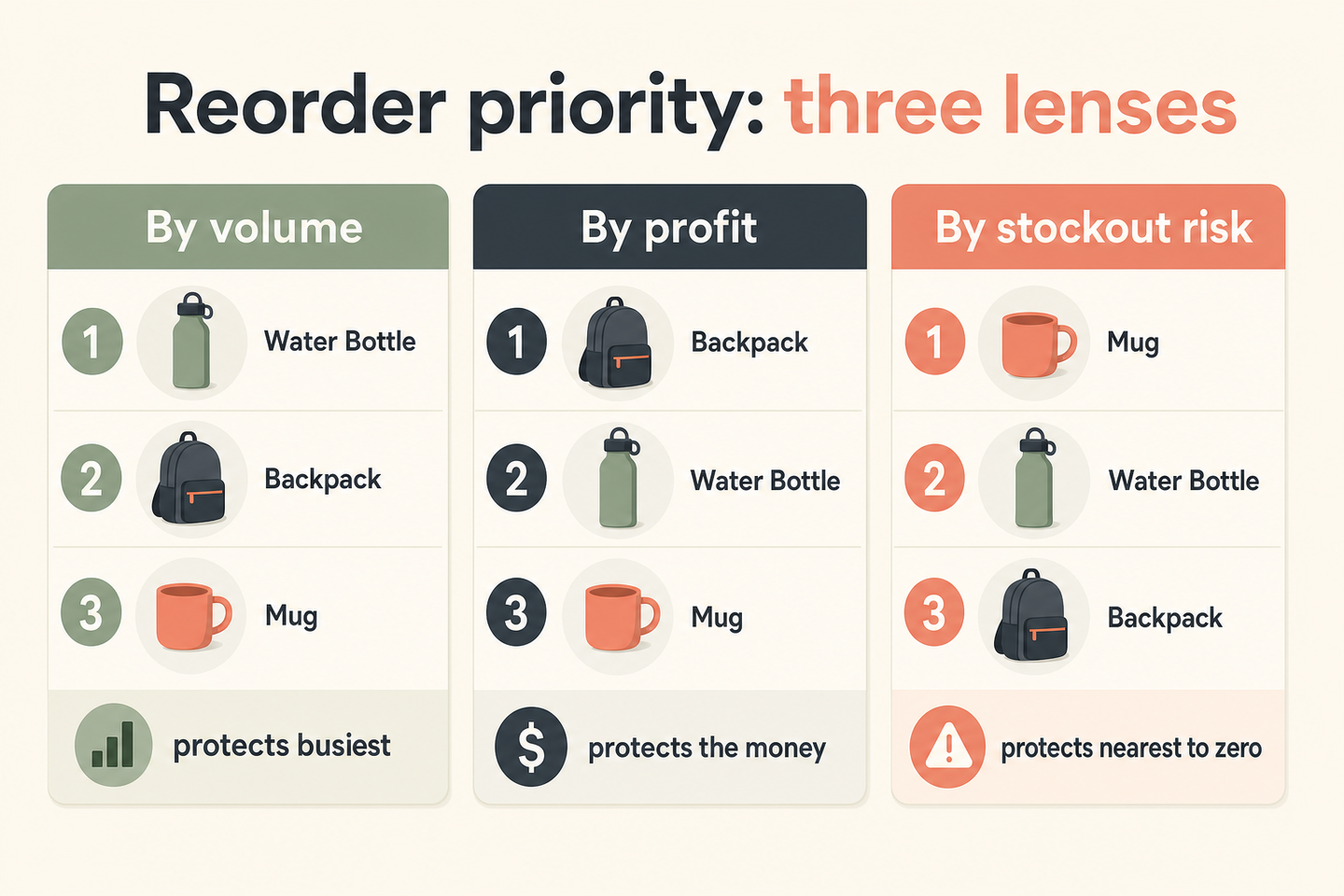
| Rank by | Protects | Blind spot |
|---|---|---|
| Sales volume | Your busiest lines, customer expectations | Ignores margin - you may be defending loss leaders |
| Profit | The money, not the movement | Needs accurate product cost to work at all |
| Stockout risk | Whatever is closest to running out | Urgent isn't always important - can crowd out planning |
The practical answer is usually a blend: protect anything about to run out, then within that, prioritise by profit. Ranking by profit needs a real cost figure per product, which is exactly what most stores don't have to hand.
How this applies to Magento 2
Magento 2 has no built-in reorder report. The admin shows quantity and salable quantity (Adobe's inventory docs cover the difference), but nothing computes sales velocity, applies a lead time, or suggests a purchase quantity - as of Magento 2.4.9 that's a report you build in a spreadsheet or add with a module. One thing to get right if you build it yourself: base velocity and cover on salable quantity, not raw quantity, or your "days remaining" will count stock that's already committed to open orders. A product with 40 units and 40 reserved has zero to sell, and a reorder report that reads the quantity field will happily tell you not to buy.
Where Moogento helps
StockEasy builds the reorder report into the admin product grid, and it runs two levels of calculation worth understanding. The simple "Reorder" figure is a static top-up: if stock is below a trigger quantity you set, it suggests bringing it back to that trigger, clamped between your minimum and maximum order quantities. It's fast and predictable but it ignores how fast the product sells.
The advanced "iReorder" figure is the one that uses the formula above. It estimates demand over a lookback window and adds cover for the lead time plus a buffer period - roughly, it projects demand across the time it takes stock to arrive and sizes the order to cover it, then clamps to your MOQ and maximum. Lead time and buffer are per-product fields, so a slow-shipping supplier's products get more cover automatically. StockEasy also shows estimated days of stock remaining based on salable quantity and a computed sales velocity, and it can email scheduled low-stock and inventory-change reports on a cron so you're not remembering to check.
Two caveats. StockEasy models seasonality as "the same calendar window a year ago" plus a simple recent trend - useful, but not a full statistical seasonal model, so sanity-check its numbers around unusual peaks. And it has no supplier records: lead time is a flat per-product number, not a per-vendor one, so if one product comes from two suppliers with different lead times you're setting a single figure. For ranking reorders by profit rather than volume, ProfitEasy supplies the per-product margin StockEasy's volume view doesn't - it reads each product's cost against its price to show a profit percentage, and that figure can ride along as a column in StockEasy's own reorder export, so your buying list can be sorted by margin, not just units. And NotifyMe covers the other side of a stockout: when something does run out, it captures the customers who wanted it and emails them the moment it's sellable again, turning a lost sale into a delayed one.
Reorder report audit checklist
- Write down the lead time for your top 20 products. If you don't know it, that's the first gap to close - it's the number that causes stockouts.
- Calculate sales velocity from a recent window, not a whole year - a product's last month predicts next month better than last spring does.
- Base "days remaining" on salable quantity, not raw quantity, so committed stock isn't double-counted.
- Set a safety buffer per product, higher for erratic sellers and unreliable suppliers.
- Check each reorder suggestion against the supplier's minimum order quantity before you trust it.
- Rank your buy list by profit at risk, not just units, at least for your top spenders.
- Sanity-check any seasonal or trend-based suggestion by hand around known peaks.
- Automate the low-stock alert so the report comes to you, rather than relying on someone opening it.
FAQ
What is a reorder point in Magento?
A reorder point is the stock level at which you should place a new purchase order. The formula is daily sales velocity multiplied by supplier lead time, plus safety stock. Magento 2 doesn't calculate it natively - you build it in a spreadsheet or add a module such as StockEasy that computes it per product from sales history and a lead time.
How do I calculate what to reorder in Magento?
Start with sales velocity (units per day over a recent window) and lead time (days until stock is sellable). Multiply them, add a safety buffer, and that's your reorder point. For the quantity, buy enough to reach your target days of cover, then round up to the supplier's minimum order quantity. Base everything on salable quantity, not raw quantity.
Why do I keep running out of stock despite having a reorder report?
Usually because the report ignores lead time. If you reorder when stock hits zero but the supplier takes ten days, you're out of stock for ten days every cycle. The reorder point has to account for the sales you'll make while waiting for the restock to arrive. Lead time is the number most reorder reports leave out.
Should I reorder by best sellers or by profit?
Blend them. Protect anything close to running out first, then within that, prioritise by profit rather than units - a high-volume, thin-margin line can be less worth defending than a steadier, higher-margin one. Ranking by profit needs an accurate per-product cost, which is where a profit report earns its place next to the reorder report.
The single highest-value thing you can do is write down your lead times. Velocity you can measure and profit you can look up, but lead time lives in your suppliers' heads until you record it - and it's the number that decides whether your reorder report keeps you in stock or just documents how you ran out.