Why Most Cart Recommendations Feel Random (And How Magento Stores Can Fix Them)

Most cart recommendation blocks feel random because they are random: they show bestsellers or "customers also bought" lists that never read what's actually in the cart. The fix for Magento cart recommendations isn't machine learning. It's plain rules: match the cart's category or attributes, exclude what's already there, hide out-of-stock items, and label the block so shoppers know why they're seeing it.
Why do cart recommendations feel random?
Because the block is usually fed by generic popularity data, not by the basket in front of the shopper. A "customers also bought" list built from store-wide sales doesn't know what's in this cart - it just knows what sells. The shopper reads that block in half a second, decides it has nothing to do with them, and learns to ignore it. Baymard Institute's testing of large retail sites found that 52% of desktop sites show cart suggestions that are either completely irrelevant or based only on "other customers bought" logic - a scale problem worth knowing about, even though the fix is store-specific.
The failure modes repeat across almost every cart we've reviewed while building this list:
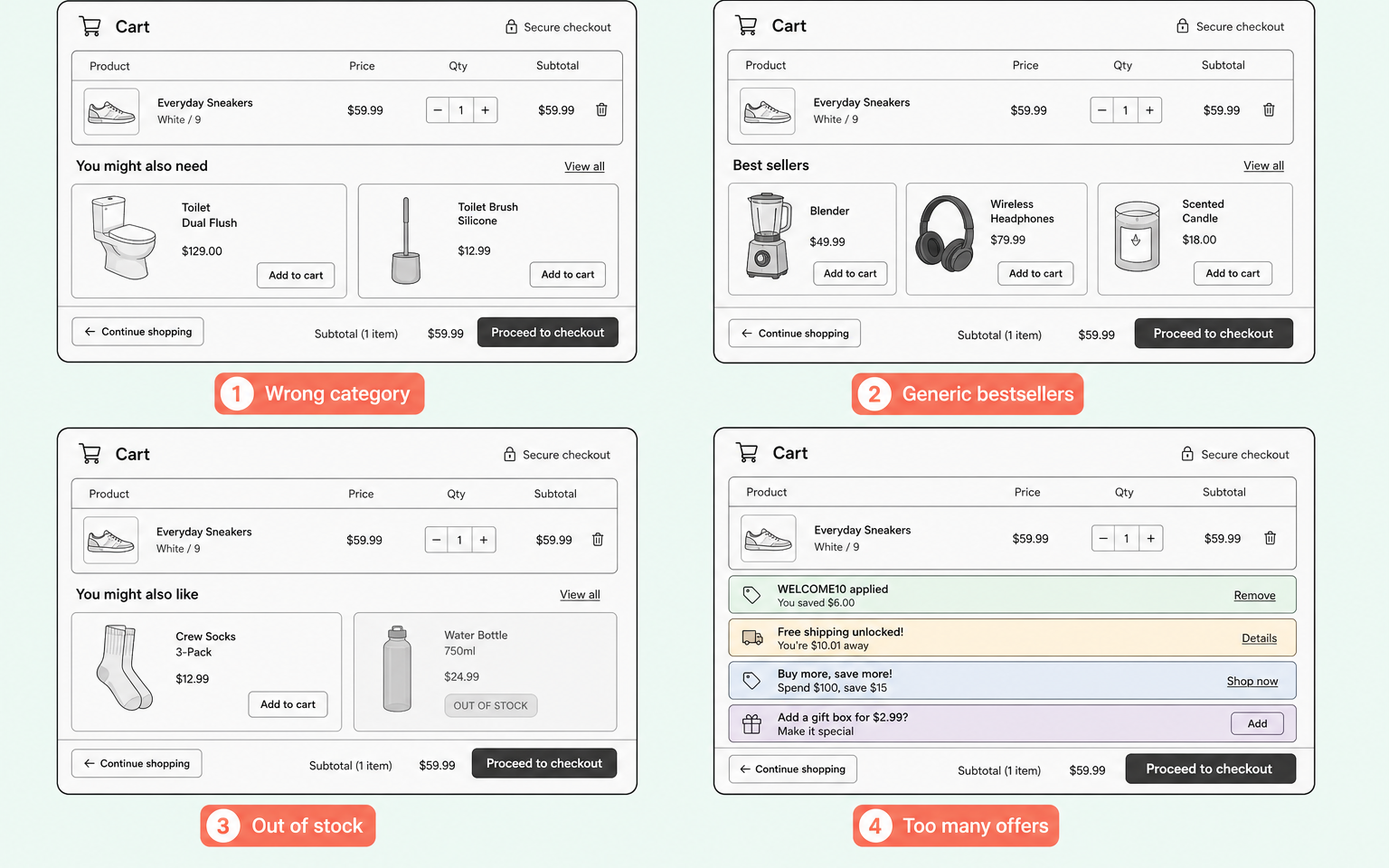
- Wrong category. A shopper buying a specific spare part gets shown an unrelated big-ticket item from a loosely related department. Nothing about the suggestion matches what's in the cart.
- Trust spillover. An accessory that plainly doesn't fit the exact model in the basket does more damage than a missing suggestion - the shopper stops trusting every recommendation on the page, not just that one.
- Context-blind offers. A financing or instalment offer pinned to every cart regardless of order value looks absurd on a small basket and only makes sense on a large one.
- Stacked clutter. Two or three "you might also like" strips competing for the same space dilute each other; none of them reads as the priority suggestion.
- Out-of-stock and duplicate items. A suggestion the shopper can't buy, or already has in the basket, is worse than no suggestion at all.
How do you score your own cart block?
Skip the retailer-watching and audit your own store instead - the difference between a 1 and a 5 is never the size of a data science team, it's whether the block reads the cart. Use this rubric against three real products from different categories in your own catalogue:
| Score | What the block does | What it signals |
|---|---|---|
| 5/5 | Checks real compatibility against the exact item in the cart (model, size, variant) | The block understands the specific product, not just its category |
| 4/5 | Matches category or theme, labels the reason, respects order value | Relevant and truthful, even without a compatibility check |
| 3/5 | Matches category but no label, or ignores order value on a promo | Half the logic is there; the rest reads as guesswork |
| 2/5 | Loosely related to the cart, unlabelled, or duplicated across surfaces | Coincidence more than logic - shoppers will notice |
| 1/5 | Store-wide bestsellers with no relationship to the cart at all | Popularity dressed up as a suggestion |
One caution on the numbers you'll see elsewhere. The famous claim that 35% of Amazon's revenue comes from recommendations traces back to a 2006 comment by Amazon's own chief executive, later repeated in consulting articles. It's a well-worn industry figure, not an audited one, so we don't lean on it.
What do relevant cart recommendations look like?
They follow six habits, visible in any block that scores well on the rubric above:
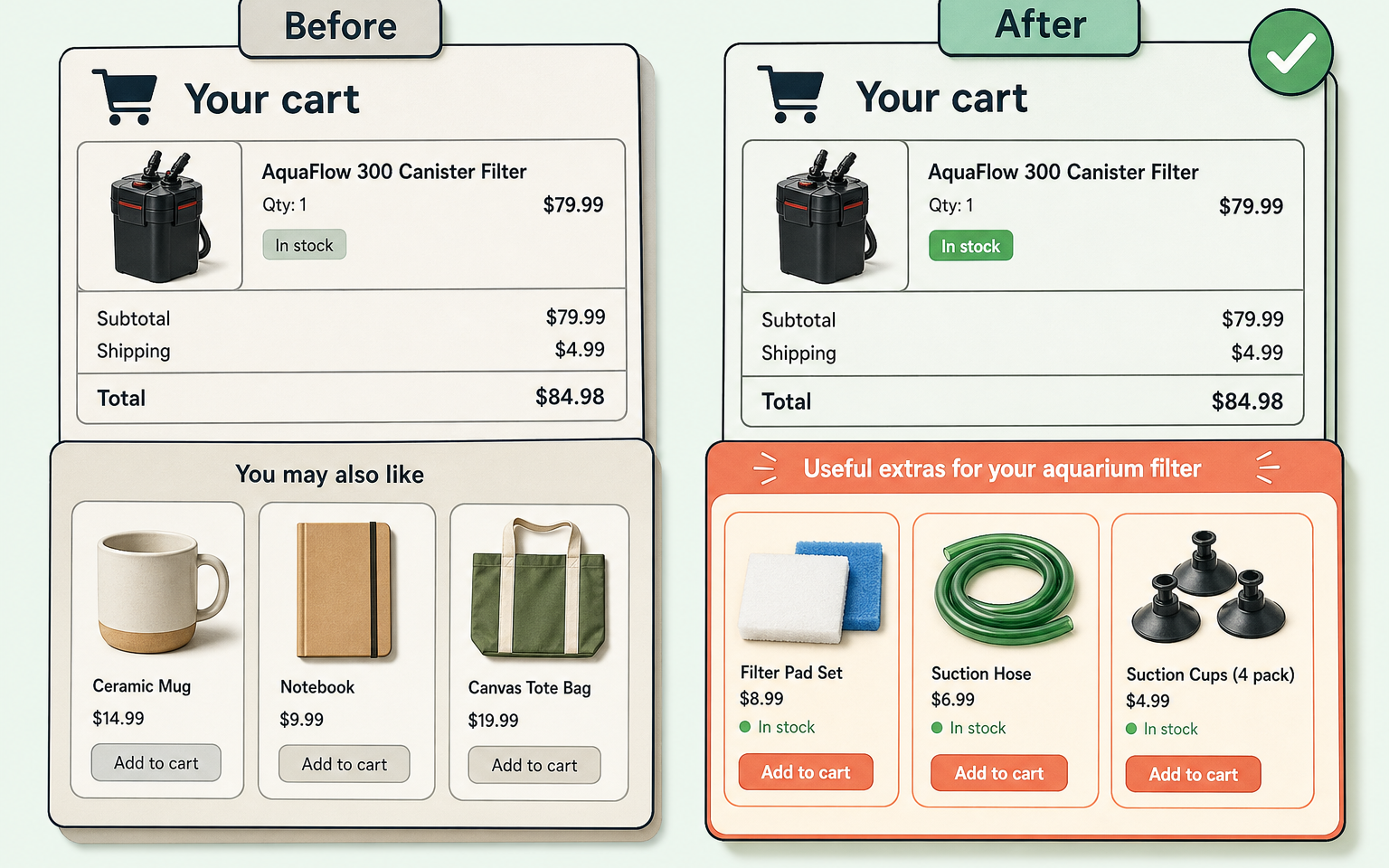
- Read the cart. The trigger is the item in the basket: its category, its attributes, or what genuinely gets bought alongside it.
- Prefer compatibility over popularity. Checking that an accessory fits the exact model beats a bestseller list every time - a bestseller list can't know what's in this basket.
- Label the reason. "Goes with your hoodie" or "Fits your filter" tells the shopper why the item is there. An unlabelled grid reads as advertising.
- Stay complementary, not alternative. Showing a rival product in the cart invites the shopper to leave checkout and compare - this is the riskiest pattern we see.
- Respect context. A finance offer that only appears once the order value justifies it reads as helpful; the same offer on every cart reads as noise.
- Never suggest what can't be bought. Out-of-stock items, gift cards, and things already in the basket should be filtered before the block renders.
How this applies to Magento 2
Magento 2 gives you the placement but not the logic. Out of the box, basket suggestions come from links you set by hand on each product's edit page, one product at a time. That approach has three practical problems on a real store:
- It doesn't scale. A 2,000-SKU catalogue means thousands of hand-set links that go stale every time the range changes.
- It isn't stock-aware. A hand-linked suggestion stays in place after the item sells out.
- It can silently break. There's a known class of defect where a cart suggestion block stops rendering entirely after a row_id versus entity_id mismatch between the cart and catalogue tables. If nobody's watching the block, nobody notices.
Adobe Commerce adds rule-driven merchandising and a recommendations service, but as of Magento 2.4.9 there's no rule engine for basket suggestions in Open Source. Most merchants either link products manually or bolt on an extension, which is where the quality of the rules matters far more than the badge on the box.
Where Moogento helps
SmartCart is our answer to exactly the failures above, and it's rule-based rather than black-box. A rule has a trigger and a pool: the trigger can be a SKU in the cart, a category in the cart, an attribute value in the cart, or a co-purchase pattern mined from your own order history. The pool is what's allowed to show. Everything then passes one set of guardrails before rendering:
- Out-of-stock items are always filtered, with Magento MSI salability checked. There's deliberately no setting to turn this off.
- Items already in the cart are excluded, including the parent product when a variant is in the basket.
- You can exclude SKUs and whole categories, and gift cards are excluded automatically.
- Suggestions get grouped under specific headings like "Goes with your hoodie", and a shopper who dismisses an offer won't see it again for 24 hours.
- The cart page shows at most two offers by default, and suggestions stand down as soon as an express checkout like Apple Pay starts. No competing with payment.
None of that needs a data feed or an AI subscription: the rules run locally in your Magento database. Post-purchase is a separate question - offers after payment carry zero checkout risk, which is why we handle them on the order confirmation page with ThanksEasy instead. The full module range is in the Moogento docs index.
Cart recommendation audit checklist
Run this against your own cart with three real products from different categories:
- Add a niche product. Are the suggestions from the same category or use-case, or are they store bestsellers?
- Is every suggested item in stock right now?
- Is anything suggested that's already in the basket, or a variant of it?
- Does the block have a label that explains why these items appear?
- Are any suggestions alternatives to the cart item rather than additions to it?
- Do promotional offers (finance, thresholds) respect the order value?
- On mobile, does the block push the checkout button below the fold?
- Empty the block's data source: does the page degrade gracefully or render a broken container?
- Who last reviewed the suggestions, and when? If the answer is "nobody", start a monthly check.
FAQ
Are related products the same as cart suggestions in Magento?
No. Magento 2 has three kinds of hand-set product links, shown in different places: related products appear on the product page, up-sells offer pricier alternatives there too, and a third link type feeds the block under the cart. All three are set manually per product in Open Source, which is why they drift out of date.
Do I need machine learning for good cart recommendations?
Not at typical merchant scale. A block that scores 5/5 on the rubric above got there through compatibility checks, category logic, and clear labels - all expressible as plain rules. Co-purchase data from your own order history is a useful supplement, and Magento stores can mine it without any external AI service.
Why are my Magento cart suggestions not showing at all?
First check the products in the cart actually have linked products set, since empty links render nothing. Then check the theme hasn't removed the block, and rule out an ID mismatch between the cart and catalogue tables - a known defect class that stops the block rendering entirely on some versions without throwing an error.
How many suggestions should a cart page show?
Fewer than you think. One or two genuinely relevant items outperform a carousel of eight guesses, and Baymard specifically warns against padding a block to hit a fixed count. SmartCart defaults to two on the cart page and one in the mini-cart for this reason.
If your cart block scores a 1 or 2 on the rubric above, fix the logic before you touch the styling. The SmartCart docs show how the rules fit together.