Back-in-Stock Emails: How to Make Them Helpful Instead of Spammy

A good Magento back-in-stock email tells the right customer that the exact product they wanted - the right size, the right colour - is available to buy right now, and lets them leave the list in one click. It's one of the few marketing emails people actively request, so the way to make it spammy is to get the details wrong: alert for a variant that's still out, fire before the product is really sellable, or email the same person three times. Get those right and it's a near-guaranteed open.
What separates a helpful stock alert from a spammy one?
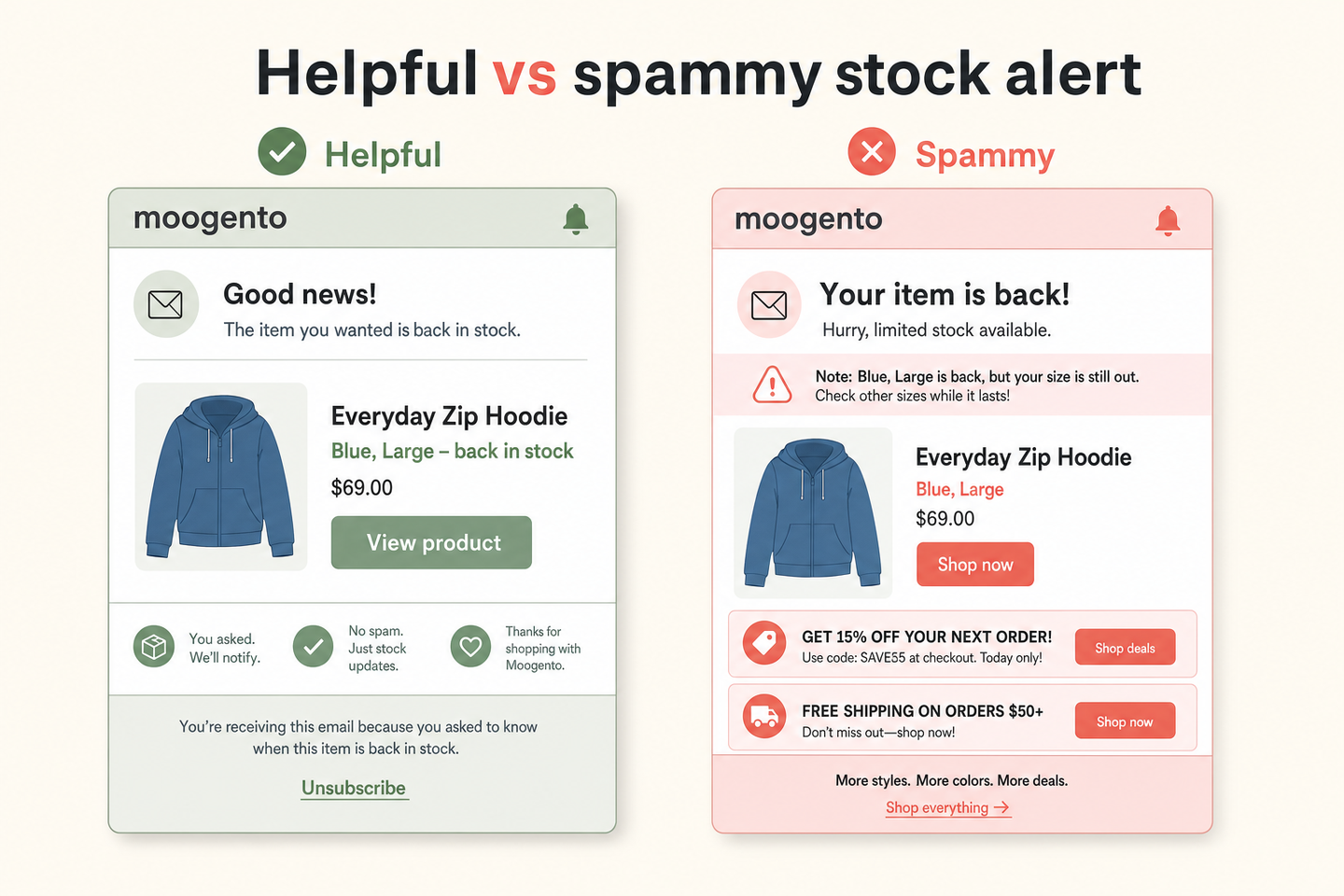
The difference is almost never the email design. It's whether the alert is true and specific at the moment it lands. A helpful alert names the exact variant, arrives only when the customer can actually add it to cart, and comes once. A spammy one is vague ("your item is back"), premature (the quantity ticked up but reservations still hold it at zero salable), or repetitive.
| Helpful | Spammy |
|---|---|
| Names the exact variant the customer wanted | Alerts on the parent product, so the wanted size is still out |
| Sends only when the product is genuinely sellable | Sends when quantity moved but salable is still zero |
| One email per restock event | Repeats every time stock wobbles above zero |
| Clear one-click unsubscribe | No opt-out, or a login-walled preference page |
| Only what the customer asked for | Bundled with unrelated promotions |
Why variant handling is the make-or-break detail
Most stock alert disappointment traces to one thing: a customer wanted a specific variant and got told the product was back, only to arrive and find their size still out. If someone signs up on a configurable product, the alert has to remember which child variant they were looking at - not just the parent. A common failure pattern is a signup that captures only the parent product ID, so everyone on the list gets emailed when any variant restocks, and most of them bounce off a still-unavailable size.
The fix is variant-level signup: capture both the configurable parent and the specific child the customer wanted, and only alert them when that child is sellable. It's more work to build, and it's the single biggest driver of whether these emails convert or annoy.
Send only when the product is genuinely sellable
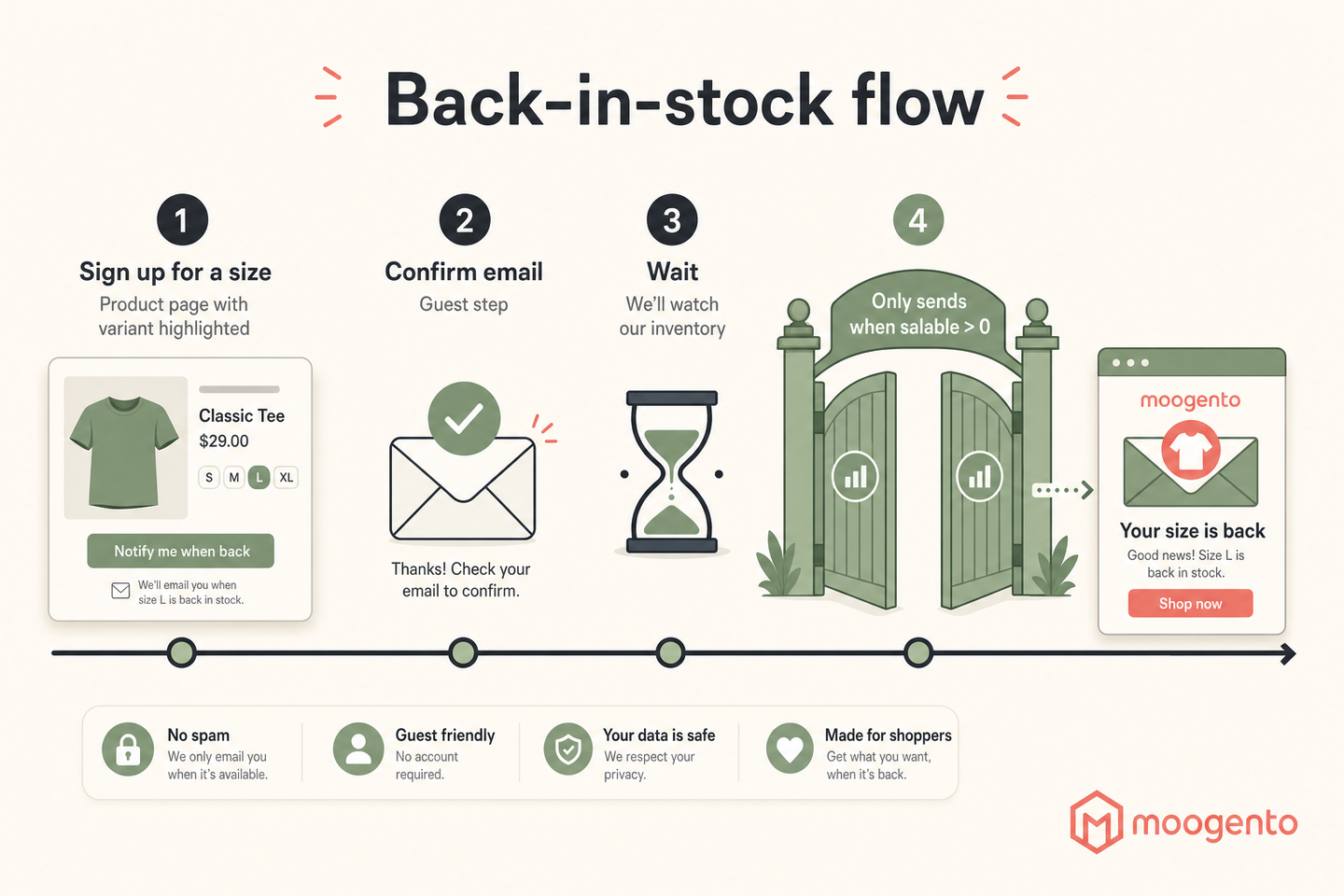
"Back in stock" should mean "you can buy it now", not "a number changed in the admin". Those aren't the same in Magento, because quantity and salable quantity differ - a product can have units recorded against it that are all reserved for open orders, leaving nothing to sell. An alert that fires on the quantity field sends people to a product they still can't add to cart.
The right trigger is salable availability: the product is in stock and its salable quantity is above zero on the website's stock. That's the check that makes the email true. It also handles the awkward case of a tiny restock - if three units come back and the alert respects sellability and sends in a controlled way, you don't blast 500 waiting customers to fight over three units and generate 497 disappointments.
Consent, frequency, and the unsubscribe
Back-in-stock signups often come from people who aren't customers yet, which makes consent and frequency more sensitive than for order emails. Three rules keep them clean. Confirm guest signups (a quick verify-your-email step) so the list isn't full of typos and other people's addresses. Cap frequency so nobody gets hit repeatedly if stock flickers on and off - a recency window that won't re-email the same person about the same product for several days is enough. And put a genuine one-click unsubscribe in every alert, not a login-walled preferences page.
Keep the stock alert single-purpose, too. The reason customers open these is that they asked for this one thing. Stapling a general promotion onto it erodes the trust that made it work, and in some regions blurs a transactional-style message into marketing that needs separate consent.
How this applies to Magento 2
Magento 2 has a native "notify me when this product is in stock" feature (Adobe's product alerts docs cover enabling it). It works, but it's basic: it alerts at the product level rather than the specific variant, its email is a plain template, and it offers little control over frequency or the sellable-versus-quantity distinction. For a store where these emails are a real recovery channel, as of Magento 2.4.9 you'll either extend the native alerts or replace them - and running two systems that both send is the classic way to email a customer twice.
Where Moogento helps
NotifyMe is built around exactly the details above. Signup is variant-aware - on a configurable product it captures the specific child the customer wanted, and alerts only when that child is sellable. The sellable check is salable-quantity based (it looks for genuinely in-stock, above-zero salable stock on the site's stock), so the email means "buy it now", not "a number moved". A frequency guard won't re-email the same person about the same product inside a short recency window, and a restock multiplier caps how many waiting customers get emailed relative to how many units actually came back, so a three-unit restock doesn't trigger a stampede.
Consent is handled the careful way: guest signups get a confirmation step, every email carries a one-click unsubscribe tied to that subscription, and duplicate signups are merged rather than stacked. Usefully, NotifyMe also suppresses Magento's native stock alert by default so the two don't both fire at the same customer - a real gotcha it's designed around. If you want the wider post-purchase and lifecycle emails to stay coordinated with these alerts, HelloCustomer groups messages like review requests so a customer with several recent orders gets one email rather than several, which keeps your stock alerts from competing with your marketing for the same inbox. And StockEasy sits upstream: better reorder timing means fewer stockouts in the first place, so the back-in-stock list is a safety net rather than your main way of selling popular products.
Back-in-stock email audit checklist
- Sign up on a configurable product for one specific variant. Does the alert later name that variant, or just the parent?
- Restock a different variant. Confirm you are not emailed for a variant you didn't want.
- Check the trigger: does the email fire on quantity, or on salable quantity? It should be the latter.
- Do a tiny restock. Are you protected from blasting a huge list over a handful of units?
- Sign up as a guest. Is there a confirmation step, or does any typo'd address join the list?
- Open the email on a phone. Is there a one-click unsubscribe, or a login wall?
- Flicker a product in and out of stock. Do you get one email, or several?
- Confirm only one system is sending - native alerts and a module both firing is a double-email waiting to happen.
FAQ
Does Magento 2 have back-in-stock emails?
Yes, natively - a "notify me when this product is in stock" alert you enable in configuration. It's functional but basic: it alerts at product level rather than for a specific variant, uses a plain template, and gives little control over frequency or the salable-versus-quantity distinction. Stores that rely on these emails usually extend or replace the native feature.
How do I send back-in-stock alerts for a specific size or colour?
You need variant-level signup: the alert must capture the specific configurable child the customer wanted, not just the parent product, and only email them when that child is sellable. Magento's native alert works at product level, so variant-specific alerts need a module such as NotifyMe that stores the child and checks its salable quantity.
When should a back-in-stock email actually send?
When the product is genuinely sellable - in stock with salable quantity above zero on the site's stock - not when the quantity field changes. Quantity and salable quantity differ because of reservations, so an alert triggered on quantity can send customers to a product they still can't buy. Trigger on salable availability so "back in stock" means "buy it now".
How do I stop back-in-stock emails becoming spam?
Confirm guest signups so the list is clean, cap frequency with a recency window so nobody is emailed repeatedly if stock flickers, keep the email single-purpose (no bolted-on promotions), and include a genuine one-click unsubscribe. Also make sure only one system is sending, since native Magento alerts and a module both firing will double-email the same customer.
These are among the highest-intent emails you'll ever send - someone raised their hand for a specific product. Spend the effort on the two details that decide whether they convert: alert for the exact variant, and only when it's genuinely sellable. Everything else is polish on top of getting those two right.