Magento Order Export Automation: Stop Copy-Paste CSVs

Magento order export automation is worth it when the same order data goes to the same destination repeatedly, or when one bad file can hold up a shipment. Copy-paste is fine at low volume, but CSV failures are quiet: a wrong delimiter, a date Excel reformatted, or a missing SKU can surface only after somebody has acted on the file. A scheduled, checked export removes that fragile hand-off.
When is a manual order export actually fine?
Manual export is fine when the volume is low, the destination is forgiving, and a human eyes the data anyway. If you send a handful of orders a week to one supplier who reads them by hand, exporting the Magento orders grid to CSV and emailing it is perfectly reasonable. The cost of a mistake is low because a person is already in the loop.
It stops being fine at three points: when the same export repeats on a schedule you keep forgetting, when the receiving system parses the file automatically (a warehouse importer, a shipping tool, an ERP), or when the export feeds money - accountancy, margin reporting, marketplace reconciliation. At those points the manual step isn't saving work, it's adding a place for the file to go wrong unseen.
Where do Magento order exports actually go?
Most stores end up exporting order data to more places than they'd guess. Each destination wants a different shape of file, which is exactly why a single hand-built spreadsheet stops scaling:
| Destination | What it needs from the export | How often |
|---|---|---|
| Warehouse / 3PL | Order ID, SKUs, quantities, ship-to address, shipping method | Multiple times a day |
| Supplier / dropshipper | Their SKUs, quantities, customer address, sometimes a PO reference | Hourly or daily |
| Shipping tool | Address, weight, service level, order reference | Real-time or batched |
| Accountant / bookkeeping | Order totals, tax, payment method, dates | Weekly or monthly |
| ERP | Full order structure, often a fixed column order | Scheduled |
| BI dashboard / Google Sheets | Whatever metrics you track, clean and consistent | Daily |
| Marketplace reconciliation | Order references matched to payouts | Per settlement |

What are the CSV failure modes to watch for?
CSV looks simple and fails in boring, expensive ways. These are the ones that bite exports specifically, and every one of them is silent until something downstream chokes:
- Wrong delimiter. A receiving system expects semicolons, the file uses commas, and every row lands in one column. Common when a supplier is in a locale where the spreadsheet default differs.
- Encoding. Accented names and non-Latin characters turn to mojibake when the file isn't UTF-8, or when Excel saves it in a regional codepage. Addresses are where this shows up first.
- Date format. Open a CSV in Excel and it "helpfully" reformats order dates, turning an unambiguous timestamp into a locale-dependent one. The importer on the other end then reads the month as the day.
- Missing SKUs. Configurable and bundle products can export the parent SKU, the child SKU, or both - and a warehouse that gets the wrong one ships nothing or ships the wrong thing.
- Duplicate exports. A re-run or an overlapping schedule sends the same orders twice, and a supplier fulfils them twice. Idempotent exports (each order exported once, tracked) prevent this.
- Silent field drift. Someone renames a column upstream, the importer maps by position, and the data quietly lands in the wrong fields.
How this applies to Magento 2
Magento 2 has a built-in export, but it's grid-shaped, not integration-shaped. You can export the Sales > Orders grid to CSV, and Magento's data export tools handle catalog and customer entities, but there's no native scheduled order export, no per-destination column mapping, and no automatic delivery to an FTP endpoint or an API. As of Magento 2.4.9, a repeating order feed to a warehouse or supplier is custom or extension territory.
So the practical Magento order-export plan is: define the exact columns each destination needs, run the export on a schedule rather than by hand, deliver it where the receiving system can pick it up, and make sure each order exports once. The failure modes above are all downstream of the manual step, so removing that step removes most of them.
How can you automate a Magento order export?
ExportEasy is built for the scheduled side. You can define reusable CSV templates, including a token such as {order_id}[Order ID] to set a header and {~warehouse-a~} for a fixed value. It also supports order, product, address, payment, and product-attribute tokens, so each destination can receive a file shaped for its own importer.
ExportEasy's scheduled tasks can send a CSV via FTP or send mapped order data to an HTTP API. The scheduled task runner checks timed tasks hourly, and the pending immediate-export fallback runs every five minutes. It logs the result and can notify a configured recipient when an export has errors. For a recurring feed, start by confirming the receiving system accepts the delivery method, delimiter, encoding, and exact date format you plan to use.
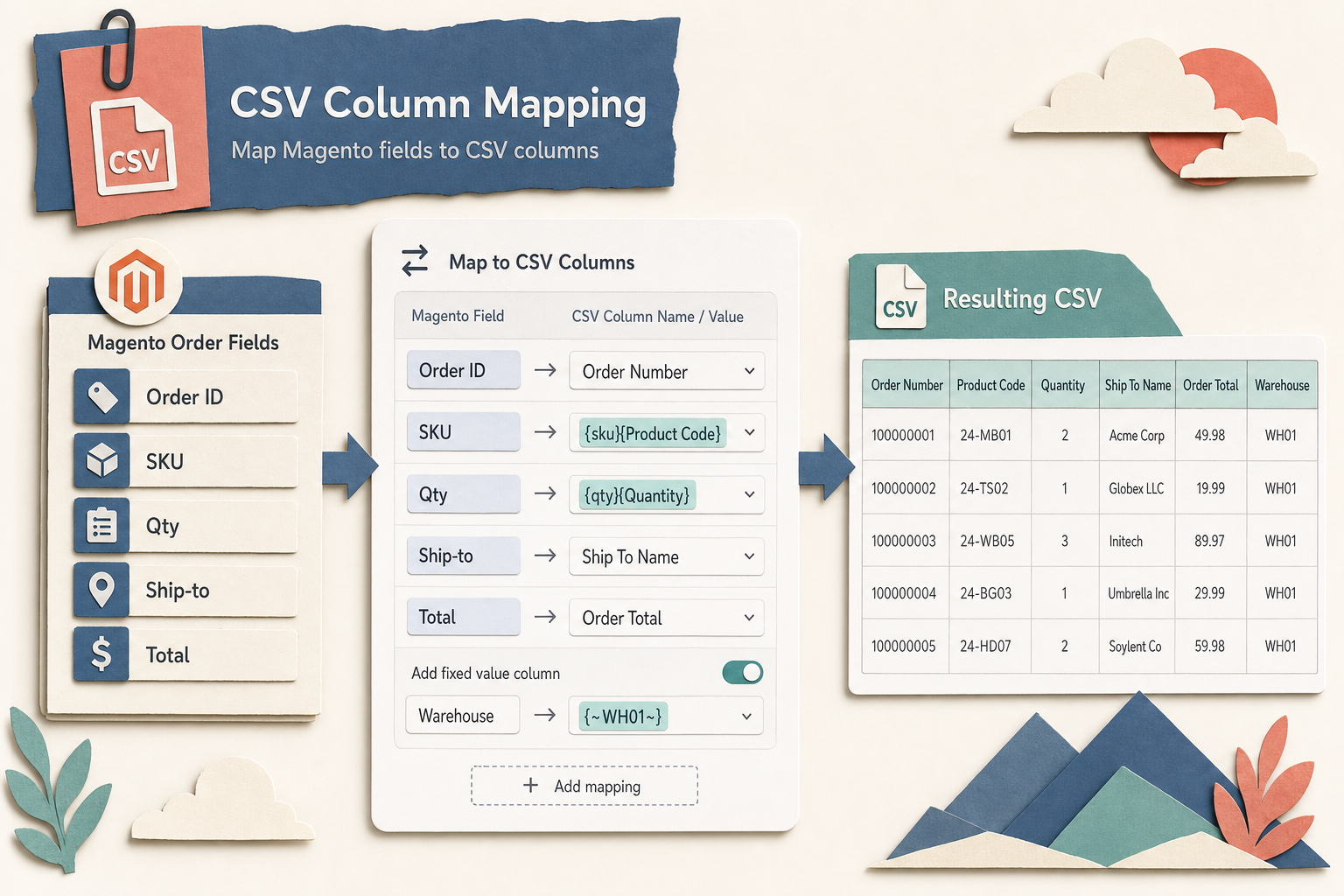
Keep the boundary clear. ExportEasy's guide covers the export configuration itself. Use the ShipEasy guide for the shipment workflow once a warehouse returns tracking, and the ProfitEasy guide when the exported data feeds a profitability review.
Order export profile checklist
- List every destination that currently receives order data, including the ad-hoc spreadsheets someone emails.
- For each, write down the exact columns it needs and the header names it expects. This is your template.
- Confirm the delimiter and encoding the receiving system requires, not the one your spreadsheet defaults to.
- Decide the SKU rule for configurable and bundle products: parent, child, or both. Get this wrong and the warehouse ships wrong.
- Set a schedule per destination that matches how they actually work, not one export for everyone.
- Choose the once-only rule deliberately. For a one-time hand-off, export only orders that have never been exported. For a recurring feed, decide how an error or retry should be handled before the destination receives a second file.
- Log every run. When a supplier says "we didn't get Tuesday's orders", the log settles it in seconds.
- Test the round trip once with a real receiving system before trusting the schedule. A file that opens fine in Excel can still fail an importer.
FAQ
Can Magento 2 export orders on a schedule natively?
No. Magento 2 lets you export the orders grid to CSV manually, and its data export tools cover catalog and customer entities, but there's no built-in scheduled order export with per-destination column mapping or automatic FTP/API delivery. That's why stores with recurring feeds use a module or a custom integration.
What causes most CSV import failures?
The usual four are a delimiter mismatch (commas versus semicolons), wrong character encoding turning accented characters to gibberish, dates reformatted by a spreadsheet into a locale-dependent form, and the wrong SKU exported for configurable or bundle products. All four are silent in the file itself and only surface when the receiving system parses it.
How do I stop the same orders exporting twice?
Use a once-only export rule when a destination must never receive the same order twice. ExportEasy records an export state, and its timed tasks can exclude orders already marked exported. Test the retry path with the receiving system too: an error should be investigated before a resend, because a remote system may have accepted the original request even if Magento did not receive a clean response.
Should each destination get its own export file?
Yes. A warehouse, an accountant and a shipping tool need different columns in different orders, and forcing them onto one file means everyone gets extra fields they have to ignore and someone eventually maps a column wrong. Define one template per destination from the same underlying order data.
Start with the destination list. Once you can see how many places order data actually flows to, the ones worth automating are usually obvious: anything on a schedule, anything parsed by machine, and anything feeding money.