
Magento Email Deliverability: Why Order Emails Don't Arrive
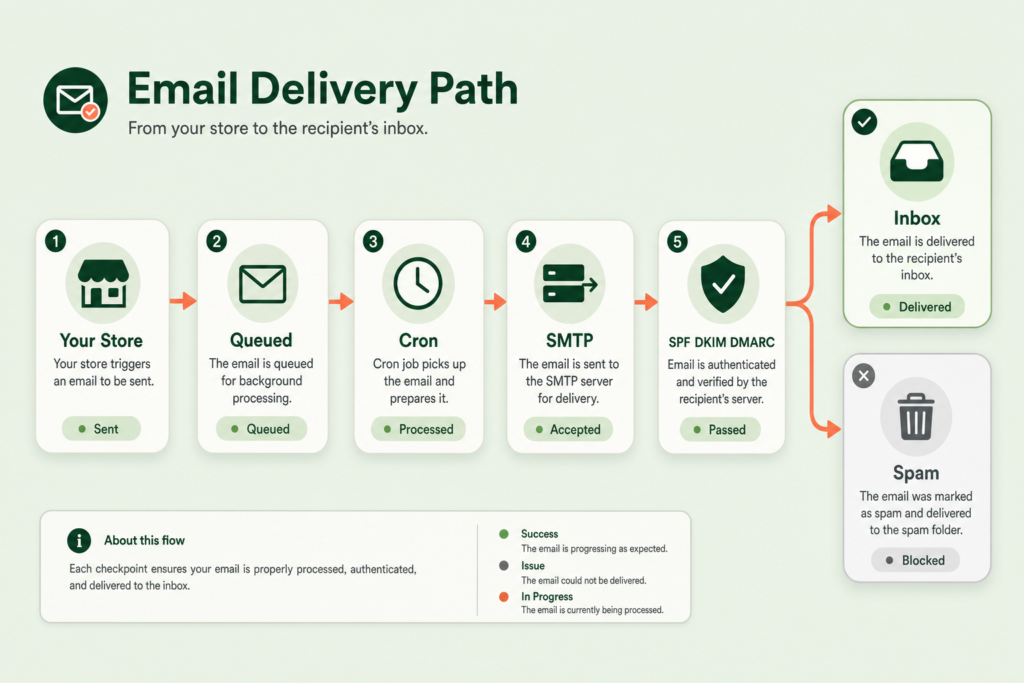
When a Magento store's order emails don't reach customers, it's usually one of three things: the cron queue that sends them has stalled, the store is sending through unauthenticated PHP mail instead of a real SMTP relay, or the domain is missing the SPF, DKIM and DMARC records that inbox providers now require. Each has a distinct symptom and a distinct fix, so the job is to work out which layer is failing rather than guessing.
Why do Magento order emails go missing?
Email leaves a Magento store through a chain, and a break anywhere in it looks the same to the customer: no email. The chain is order placed, email queued, cron processes the queue, a mail transport relays the message, the receiving server checks who sent it, and finally inbox or spam. Most "Magento isn't sending emails" reports are actually a failure at one specific link, not a broken store.
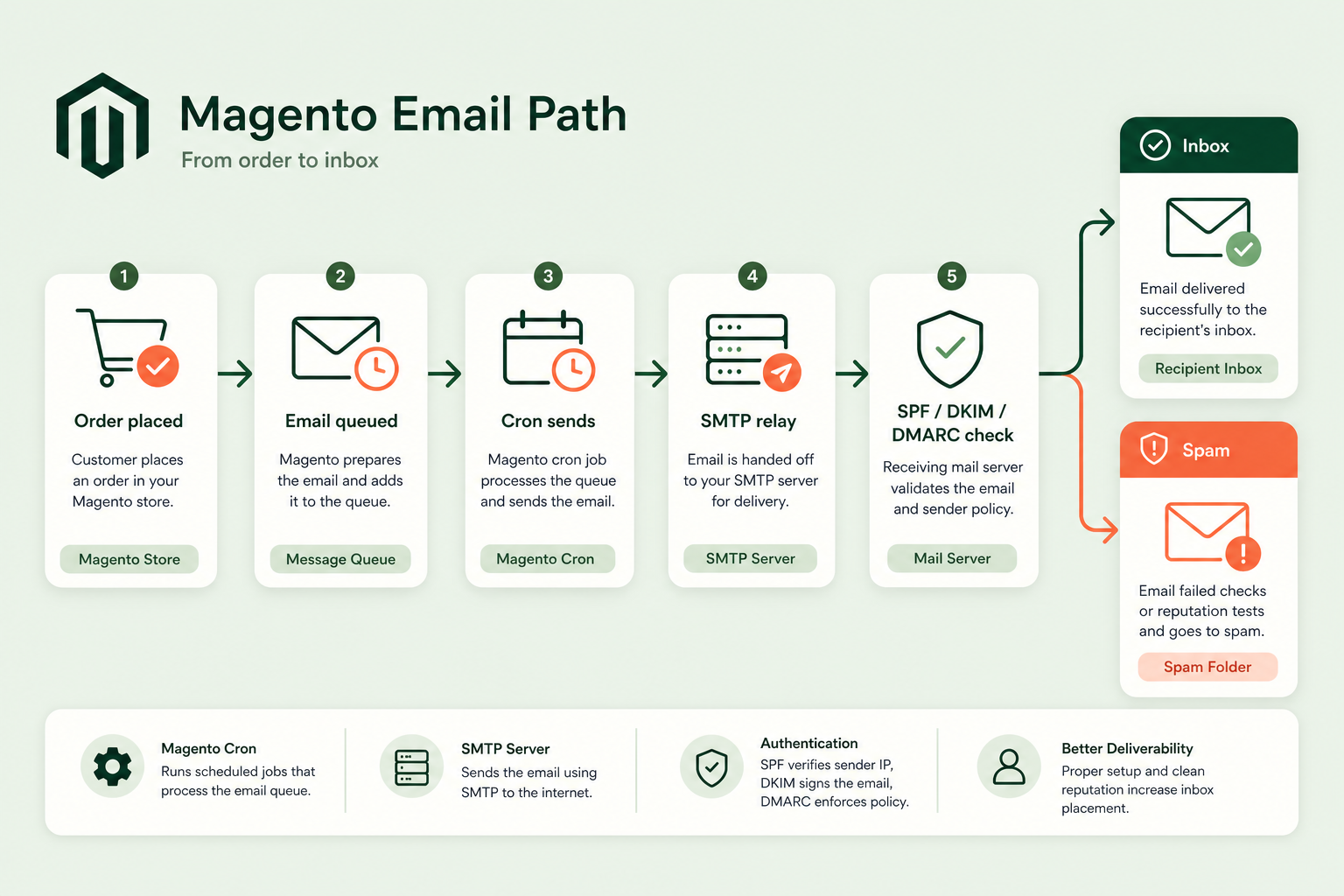
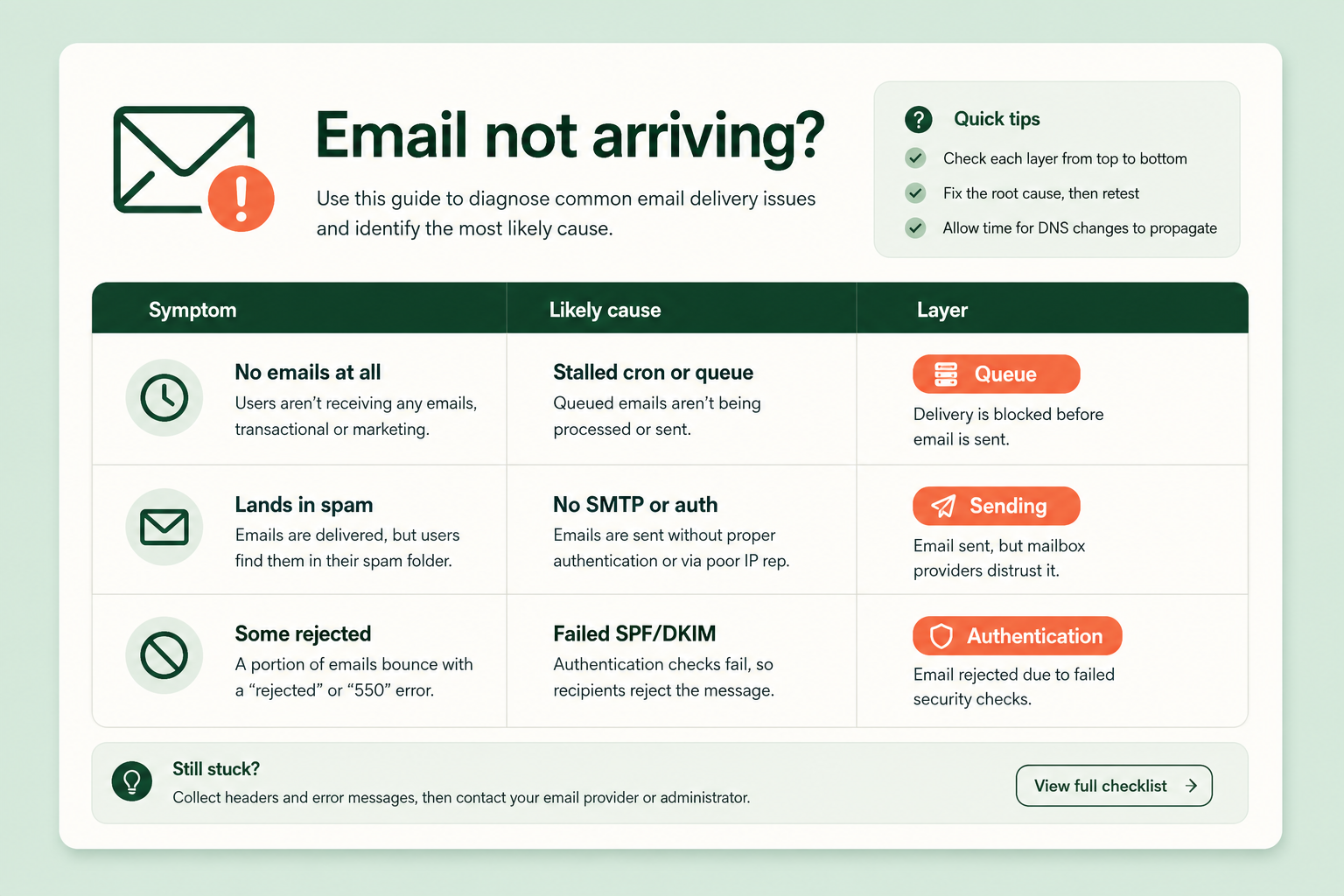
The trap is treating the symptom as the cause. "Emails aren't sending" could be a dead cron (they never leave the queue), a missing SMTP config (they leave but get rejected), or failed authentication (they arrive at the provider and get binned). Same complaint, three completely different fixes.
Is your cron actually running?
Start here, because it's the most common cause and the easiest to miss. Magento 2 can send transactional emails asynchronously: the email is written to a queue and a scheduled cron job sends it a minute or two later. If cron isn't running - or the relevant consumer isn't - the queue fills and nothing goes out, no matter how perfect your SMTP and DNS are.
The tell is a delay that becomes a total stop: emails that used to arrive late now don't arrive at all, and the order confirmations sit unsent. Asynchronous sending is toggled at Stores > Configuration > Sales > Sales Emails > General Settings (Asynchronous sending). With it on, cron is doing the sending, so a dead cron means dead email. Confirm cron is scheduled and running before you touch anything else - a lot of "deliverability" investigations end right here.
Are you sending through real SMTP?
By default Magento hands mail to the server's local sendmail via PHP, with no authentication and whatever reputation the server's IP happens to have. On shared or misconfigured hosting that's a fast route to the spam folder or an outright block, because receiving servers distrust mail from an IP that isn't a recognised sender.
The fix is to send through an authenticated SMTP relay or a transactional email provider - a service whose whole job is landing in inboxes, with warm IPs and proper authentication. Magento Open Source has no built-in SMTP configuration screen as of Magento 2.4.9, so this is an extension or a server-level mail config, not a native setting. Once you're relaying through a real service, deliverability usually jumps before you've touched a single DNS record, because you've stopped sending from an untrusted IP.
What do SPF, DKIM and DMARC actually do?
They tell the receiving mail server that your store is allowed to send email as your domain. Without them, a message claiming to come from orders@yourstore.com looks exactly like a spoof, and modern providers treat it accordingly. Google's sender guidelines require at least SPF or DKIM for all senders, and SPF, DKIM and DMARC together for high-volume senders - so these aren't optional niceties any more.
| Record | What it does | Where it lives |
|---|---|---|
| SPF | Lists which servers are allowed to send mail for your domain | A TXT record in your domain's DNS |
| DKIM | Cryptographically signs your mail so the receiver can verify it wasn't tampered with and came from you | A TXT record (public key) in DNS; signing set up at the sending service |
| DMARC | Tells receivers what to do with mail that fails SPF and DKIM, and where to send reports | A TXT record in DNS (_dmarc subdomain) |
These are DNS and sending-service settings, not Magento settings - no ecommerce plugin writes DNS records for you. The important practical point: if you switch to a new SMTP relay or provider, you have to add that provider to your SPF record and set up DKIM signing for it, or your freshly relayed mail fails authentication and lands in spam anyway. Changing the sender without updating the DNS is a classic own-goal.
Transactional versus marketing email
Keep them separate, ideally on different sending identities. Transactional email - order confirmations, shipping updates, password resets - is expected, wanted, and should never be at risk from a marketing complaint. If you send both from the same reputation and a promo blast tanks your spam rate, your order confirmations get caught in the fallout.
A dedicated transactional stream (a subdomain, or at least a distinct sending service) insulates the emails customers genuinely need from the ones they merely tolerate. It also makes diagnosis cleaner: when order emails specifically go missing, you're looking at one narrow path rather than your entire mail reputation.
How this applies to Magento 2
Magento 2's default mail setup is the weakest link for most stores: asynchronous sending depends on cron, the default transport is unauthenticated PHP mail, and there's no native SMTP screen or DNS handling. So the Magento-specific deliverability plan is short and ordered: confirm cron and the email consumer are running; route mail through an authenticated SMTP relay or transactional provider instead of PHP mail; and add SPF, DKIM and DMARC for whatever service you send through. Do them in that order - there's no point authenticating mail that never leaves the queue.
Where Moogento helps
The full walkthrough lives in Moogento's guide to sending reliable Magento emails, which covers SMTP, SPF, DKIM, DMARC and the cron checks in the order above. On the sending side, HelloCustomer can reroute all of Magento's outbound transactional mail through a custom SMTP server or a transactional provider (MailerSend, Emailit or Resend) instead of the default PHP transport - so you get authenticated sending from a reputable service without editing server mail config. It also checks a hard-bounce suppression list before sending, so repeatedly-failing addresses stop dragging on your reputation.
One boundary: SPF, DKIM and DMARC are DNS records, and no Magento module - HelloCustomer included - writes DNS for you. A module can move your sending onto a trustworthy relay; you still have to add that relay to your SPF record and switch on its DKIM signing in your DNS. The module fixes the transport; the authentication is yours to publish. The rest of Moogento's post-purchase email modules, and how they sit on top of this foundation, are covered in the Moogento docs.
Deliverability checklist
- Confirm cron is scheduled and running, and the email queue is being processed. A dead cron stops async email entirely.
- Place a test order and time the confirmation. A long delay that becomes no email points at the queue, not authentication.
- Check whether you're sending via PHP mail or a real authenticated SMTP relay. If it's PHP mail, that's your first fix.
- Verify SPF exists and lists your actual sending service. Adding a new relay without updating SPF breaks authentication.
- Verify DKIM signing is set up for the service you send through, with the public key published in DNS.
- Publish a DMARC record so receivers know how to handle failures and you get reports.
- Separate transactional email from marketing, so a promo complaint can't sink order confirmations.
- Watch your spam-complaint rate. Providers now expect it kept low, and a spike gets you throttled or blocked.
FAQ
Why are my Magento 2 order emails not sending at all?
The most common cause is cron. Magento can queue transactional emails and send them via a scheduled cron job; if cron or the email consumer isn't running, the queue fills and nothing goes out. Check cron first. If it's running, the next suspects are an unauthenticated mail transport or failed SPF/DKIM authentication getting the mail rejected.
Does Magento send email through SMTP by default?
No. Magento Open Source hands mail to the server's local sendmail via PHP by default, with no authentication, and has no native SMTP configuration screen as of Magento 2.4.9. To send through an authenticated relay or transactional provider you need an extension or a server-level mail configuration.
Do I need SPF, DKIM and DMARC for a Magento store?
Yes. Major inbox providers now require at least SPF or DKIM for all senders, and all three for high-volume senders. Without them, mail claiming to come from your domain looks like spoofing and gets filtered or rejected. These are DNS records tied to your sending service, not Magento settings.
Can a Magento extension fix my email deliverability?
Partly. An extension can move your sending from unauthenticated PHP mail onto a reputable SMTP relay or transactional provider, which alone often lifts deliverability. But SPF, DKIM and DMARC are DNS records that no extension writes for you - you still have to publish them for whatever service you send through.
Work the chain in order: cron, then transport, then authentication. Most stores that think they have a deliverability problem actually have a stalled queue or an untrusted sending IP, and both are fixable before you go near a DNS record.